
Known Participant
October 15, 2024
Answered

photoshop 2025 update

  • October 15, 2024
  • 3 replies
  • 8687 views

1st question:
when I first run photoshop after updating to version 2025, photoshop recommends that I update my mac to version 14.6.1 or later.

I have kept version 13.6.7 until today because I feared problems with other adobe applications (indesign for example).

have you updated to the latest version of macOS without problems with Adobe software?


last question:

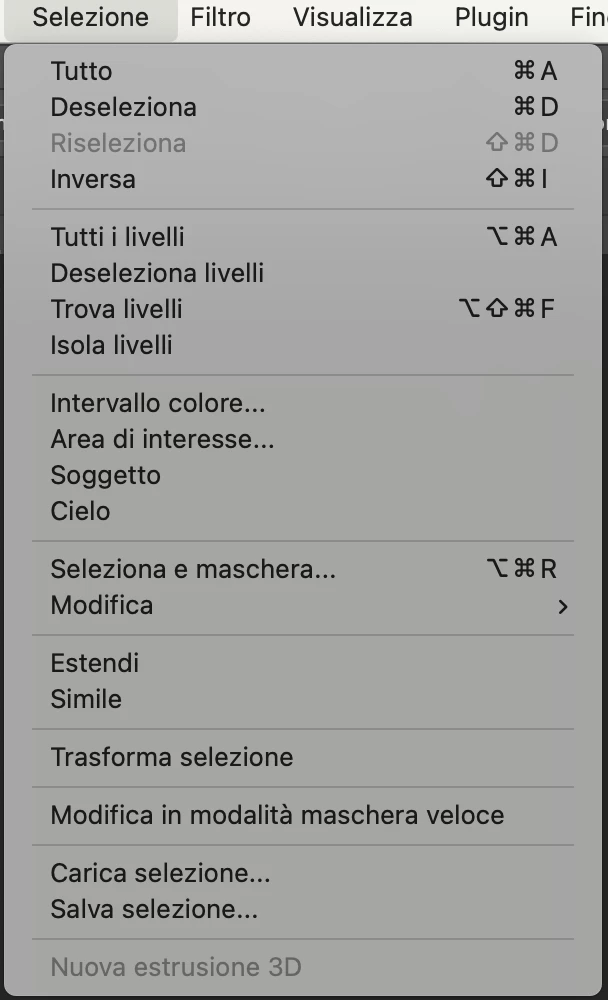
I notice there is "New 3D extrusion" grayed out in Select menu (see screenshot).

Why is grayed out ?


Correct answer Lumigraphics

Yes I recommend upgrading to Sonoma 14.6.1 or the new release of Sequoia 15.0.1. Apple slowly trails off support for older systems, Ventura is still supported but a lot of things have been improved in the newer releases.

3 replies

gener7
Community Expert
Community Expert
October 15, 2024

Photoshop stills runs on Macos 12. but Adobe Camera Raw 17 will need 13 as a minimum.

https://helpx.adobe.com/photoshop/system-requirements.html


One problem on install was that the GPU for ACR 16.5 was disabled meaning it wouldn't work at all. Deleting TempDisableGPU2 file in ACR's GPU folder fixed that problem. That bug disabled it on a M1 Mac.

https://community.adobe.com/t5/camera-raw-discussions/new-update-with-camera-raw-disabling-gpu/td-p/14178826/page/2


Otherwise, all seems normal.

LumigraphicsCorrect answer
Legend
October 15, 2024

Yes I recommend upgrading to Sonoma 14.6.1 or the new release of Sequoia 15.0.1. Apple slowly trails off support for older systems, Ventura is still supported but a lot of things have been improved in the newer releases.

Known Participant
October 17, 2024

thanks @Lumigraphics ,
my Apple M1 Max with mac os Version 13.7 (22H123) only offers me the update to macOS Sequoia 15.0.1 but not to macOS Sonoma 14.7

Legend
October 17, 2024

You can download the Sonoma updates from Apple.

https://support.apple.com/en-us/102662

Ged_Traynor
Community Expert
Community Expert
October 15, 2024

@Milko con la elle I'm not a MAC user so can't answer the first question, as for the second question, 3D features are being discontinued in Photoshop, if you want to continue using 3D features you can install version 22.2 which is available from the Creative Cloud app and can be installed alongside the current version
https://helpx.adobe.com/ie/photoshop/kb/3d-faq.html

Known Participant
October 17, 2024

thx, @Ged_Traynor 

I had read about the discontinuity in Photoshop's 3D functionality. However, the reappearance of the menu item indicated in the screenshot had raised a doubt in my mind...