hawosc
Known Participant
February 9, 2021
Question

Photoshop 22.2 does not start

  • February 9, 2021
  • 2 replies
  • 982 views

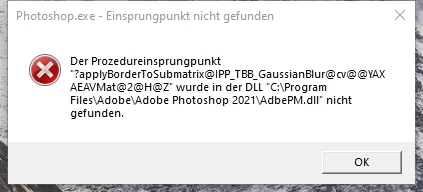
After updating Photoshop to 22.2 it does not start anymore. The following error occurs:
 

Regards

H. Schlichter

 

This topic has been closed for replies.

2 replies

Participating Frequently
February 10, 2021

I have the same problem. Older version of Photoshop without any problems, also the latest Lightroom classic.

hawosc
hawoscAuthor
Known Participant
February 11, 2021

Nothing did help. I think that error messages should give some hints to the SW developer, or not?

Just stating to reinstall PS is not a good solution.


AxelMatt
Community Expert
Community Expert
February 11, 2021

In some cases, reinstallation helped solve the problems. As I wrote I have installed the update and I don't have this problem. So it isn't a general problem in the new version that developers have to solved.

Do you have tried the suggested clean reinstallation?


You can also wrote your problem into the Photoshop bug forum. In this forum also technical staff from Adobe are reading. This forum is is a public forum, Adobe employees are rarely here.


https://feedback.photoshop.com/topics/photoshop/5f5f2092785c1f1e6cc4086b


My System: Intel i7-8700K - 64GB RAM - NVidia Geforce RTX 3060 - Windows 11 Pro 25H2 -- LR-Classic 15 - Photoshop 27 - Nik Collection 8 - PureRAW 6 - Topaz Photo AI
AxelMatt
Community Expert
Community Expert
February 9, 2021

Do you have reboot your PC after updating Photoshop?

Please try also to reset the Photoshop preferences. -> https://helpx.adobe.com/photoshop/using/preferences.html#reset_preferences


If this doesn't help please give us more informations including the following : 

Adobe product and version number 

Operating system and version number 

The full text of any error message (s) 

What you were doing when the problem occurred 

Screenshots of the problem and/or error messages 

Computer hardware, such as CPU; GPU; the amount of RAM; etc 


My System: Intel i7-8700K - 64GB RAM - NVidia Geforce RTX 3060 - Windows 11 Pro 25H2 -- LR-Classic 15 - Photoshop 27 - Nik Collection 8 - PureRAW 6 - Topaz Photo AI
hawosc
hawoscAuthor
Known Participant
February 9, 2021

Did not help.

Informations:

  • Photoshop 22.2
  • Windows 10 Pro
  • Full text see attached screenshot
  • CPU: AMD Phenom II X4 955
  • Nvidia Geforce GTX 970
  • 16 GB RAM