

27shutterclicks
Inspiring
August 29, 2022
Answered

Photoshop 23.5 - Graphics hardware acceleration, Scrubby Zoom, Flick Panning NOT working

  • August 29, 2022
  • 3 replies
  • 3481 views

I updated Photoshop to 23.5 on Windows 10 and scrubby zoom and all hardware acceleration features (like smooth flick panning) are not working, even though "Use graphics processor" is checked under Preferences > Performance and the graphics adapter is detected as AMD Radeon R9 200 Series.


I tried all recommended fixes, like:

  • enabling/disabling graphics processor and restarting PS
  • resetting preferences files
  • loading PS without optional plugins.


Nothing worked.


In the end, I just reverted back to 23.4.2 and scrubby zoom is back! So the problem is for sure with the 23.5 update that breaks the feature, possibly by no longer recognizing my graphics card as "capable" for graphics acceleration, all while not actually disabling graphics acceleration in Preferences. 


My graphics card, although old, is still capable of playing recent games, even though AMD no longer provides driver updates for it. I don't want to spend $1k on a new card only to get scrubby zoom to work in PS. Adobe please fix it.


Here's a screenshot of the Help > GPU Compatibility check in 23.4.2., with scrubby zoom working:
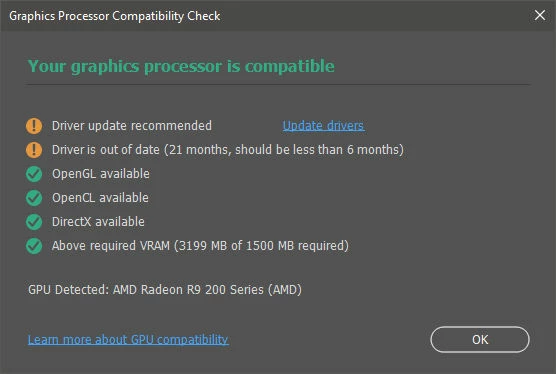
 

I reinstalled 23.5 a second time and the Help > GPU Compatibility window shows same info exactly as 23.4.2 (screenshot below), but scrubby zoom doesn't work.
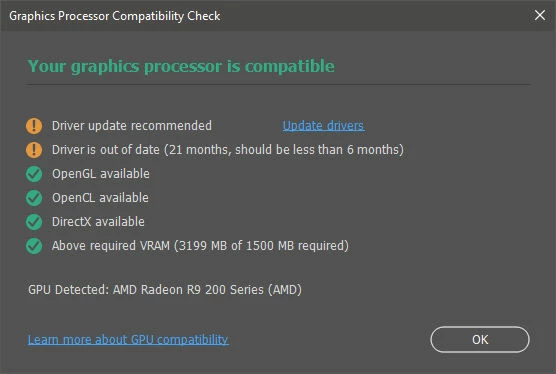
 

Reverting back to 23.4.2 a second time makes scrubby zoom and flick panning functional again.


UPDATE: I borrowed and installed a new video card (GeForce 2070S) from a friend and updated Photoshop to 23.5 again. The scrubby zoom works with the new video cards and drivers. So the problem lies definitely with the way the new update recognizes older video cards and/or drivers.


But, as I said before, we shouldn't have to upgrade the video card to keep using basic features like scrubby zoom and smooth panning, features that have been working fine for forever, and still would.


If this is intentional by the Photoshop team, to no longer support older video cards and drivers, then there should be a message to the user and Use graphics processor should be set to disabled in Preferences > Performance.

This topic has been closed for replies.
Correct answer davescm

@davescm  According to the link you provided, the "recommended" requirements of 4GB GPU memory for the video card is for 4k displays or greater. So if you have a non-4k monitor, that doesn't apply and his 2GB GPU memory card exceeds the minimum requirements and should work with Photoshop without trouble.


It also states :

'If you are using an older graphics card or driver, GPU functionality in Photoshop may be limited or not supported.

Generally, consider using GPUs with an Average Ops/Sec of 2000 or higher on PassMark's GPU Computer Benchmark Chart.'


Dave

3 replies

NB, colourmanagement
Community Expert
Community Expert
September 13, 2022

Here are some suggestions from Adobe for GPU issues.

https://helpx.adobe.com/photoshop/kb/troubleshoot-gpu-graphics-card.html


neilB

@mj
Community Expert
Community Expert
August 29, 2022

Hi @27shutterclicks,


These features are defintely the domain of the GPU now.


Here's a resource that you may find helpful.


https://helpx.adobe.com/photoshop/kb/photoshop-cc-gpu-card-faq.html


27shutterclicks
Inspiring
August 29, 2022

@TheDigitalDog It's not a GPU bug if it works with the previous version of PS and not the new one. It's a PS bug.


Also, disabling GPU is NOT an option for daily Photoshop users. Essential features like scrubby zoom and flick panning are mission-critical when using PS daily. While I understand that new features may require more from the video card, features as old as scrubby zoom don't need anything new. If anything, there should be a choice to the user as to which features to enable for GPU acceleration and which not. If what I need is scrubby zoom and flick panning and not newer features, then I should make that choice. It's like using a car without AC, because the resources are needed for lane-assist and radar cruise control and u have no choice in the matter.


@@mj I am well aware these are features that are GPU-accelerated, and as I mentioned in my original post, AMD no longer provides driver updates for this card. But if this card can run resource-hungry games like latest Call of Duty releases at high resolution, I think it can handle a measly scrubby zoom. The problem is not the card or the drivers, the problem is the PS update which needs to be tested for backward compatibility.

davescm
Community Expert
Community Expert
August 30, 2022

@davescm Regarding the two recommendations:


  1. I specified that AMD no longer provides driver updates for this older video card, so updating drivers is not an option. I understand the driver updates are "recommended" but the gpu health check still says compatible, even though nothing works as far as the gpu goes - so it's not actually compatible.

  2. I also specified in my original message that I did already reset the PS preferences file.


If you have clean installed the GPU driver, not just kept the last update, then you are left with no option but to roll back the Photoshop version to get your GPU to work with Photoshop.


Dave

TheDigitalDog
Inspiring
August 29, 2022

Yes: the problem lies definitely with the way the new update recognizes older video cards and/or drivers.

It's a GPU bug and you need to contact the manufacturer or find out if there's an updated driver for it. This is why disabling GPU is an option as more and more functionality moves to the GPU in newer versions of many Adobe products.
Also see: https://helpx.adobe.com/photoshop/kb/acr-gpu-faq.html

Author “Color Management for Photographers" & "Photoshop CC Color Management/pluralsight"