
Participant
April 28, 2023
Question

Photoshop 24.4.1 - rotate image while cropping bug

  • April 28, 2023
  • 2 replies
  • 313 views

When I use the crop tool to rotate the image as well, the area where the rotate icon is displayed was much larger in previous versions. Maybe it's a bug - out of habit i'm used to the more generous area for rotating. if you click something outside it immediately crops. this leads to many incorrectly cropped images for me and my co-workers: undo and recrop for almost all images can't be it.
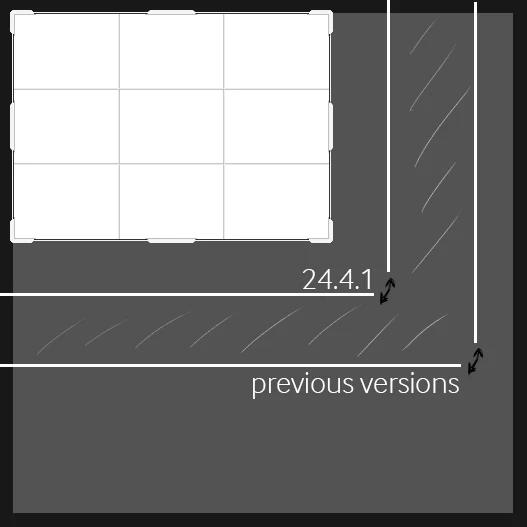


This topic has been closed for replies.

2 replies

Participant
June 6, 2023

I have exact same problem,
Is extreamly anoying when I try to rotate any layer... This is hard to do once you are working quickly, you have to take care to place cursor correctly so close of the image to rotate.
This is one of the actions that we use more frequently and honeslty is breaking the experience 

Kevin Stohlmeyer
Community Expert
Community Expert
April 28, 2023

Hi @SecondRage heres the trick - get your cursor to show the rotate function off a corner and move the cursor diagonnaly from the selected area in a stright line - the rotate cursor holds until you move away from that diagonal relationshop to the corner.