gustavox20745627
Participant
October 10, 2023
Question

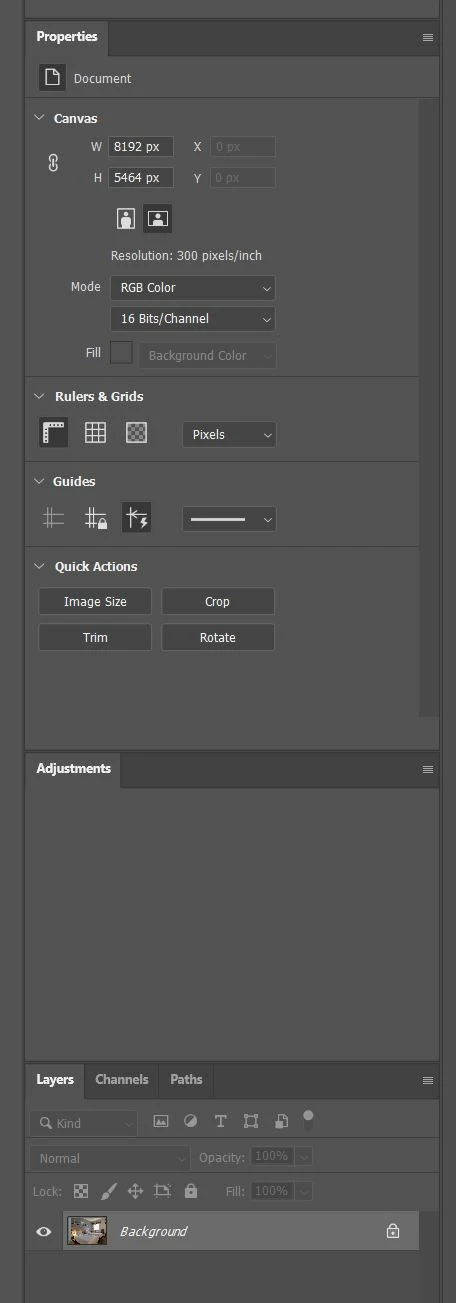
Photoshop 25.0.0 is not showing adjustments icons

  • October 10, 2023
  • 3 replies
  • 303 views

Hi.


When I open any image, photoshop doesn´t show adjustment icons on Adjustment Tab. I close Photoshop, open it again, open the same image and... nothing.


Thanks.
 

This topic has been closed for replies.

3 replies

Ged_Traynor
Community Expert
Community Expert
October 13, 2023

@gustavox20745627 I'm not having the issue on the 2 PC's that I run Photoshop on, one has Windows 10 and the other has Windows 11

Try using the Adobe Cleaner Tool

https://helpx.adobe.com/ie/creative-cloud/kb/cc-cleaner-tool-installation-problems.html


gustavox20745627
Participant
October 13, 2023

I did a reset, open Photoshop again and not solved. Uninstalled Photoshop, installed it again and the problem is not solved. Adobe must correct this issue. It´s a bug, no doubt.

Ged_Traynor
Community Expert
Community Expert
October 10, 2023

@gustavox20745627 try manually resetting your Photoshop preferences
https://helpx.adobe.com/ie/photoshop/using/preferences.html#Manually
Remember to backup your settings before doing the preference reset
https://helpx.adobe.com/ie/photoshop/using/preset-migration.html
