

umaynome
Inspiring
April 26, 2024
Question

Photoshop ***25.7.0*** NEW PROBLEM

  • April 26, 2024
  • 9 replies
  • 1085 views

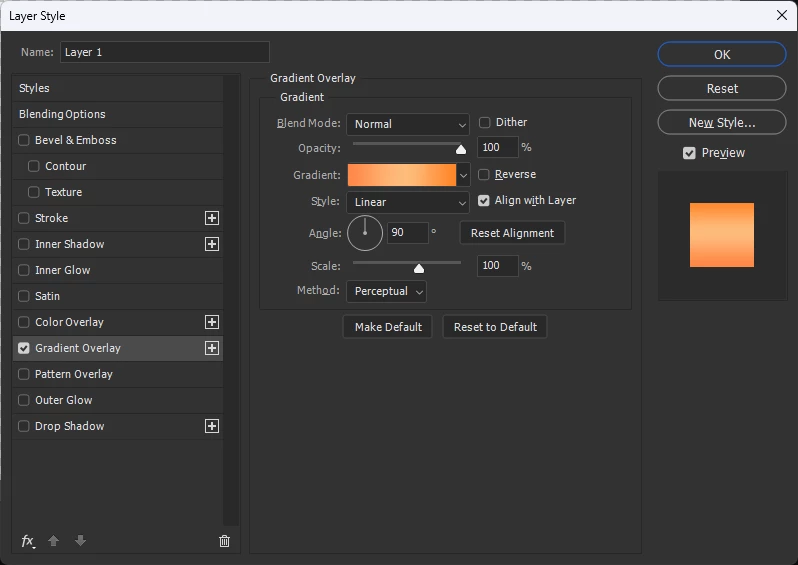
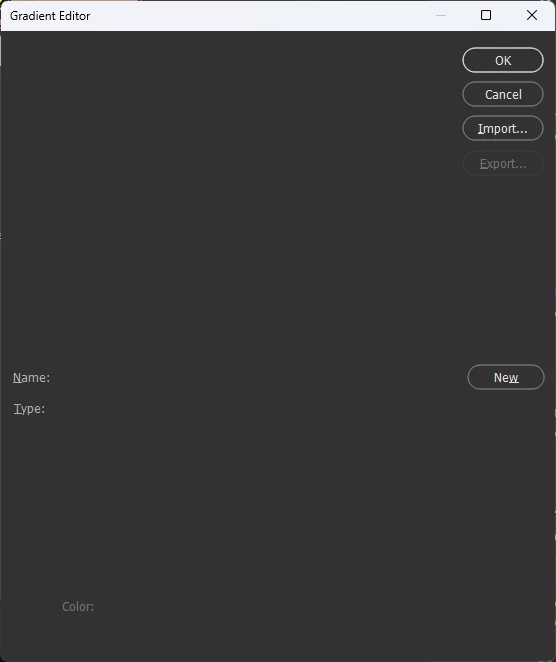
Hello I am running Windows 11, 64bit,, Adobe PS, new version ... now my Layer Styles Panel>>Gradients>>when i click into the gradient color to pop up all my gradients panel the pop up wont show my presets (see photo) and it will only come into view once i click in that window and start to scroll through them.


HELP PS looks like a bug


PS... This is a new problem in relation to the new PS as it has always worked fine before the latest upgrade.
 

This topic has been closed for replies.

9 replies

Participant
May 4, 2024

That not only dumps your preferences, it dumps your presets as well. I lost a lot of gradients that I had built.

umaynome
umaynomeAuthor
Inspiring
May 2, 2024

Ha Well atleast i wasnt crazy... yes its a bug...my gradients (some) are in folders....MOST are out in the open and i can see them visibly and when my pop up box was expanded they all would dissapear so what i have done as a work around was make the pop out box default size (small) and they all show as normal.


Clearly a bug

Participating Frequently
May 16, 2024

I'm having the same problems, even to the extent that Photoshop freezes. When I apply a gradient layer the gradient editor box comes up blank and then if I click and scroll some presets appear but I have uninstalled and reinstalled and the problem is not fixed.

Participant
May 2, 2024

This is also a problem on Mac's OS 14.4.1 you can open the pallet and if you have folders, it shows the folders, but as soon as you open a folder you can't see your preset gradients. I might get a few to show as I scroll down, but most are cut off and I can't get a visual. It stutters and is spotty. All since the last PS update to 25.7.1 - highly annoying and it screws up the work flow.

umaynome
umaynomeAuthor
Inspiring
April 28, 2024

Not sure but i have gradients in the pop out editor that arent comtained in a folder as a group. Something the new PS doesnt like about this area and thats about all i can think of versus the screen shot from Ged.


Nonetheless, I will keep the window as is for now and wait abd see with future updates.


Thank you both

Dean


umaynome
umaynomeAuthor
Inspiring
April 27, 2024

ok let me today, once i get time do this resetting and see how it goes from there now. I am not sure why i get this error on expanding the window itself, maybe to many gradients, who knows really but this is new to the new PS update for sure but i will try to fix via the resetting and follow back with you. Thank you.

davescm
Community Expert
Community Expert
April 27, 2024

I can confirm no issue here with gradient editor in v25.7 and Windows 11


Dave

Ged_Traynor
Community Expert
Community Expert
April 27, 2024

@umaynome as I mentioned in my original reply, I'm not having the issue you described, the Gradient Editor is showing fine for me, I can resize the window without issue.

umaynome
umaynomeAuthor
Inspiring
April 27, 2024

Hi @Ged_Traynor , i havent tried your method yet but messing around with this i found out how to get it working and maybe something you can try as well. The gradient editor pop up, I have always in the bottom right corner dragged this to make it a bit larger on my screen then the stock size pop out.........and when i reset this window size back to preset the gradients showed fine and i could close and re-open over and over it was just fine.


However while open, if i drag the box to make it larger in size again the gradients dissapear on me as before. This has to be a bug.


Maybe you can test this out or others to see if you can resize your window and the reactions?


Thanks

Ged_Traynor
Community Expert
Community Expert
April 27, 2024

@umaynome the Gradient Editor is working as expected for me with Photoshop version 25.7, try manually resetting your Photoshop preferences
https://helpx.adobe.com/ie/photoshop/using/preferences.html#Manually
Remember to back up your settings before doing the preference reset
https://helpx.adobe.com/ie/photoshop/using/preset-migration.html