Legend
December 13, 2024
Answered

Photoshop 26.1 is now available -- again.

  • December 13, 2024
  • 3 replies
  • 1621 views

Ps v26.1 was released on November 19, 2024.

This evening (USA Mountain Time) December 12, 2024, the release of Ps 26.1 was announced again.]
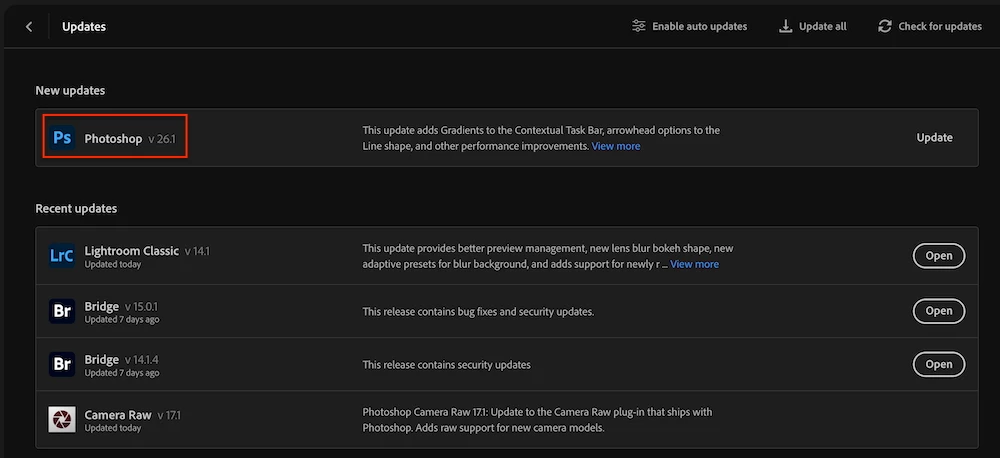

This topic has been closed for replies.
Correct answer AxelMatt

Do you has already installed the update? If yes, try the following...


Open the CC client, logout and relogin again.

Check if the client is up-to-date. 


Try resetting the CC App.

To reset the Creative Cloud desktop app, make sure it's in the foreground, then press:

Win: Ctrl + Alt + R

Mac: Cmd + Opt + R


If that doesn't work, try uninstalling and reinstalling the CC App:

https://helpx.adobe.com/creative-cloud/help/uninstall-creative-cloud-desktop-app.html

https://helpx.adobe.com/download-install/kb/creative-cloud-desktop-app-download.html


3 replies

Jeff Arola
Community Expert
Community Expert
December 13, 2024

If one clicks on View more it looks like an update and not a mistake, since it does reference the just released camera raw 17.1


LAMY2017Author
Legend
December 13, 2024

Then shouldn't the update should have read v26.1.1? If the previous update didn't have ACR 17.1.

Uninstall/reinstall seems to be the only choice since resetting CC removes access to the latest supposed update.

Larry
D Fosse
Community Expert
Community Expert
December 13, 2024

I ran the update, mostly to just get it out of the way.


It did something, but I have no idea what. Maybe it just reinstalled something. ACR 17.1 I already had.


Anyway, everything's running normally now.


D Fosse
Community Expert
Community Expert
December 13, 2024

I'm getting it too.


This has happened at least once before, also to a lot of users. The current version came up again. The advice then was to just run the update, which of course finished in a flash because it didn't actually do anything.


I'll just let this sit for a while and see what happens. Just running it probably won't do any harm. My guess is that a lot of people will see this.

AxelMatt
Community Expert
AxelMattCommunity ExpertCorrect answer
Community Expert
December 13, 2024

Do you has already installed the update? If yes, try the following...


Open the CC client, logout and relogin again.

Check if the client is up-to-date. 


Try resetting the CC App.

To reset the Creative Cloud desktop app, make sure it's in the foreground, then press:

Win: Ctrl + Alt + R

Mac: Cmd + Opt + R


If that doesn't work, try uninstalling and reinstalling the CC App:

https://helpx.adobe.com/creative-cloud/help/uninstall-creative-cloud-desktop-app.html

https://helpx.adobe.com/download-install/kb/creative-cloud-desktop-app-download.html


My System: Intel i7-8700K - 64GB RAM - NVidia Geforce RTX 3060 - Windows 11 Pro 25H2 -- LR-Classic 15 - Photoshop 27 - Nik Collection 8 - PureRAW 6 - Topaz Photo AI
LAMY2017Author
Legend
December 13, 2024

* CC client, logout and relogin again

I reserved this step for last due to poor memory (I stay logged in, can't remember my pwd)

* uninstalling and reinstalling the CC App:

Never again. You have to reinstall all your Adobe apps.

* resetting the CC App.

Ah. Easy-peasy. Three-fingered salute. Less than 10 seconds after performing, the update reminder is gone.

Larry