Participant
August 13, 2025
Answered

Photoshop 26.9 – Missing 'Harmonize' Option and Camera RAW 17.5 Not Opening

  • August 13, 2025
  • 4 replies
  • 4109 views

Hello,

I am currently using the latest version of Adobe Photoshop (v26.9), but I am unable to access some of the newly introduced features. For example, the “Harmonize” option (Color Harmonization) does not appear in the Properties panel when it should.

In addition, when I update the integrated Camera RAW plugin to version 17.5, the Camera RAW module fails to launch entirely.

Could you please advise on possible causes or solutions for these issues? Any guidance would be greatly appreciated.

Thank you in advance.
Correct answer Ged_Traynor

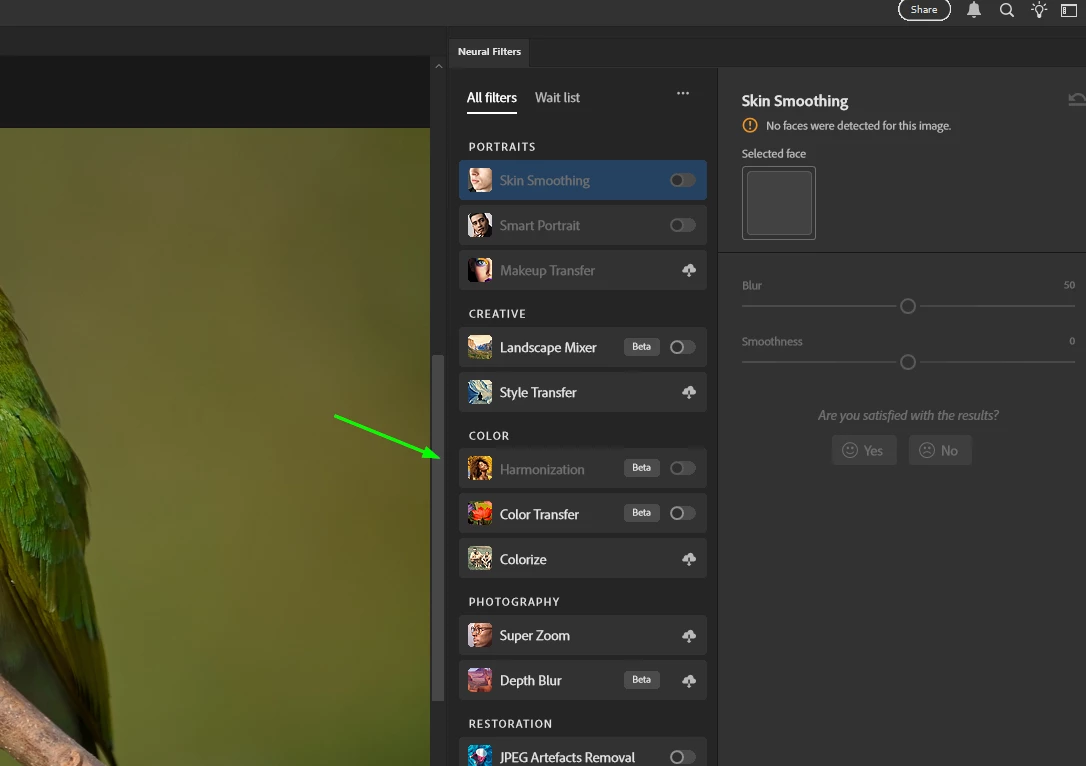
@kaan23143772id9u go to Filter > Neural Filters to access Harmonization

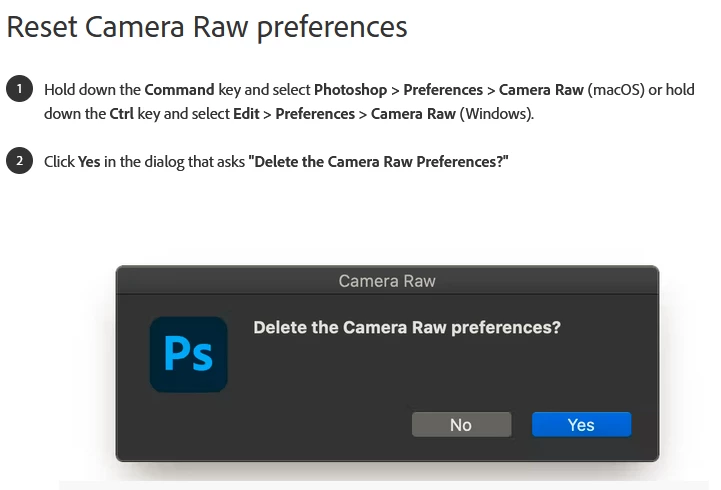
For the ACR issue, try resetting the ACR preferences

4 replies

Participant
September 12, 2025

It seems like the missing Harmonize option and the Camera RAW issue might be due to compatibility. Sometimes Photoshop updates roll out features gradually depending on plan type or region. Also, mismatched versions between Photoshop and Camera RAW can cause the plugin not to launch. I’d suggest resetting Photoshop preferences, updating your GPU drivers, and if that doesn’t help, try reinstalling Camera RAW or rolling back to the last stable version that works with v26.9.

Ged_Traynor
Community Expert
Community Expert
August 18, 2025

@kinjal_0495 you need to go to Filter > Neural Filters

Sameer K
Community Manager
Community Manager
August 18, 2025

Hey, @kaan23143772id9u, and @kinjal_0495. You've got the right advice from @Ged_Traynor.


Additionally, if you're looking for the Harmonize, powered by Generative AI, you'll need Photoshop (beta) to try it out. 

You can get Photoshop (beta) from the Creative Cloud > Apps tab > Beta Apps section. Please head here to learn more: https://adobe.ly/3HtqZD0;


Thanks! 

Sameer K
(Type '@' and type my name to mention me when you reply)

Participant
August 24, 2025

Hello, I am using the Beta on a Mac and the Harmonize feature does not appear in the contextual menu and when I use the Neural Filters menu it doesn't seem to understand what to do. It basically makes all the colors wrong on the layer I am trying to harmonize. I am running on a Mac Studio and most of the tutorials I've seen were on Windows. 

Participant
August 18, 2025

Harmonize tools are not show in my photoshop 26.9

Ged_Traynor
Community Expert
Ged_TraynorCommunity ExpertCorrect answer
Community Expert
August 13, 2025

@kaan23143772id9u go to Filter > Neural Filters to access Harmonization

For the ACR issue, try resetting the ACR preferences