Silverbell
Inspiring
October 9, 2017
Answered

Photoshop 3d camera rotated instead of 3d layer (+Video)

  • October 9, 2017
  • 2 replies
  • 3000 views

photoshop 3d rotation problem - YouTube

Here is the video where i am showing you my problems. I just began to learn photoshop3D tool and what i want to do eventually is to create all my matte paintings and position them in Photoshop to create sense of depth and parallax and then export them as a 3d layers into after effects to create animation and further editing. Dont know if it will be possible though.But anyways I use Photoshop 2014.2.2 and my problem is that i cannot rotate my 3d plane of a tree image, instead of it just the camera rotated. Also if i will find 3d rotation tool for the object will i have to adjust the pivot point of a layer before transforming it into 3d layer? Also i would like to know if i will be able to properly export it into after effects later? Thanks
    This topic has been closed for replies.
    Correct answer davescm

    Hi

    You asked a couple of questions.

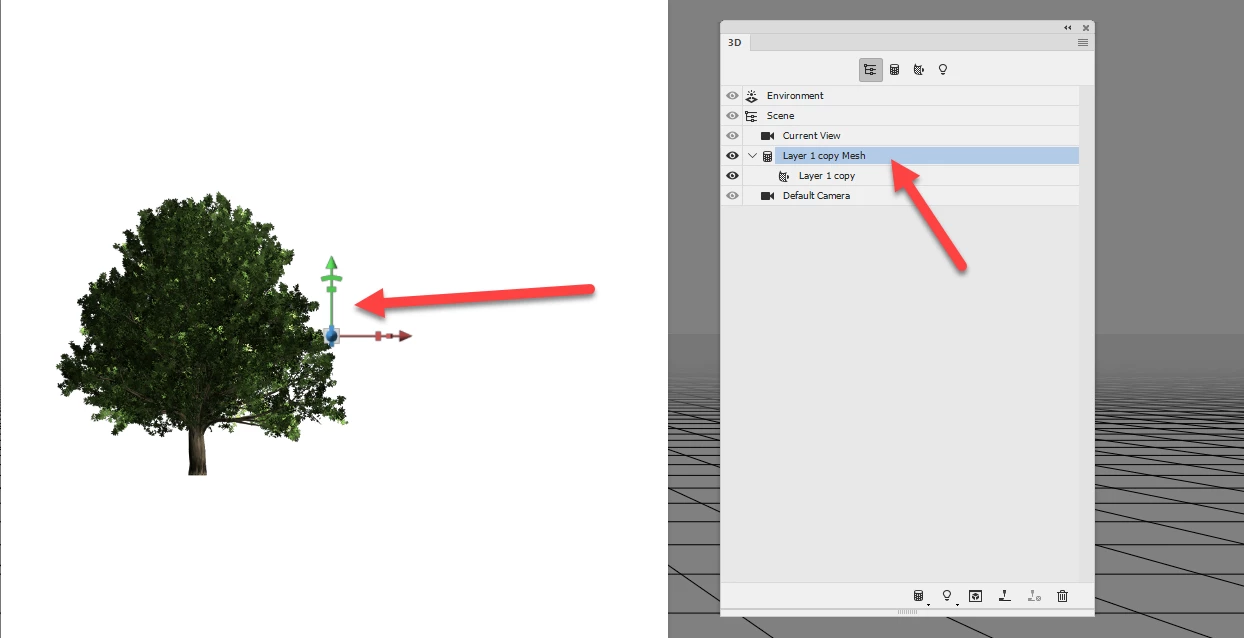
    1. To rotate the object rather than the camera - open the 3D panel and highlight the Mesh. Then select the move tool and use the on screen x/y/z tool to move the object.

    2. When you make a postcard from the layer the pivot point will be at the centre. If you want it in the tree, before going into 3D , move the tree to the centre of the layer and make a postcard as before.

    Dave

    2 replies

    Silverbell
    Inspiring
    October 9, 2017

    Thanks a lot!

    davescm
    Community Expert
    Community Expert
    October 9, 2017

    You're welcome

    Dave

    Silverbell
    Inspiring
    October 9, 2017

    Can anybody help or not please?  Nobody here ever worked with Photoshop 3d? Simple question why I don't see object rotation tool and just camera rotation? I need to rotate object and not the camera

    davescm
    Community Expert
    davescmCommunity ExpertCorrect answer
    Community Expert
    October 9, 2017

    Hi

    You asked a couple of questions.

    1. To rotate the object rather than the camera - open the 3D panel and highlight the Mesh. Then select the move tool and use the on screen x/y/z tool to move the object.

    2. When you make a postcard from the layer the pivot point will be at the centre. If you want it in the tree, before going into 3D , move the tree to the centre of the layer and make a postcard as before.

    Dave