
Photoshop 3D renders unwanted strange grey shades
Hi all
I'm playing around with Photoshop 3D function with the following tutorial
https://design.tutsplus.com/tutorials/3d-frilly-text-effect--cms-28265
I followed exactly every step and everything worked fine until I rendered the 3D scene
There are strange grey polygon shades on the background of the scene.
Below is the screen shot of those strange grey shades
I did blur out the main text, but the main text got no problem, the shades only occur on the background:
Below is another try, I started everything again using the same setting as the tutorial,
but the strange grey shades still occured when rendering.

This is the normal 3D rendered scene of how it should look like:

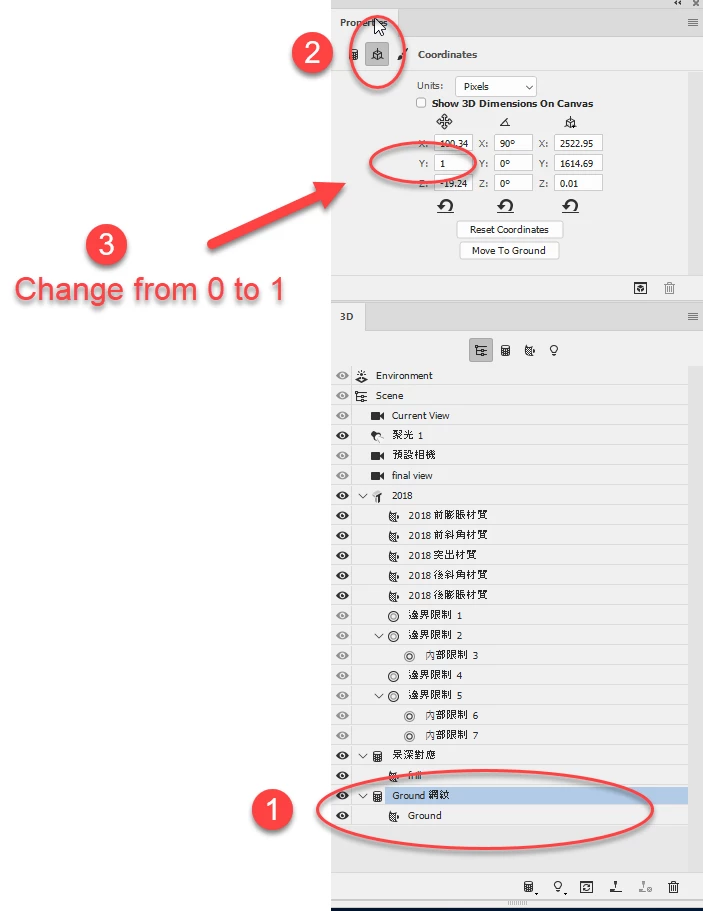
I tried hiding the lighting and the normal of the ground,
still results in the strange grey boxes after rendering.
setting of the document:
1250 x 800 px, 300dpi,
am using pc win7 64bit, Photoshop cc2018
(Intel Xeon CPU E3-1225 v3 @ 3.20GHz, 16GB ram)
Coz I'm new to the photoshop 3D, I'm sure I am missing some settings here.
Or does it have to do with the hardware of my computer?
Thank you everyone!
 AdChoices