Participating Frequently
May 5, 2021
Answered

Photoshop 6.0 hangs when trying to access "recent" file path on unreachable network-drive

  • May 5, 2021
  • 4 replies
  • 4630 views

Every once in a while, Photoshop 6.0 tries to access a few recently used file paths. Those files are on a network drive with IP address 10.0.0.3. When that network drive is available, everything works fine. But when it isn't available (e.g. when I take my laptop to work) Photoshop hangs for around 15 seconds every time it tries to access those files.

This happens randomly throughout normal usage and sometimes at startup when the splashscreen shows "Initializing menus..." (translation from german might not be exact).

I have already set the "List of recent files contains N files" setting to 0, but the problem persists. Setting the setting >0 again makes the files show up in the menu again, so Photoshop still remembers the files, it just does not show them when the setting is set to 0.

I moved the settings folder in %AppData% to another location and restarted and that fixed the problem, but that's not a long-term solution.


Are there any other places where recent files are remembered so I can clear them? Is there documentation about the psp file format?


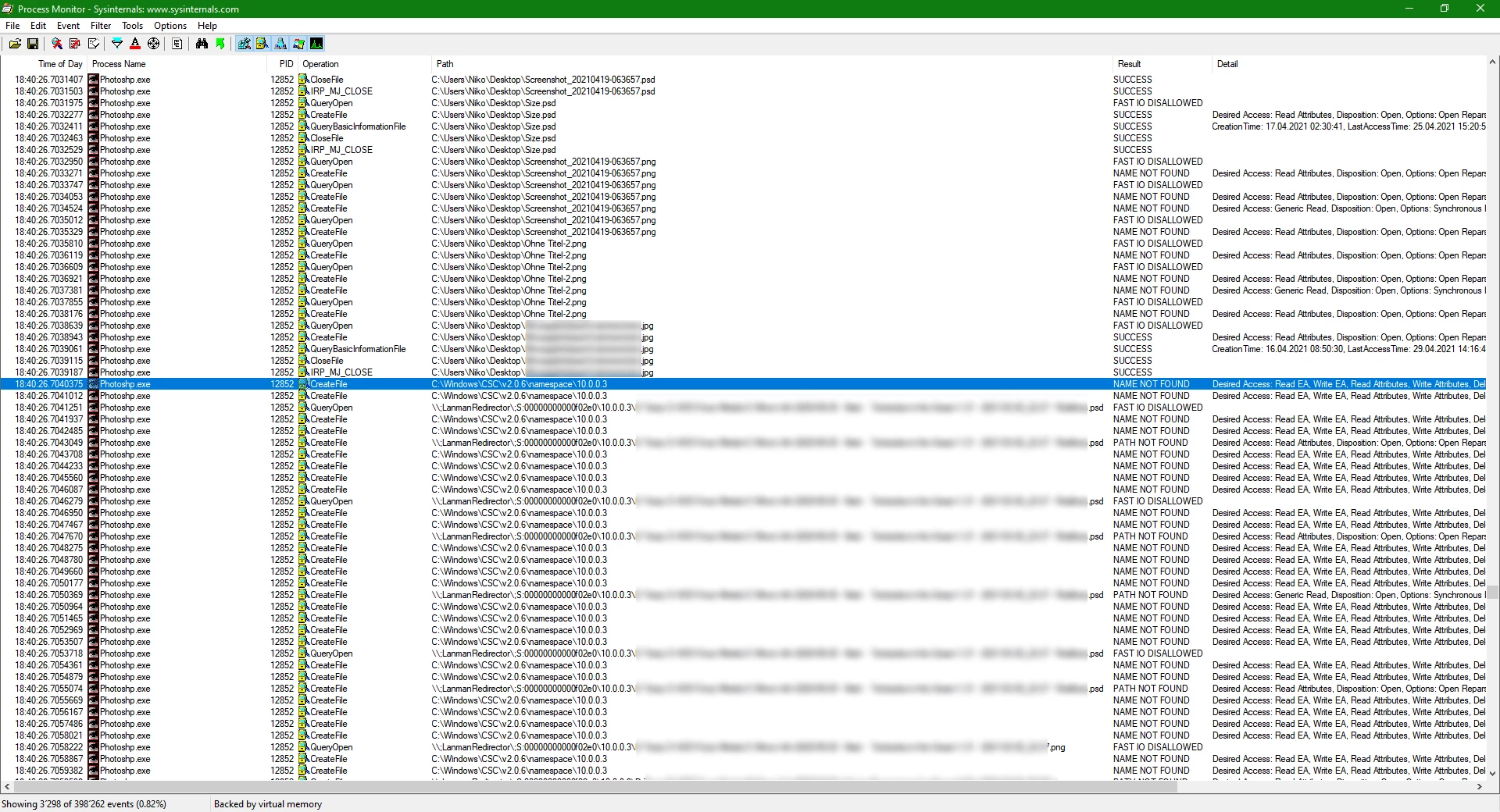
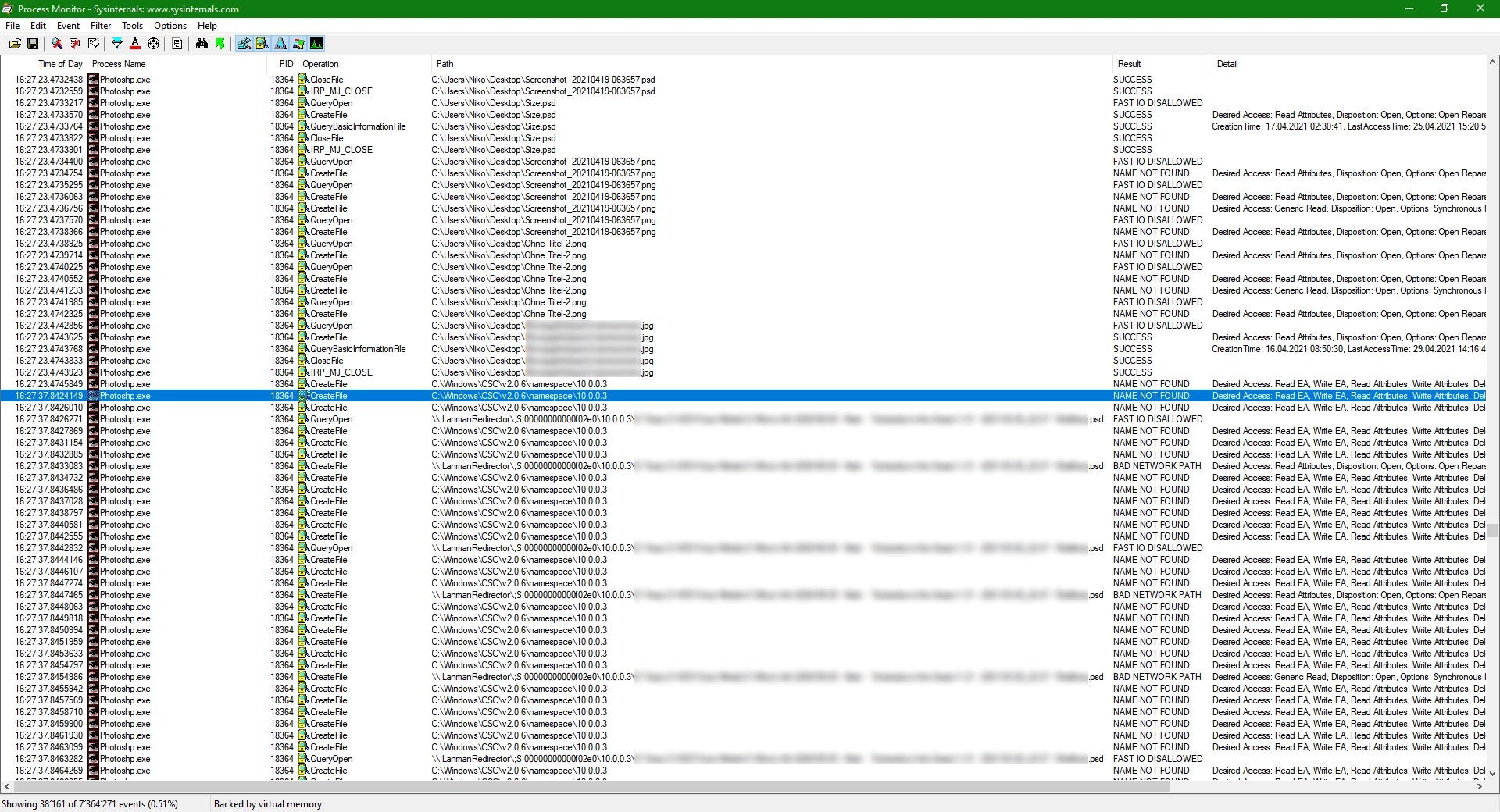
I have attached screenshots or Process Monitor.

Photoshop hangs when it can't reach the network-drive:

Photoshop doesn't hang when it can reach the network-drive:

This topic has been closed for replies.
Correct answer Jeff Arola

Apparently that is a bug corrected in the photoshop 6.0.1 update.


Adobe Photoshop 6.0.1 Update

The Adobe Photoshop 6.0.1 update fixes several problems discovered after Photoshop 6.0 was released.
Before applying the updater, please reboot your PC.

Significant fixes in the 6.0.1 release include the following:

- The painting tool brush picker has new usability improvements:
* Enter brings up and dismisses the preset picker at the current mouse location.
* Double-clicking a brush in the picker selects the brush and dismisses the picker.
* The current brush is always highlighted in the preset picker.
* The First Brush and Last Brush keyboard shortcuts (> and <) work regardless of whether the current brush exactly
matches a preset brush.
- Image clipping paths in EPS and TIFF files saved from Photoshop 6.0.1 have been modified so that other software, such as QuarkXPress, is able to read them.
- ImageReady is able to save and preview animations under constrained memory conditions.
- There is no slow-down of performance when files in the Open Recent list are unavailable.
- Batch file naming works correctly.
- Export Paths to Illustrator retains path scaling.
- Using certain tools (such as move, marquee, or lasso) after using the Open, Save, and Print commands no longer generates a Program Error dialog.
- Selecting a single color in Color Range now works correctly.
- Online help is accessible for more Web browser configurations.
- New Japanese character map (CMap) files are included to resolve conflicts with ImageStyler 1.0 and PageMaker 6.5.2 Plus.
- Memory usage is better on all Windows operating systems; the network should no longer become unavailable when Photoshop is running.
- Showing and hiding edges for a selection no longer requires pressing Ctrl+H twice.


You can see what version of photoshop 6 you have by going to Help>About Photoshop

and looking at Version.


photoshop 6.0.1 update

http://download.adobe.com/pub/adobe/photoshop/win/6.x/ps601up.exe


Adobe® Photoshop® 6.0.1 Plug-ins Update

http://download.adobe.com/pub/adobe/photoshop/win/6.x/Pentium4.exe

This collection of revised plug-ins for Adobe Photoshop 6.0.1 resolves problems for all Windows systems, and offers enhanced performance on Intel® Pentium® 4 processor-based systems.

This update includes four separate files:

- MMXCore.8bx contains new performance enhancements for Pentium 4 systems and all existing enhancements for other Pentium-class systems that use MMX technology.

- LightingEffects.8bf includes all of the functionality of the existing Lighting Effects plug-in, as well as additional enhancements for Pentium 4 systems.

- Shear.8bf resolves an out-of-memory condition.

- Plugin.dll resolves problems with plug-ins that do not use multiple processors.

These plug-ins replace the existing plug-ins of the same names installed with Photoshop 6.0.1.

 

4 replies

Jeff Arola
Community Expert
Jeff ArolaCommunity ExpertCorrect answer
Community Expert
May 6, 2021

Apparently that is a bug corrected in the photoshop 6.0.1 update.


Adobe Photoshop 6.0.1 Update

The Adobe Photoshop 6.0.1 update fixes several problems discovered after Photoshop 6.0 was released.
Before applying the updater, please reboot your PC.

Significant fixes in the 6.0.1 release include the following:

- The painting tool brush picker has new usability improvements:
* Enter brings up and dismisses the preset picker at the current mouse location.
* Double-clicking a brush in the picker selects the brush and dismisses the picker.
* The current brush is always highlighted in the preset picker.
* The First Brush and Last Brush keyboard shortcuts (> and <) work regardless of whether the current brush exactly
matches a preset brush.
- Image clipping paths in EPS and TIFF files saved from Photoshop 6.0.1 have been modified so that other software, such as QuarkXPress, is able to read them.
- ImageReady is able to save and preview animations under constrained memory conditions.
- There is no slow-down of performance when files in the Open Recent list are unavailable.
- Batch file naming works correctly.
- Export Paths to Illustrator retains path scaling.
- Using certain tools (such as move, marquee, or lasso) after using the Open, Save, and Print commands no longer generates a Program Error dialog.
- Selecting a single color in Color Range now works correctly.
- Online help is accessible for more Web browser configurations.
- New Japanese character map (CMap) files are included to resolve conflicts with ImageStyler 1.0 and PageMaker 6.5.2 Plus.
- Memory usage is better on all Windows operating systems; the network should no longer become unavailable when Photoshop is running.
- Showing and hiding edges for a selection no longer requires pressing Ctrl+H twice.


You can see what version of photoshop 6 you have by going to Help>About Photoshop

and looking at Version.


photoshop 6.0.1 update

http://download.adobe.com/pub/adobe/photoshop/win/6.x/ps601up.exe


Adobe® Photoshop® 6.0.1 Plug-ins Update

http://download.adobe.com/pub/adobe/photoshop/win/6.x/Pentium4.exe

This collection of revised plug-ins for Adobe Photoshop 6.0.1 resolves problems for all Windows systems, and offers enhanced performance on Intel® Pentium® 4 processor-based systems.

This update includes four separate files:

- MMXCore.8bx contains new performance enhancements for Pentium 4 systems and all existing enhancements for other Pentium-class systems that use MMX technology.

- LightingEffects.8bf includes all of the functionality of the existing Lighting Effects plug-in, as well as additional enhancements for Pentium 4 systems.

- Shear.8bf resolves an out-of-memory condition.

- Plugin.dll resolves problems with plug-ins that do not use multiple processors.

These plug-ins replace the existing plug-ins of the same names installed with Photoshop 6.0.1.
 

Niko5C5FAuthor
Participating Frequently
May 6, 2021

The setup in "ps601up.exe" claims to have successfully updated Photoshop to 6.0.1. Unfortunately, the splash screen still shows "Version 6.0". I found another source for the update: ftp://ftp.adobe.com/pub/adobe/photoshop/win/6.x

The file "ps601deup.exe" ("de" for german) worked for me. Now the splash screen shows "Version 6.0.1".


But:

If I have opened a network file recently, Photoshop will still try to check whether it exist on startup. If it doesn't, Photoshop still hangs for 15 seconds before finally starting, and once it does, the file does not appear in the "File -> Open recent file" menu. But it does not check for that file again while it's open and on successive startups, until I open that file again.


So "There is no slow-down of performance when files in the Open Recent list are unavailable." is a lie, but it's much better than before and it's good enough for me.


Thank you for your help!

Jeff Arola
Community Expert
Community Expert
May 5, 2021

In photoshop cs6 on windows 10 using File>Open then clicking on Quick access gives a list of recent files, though it's for every program not just photoshop.


If in photoshop cs6 you go to File>Recent and click Clear Recent File List that shouldn't affect the Recent files in the File>Open>Quick access.

Niko5C5FAuthor
Participating Frequently
May 5, 2021

> File>Recent and click Clear Recent File List

That menu item does not exist in Photoshop 6.0.

Legend
May 5, 2021

"That menu item does not exist in Photoshop 6.0."

What would you like us to do about that? You see, the other responder assumed you MUST mean Photoshop CS6, that nobody could possibly be actually running 6.0. One of us is right (I don't mind which of us).

Legend
May 5, 2021

Photoshop doesn't know your files are on a network. And doesn't care. It tries to read or write them in EXACTLY the way that it would try to read or write a file on your hard disk. It may be surprised, but doesn't care, if the file read/write takes minutes, and if the system never reports it as either succeeding or failing, it will hang forever. Like any app. It is not considered correct for an app to try and add its own timeouts or network-specific handling. 


Is this really the 21-year old Photoshop 6? Not that it would be any better. Suggest you focus on driving these files out of recently used and NEVER AGAIN open from a network drive. 

Niko5C5FAuthor
Participating Frequently
May 5, 2021

> It tries to read or write them in EXACTLY the way that it would try to read or write a file on your hard disk [...] it will hang forever. Like any app. 

Well... I know, but that's not really the question here. Photoshop must have those file paths somewhere in its settings. I want to know where exactly and how to remove them.

Also, "Like any app" isn't exactly true. I don't see why Photoshop needs to access those files at all if I'm not trying to open them. It should just display the file names in the recent list and not touch the actual files until I click on them.

The long timeout when accessing disconnected network shares is a problem with Windows in general, but Photoshop is the one that's accessing the files in the first place. The use case for Photoshop here is that it does not display non-existing files in the recent list. I kinda get that, but then why does it not just discard the non-existing files instead of trying to access those same files multiple times a minute?

So the most straightforward solution is to tell photoshop to not remember those paths, which is why I'm asking here for information about that.


Legend
May 5, 2021

Like I said, get them out of the recent files list (by opening others on your hardisk). Never again open from the network. Job done.


In fact it is unlikely to be trying to open the files. Just check if they exist. Some versions of apps helpfully try to remove things from the recent list if they don't exist. So it hangs if a network drive goes away. People complain; programmers stop it doing that. A few years pass. People complain that the recent files list contains files that no longer exist. So this is fixed, and the hang returns. Apps typically go through cycles with their recent lists between these two different problems, I imagine Photoshop has done this often since your antediluvian version.

Abambo
Community Expert
Community Expert
May 5, 2021

Normal, Photoshop waits for the network to respond. Somehow PS6 does not see the time-out (or no timeout is sent).

ABAMBO | Hard- and Software Engineer | Photographer
Niko5C5FAuthor
Participating Frequently
May 5, 2021

Are you saying "Normally, Photoshop waits ..." or "This is normal. Photoshop waits..."?