
Participating Frequently
November 28, 2022
Answered

Photoshop 6 upgrade cannot find installed 5.5 version.

  • November 28, 2022
  • 5 replies
  • 11754 views

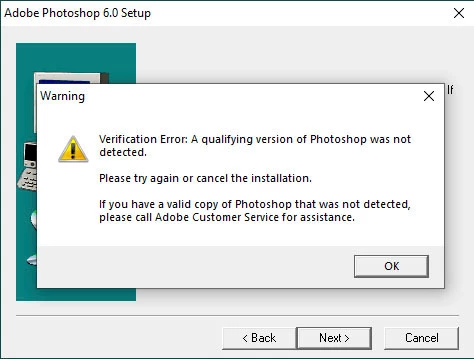
I have a legal and installed version of photoshop 5.5 (yeah, I know, I'm a dinosaur) and I try to upgrade to photoshop 6 and the install tells me that "A qualifying version of Photoshop was not detected" but both versions are legal disks.  If anyone knows what I am supposed to do now, I would appreciate that knowledge.


This topic has been closed for replies.
Correct answer kglad

You responded and I appreciate that.


try running in compatibilty mode,  probably using the oldest os offered, or win 98

5 replies

Jeff Arola
Community Expert
Community Expert
December 6, 2022

William,


I'm very sorry this happened to you.


Participating Frequently
December 6, 2022

I am very sorry as well.  Thank you all for giving a crap.


Jane, how did you know about the @outlook.com address?  Are you aware of others that have been hosed like myself?


And d fosse, I apologize for being rude.

jane-e
Community Expert
Community Expert
December 6, 2022

Hi William,


They had a slightly different address, which was banned. I will report this one.


Jane


jane-e
Community Expert
Community Expert
November 28, 2022

@William27340386uf31 wrote:

I try to upgrade to photoshop 6


Upgrades to Photoshop 6.0 are no longer being sold legally. Where did you purchase this?


Jane


Participating Frequently
December 6, 2022

In 2000, the company I worked for bought me PS 5.5.  They bought it for me because I saved them a boatload of money (at the time, if I remember correctly, PS 5.5 cost around $900).  The design firm they used charged them $3000 for one banner image that could have been done in PS in a few minutes while drunk!  The only thing they had that PS did not was a specific font that the sales team liked and the font could be purchased for $69 and allowed commercial use.  It was actually my boss that bought me the PS 6 upgrade without me asking "in case there was functionality that PS 5.5 did not have."  When PS was bought for me, I was told that both software versions were mine and I could keep them when I left the company, which I thought was kinda unprecedented but greatly appreciated.  I apologize for not responding earlier, but Adobe contacted me and gave me a very good price on CS6.  That version may be old to many, but it was about 12 years newer than PS6 which excited me to no end!  Thank you very much for responding to my question!

D Fosse
Community Expert
Community Expert
December 6, 2022
quote

Adobe contacted me and gave me a very good price on CS6


By @William27340386uf31


They would never do that! This sounds like a scam.


There has never been an upgrade path from PS version 5.5 to PS version 13 (CS6). Even if it was a legit CS6 upgrade, it wouldn't accept 5.5 as a valid qualifying version. It would be far too old.


Photoshop CS6 hasn't been legally available, in any form, since 2015 or so.

gener7
Community Expert
Community Expert
November 28, 2022

Odd enough if you have photoshop 6 installed anywhere else, just copy the folder over to your PC. This was before activation and registry checks. It will open without any problems except for the 2GB hard drive restriction.

D Fosse
Community Expert
Community Expert
November 28, 2022

Maybe I misunderstand what you're saying, Gene, but copying the app folder over won't work. It's not activation, but the installer still has to write a lot of registry keys.

D Fosse
Community Expert
Community Expert
November 29, 2022

@D Fosse wrote:

I was amazed at the clone tool.


Was it called the Clone Stamp tool in PS6? I've been trying to remember when they changed the name from Rubber Stamp tool.


Jane


Oh, it may have been rubber stamp. It was magic either way...


I mean, I knew computers had put a man on the moon, but to have it in your own home 😉


It just struck me how old Photoshop 6.0 really is. It's amazing that it still runs on a modern Windows computer. I ran it with 256 megabytes of RAM and a whopping 4 GB hard drive. A friend of mine had two screens, and I used to sit and watch in jaw-dropping awe as he dragged an image straight across to the other screen. Man, that was some serious Matrix-style sh't... 😄

Jeff Arola
Community Expert
Community Expert
November 28, 2022

I forgot to say, copy the photoshop 6 install folder to your drive so you can run the ps 6 installer with the ps 5.5 install disk in the cd drive.

Jeff Arola
Community Expert
Community Expert
November 28, 2022


Jeff Arola
Community Expert
Community Expert
November 28, 2022

If you have the original ps 5.5 install disk, insert that in your cd/dvd drive then run the ps 6 installer.