emin23810549ktsf
Participant
April 22, 2023
Question

Photoshop adobePM.dll error

  • April 22, 2023
  • 1 reply
  • 4477 views

Hello, I have a Windows 10 operating system and my computer has the necessary features to run Adobe Photoshop. I formatted my computer a month ago and had to reinstall all the programs, but I have been unable to use Photoshop for a month now. Let me explain my problem in detail.

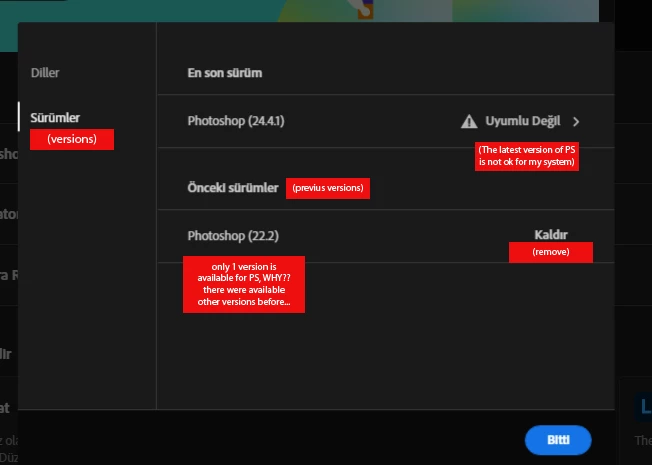
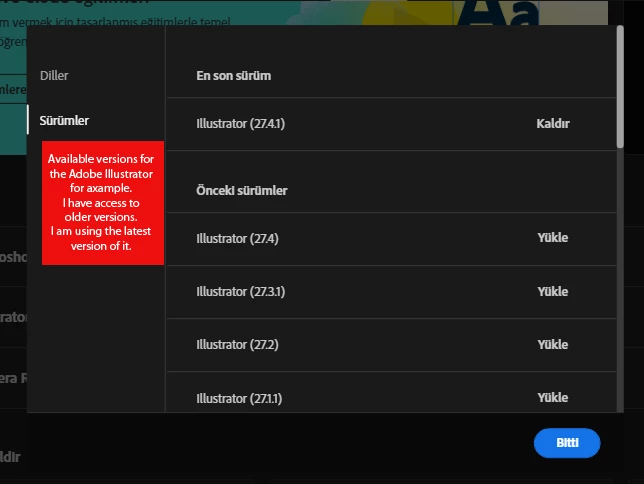
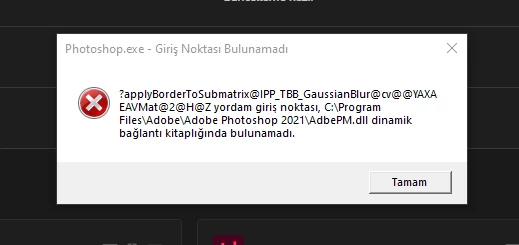
Firstly, while I can see older versions of other programs in Creative Cloud, I can only see a single version of Photoshop. When I downloaded this version, I received an error message stating that some DLL files were missing, preventing the program from launching. I then had to download the missing DLL files from unspecified sources and add them to the Adobe Photoshop folder. After this, I received the error message shown in the screenshot I have shared, stating that the dynamic link connection point could not be found, and I have been unable to resolve this issue.

Please do not suggest solutions such as restarting my computer, wiping everything and restoring, updating my graphics card drivers or Windows, updating C++, etc. I have tried all of these and they have not worked. It is shameful for Adobe that I have to make so much effort to benefit from a service that I am paying for. I am satisfied with other programs and have been using them for years, but Photoshop is really pushing my patience. Please suggest a solution to this error message, or I will cancel my subscription and try other alternatives. This has been causing significant delays in my work for a month, and this is no longer a sustainable situation for me. Thank you.

(PS: The win 10 is original, I have Adobe CC subscribtion)
 

This topic has been closed for replies.

1 reply

davescm
Community Expert
Community Expert
April 22, 2023

'I then had to download the missing DLL files from unspecified sources and add them to the Adobe Photoshop folder.'


That in itself is likely to cause issues. Never download dlls from unspecified sources, you do not know what they contain. If you are lucky they may just be corrupt or the wrong versions. If you are unlucky they could contain malware.


Uninstall Photoshop, run the Adobe CC Cleaner tool, then reinstall Photoshop. That should give you a functioning installation with the correct Adobe dlls

https://helpx.adobe.com/uk/creative-cloud/kb/cc-cleaner-tool-installation-problems.html


Dave

emin23810549ktsf
Participant
April 23, 2023

Thank you for your reply,

I did it before however i did it again by following the all steps. And here is the same error again. It says dll files are missing and I have still access to only 1 version of Photoshop.

PS: I turned off the win defender before downloading Adobe CC by the way. It can't block the missing files. I think there is something wrong with the CC App. I removed it and reinstalled it 6 times and maybe more. It still gives me only 1 version for Photoshop and that version is broken. (Photoshop version 22.2) 


davescm
Community Expert
Community Expert
April 24, 2023

Thak you for your reply Dave, 

I use it just a month ago without any problem but anyway I really don't want to try to figure this out anymore... I don't need the latest tools of it. How can i see the older versions? There are only 1 available version for Photoshop on my Creative Cloud App. I have access older versions for other apps but for Photoshop it shows only PS version 22.2. As I said before, I used CC Cleaner tool. I deleted and reinstalled the CC and the apps. Do you have any other suggestion?

Thank you.


Adobe only support versions back to v22.2 - in fact the policy is only two versions supported but that was extended temporarily to allow those who needed 3D functionality to download the last version that worked. 

If your hardware does not meet the system requirements for Photoshop then there is nothing we can do at this forum.


https://helpx.adobe.com/photoshop/kb/known-issues.html#ErroratloadingofippCVlibrary

https://helpx.adobe.com/uk/photoshop/system-requirements.html


You might be able to get a download link by contacting Adobe Customer Care - but their policy is only to support the last two versions.

Dave