jonathant85336572
Participant
April 25, 2018
Answered

Photoshop animated GIF export render issue

  • April 25, 2018
  • 2 replies
  • 19192 views

Hi

I'm having issues exporting (Save for web in Photoshop) to an animated gif.

I have 30 frames of a swan kicking its feet but as you can see below that it takes each frame and overlays one on top of the other when rendered out to a gif.

So the original PSD is fine but if you open the rendered gif then you will see frame after frame stacking up one on top of the other.

The surrounding white is transparent and so only the red line will show. With transparency turned off it is fine but unfortunately that is no what is need.

Any ideas?

Cheers

Jon

Correct answer jonathant85336572

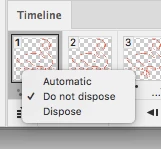
Thanks so much for helping. You mentioned deleting the frames and then redoing it (layers to frames). It worked a treat. Also I noticed that the difference was it had the DO NOT DISPOSE on that in my 18 or so years of using it have never seen :-) Always learning. Anyway a bit of other history to this was that I originally exported as a gif from After Effects / Media Encoder and so must have had this option fixed on there. This is why I had to bring it in to PSD to rub away some other errors but now I'm going to go back and see what options I had missed in After Effects / Media Encoder and make sure I have it dialled in for next time.

Thanks again all

Cheers

Jon

2 replies

Inspiring
April 25, 2018

I opened up the file and the layers have multiple feet on them. Each layer had one set of feet it would be easy to set-up the frames then animate in the animation timeline. Below is just one layer. The animate timeline reads the layer or layers.

JJMack
Community Expert
Community Expert
April 25, 2018

Upload your layered psd file and post a line to it.  It look like you are duping the current frame in the animation timeline and adding the next layer to the duped frames visibility. Since the animations layers has a transparent background and you are acuminating layers the swans's outlines in each new duped frame add in it layers differences.  If you delete all frames then use the animation panel fly-out menu Make frames from layers.  The Animation should be good.  You may want to fill each layers transparent background with a color like white so your animation would be visible over and orange page background,

It looks like you tried yo removed a white background because  I see white fring in the animation when viewed over a black background.

JJMack
jonathant85336572
jonathant85336572AuthorCorrect answer
Participant
April 25, 2018

Thanks so much for helping. You mentioned deleting the frames and then redoing it (layers to frames). It worked a treat. Also I noticed that the difference was it had the DO NOT DISPOSE on that in my 18 or so years of using it have never seen :-) Always learning. Anyway a bit of other history to this was that I originally exported as a gif from After Effects / Media Encoder and so must have had this option fixed on there. This is why I had to bring it in to PSD to rub away some other errors but now I'm going to go back and see what options I had missed in After Effects / Media Encoder and make sure I have it dialled in for next time.

Thanks again all

Cheers

Jon

Participant
July 24, 2021

if anyone comes here with the same problem, do not be confused and waste time with the other procedures described here.  THIS is the solution. select all the frames in the animation panel, right click, and make sure that "DISPOSE" is selected. if "do not dispose" is selected, the frames will stack on top of each other.