Participant
April 15, 2023
Question

Photoshop Batch Aciton

  • April 15, 2023
  • 1 reply
  • 627 views

Hello everyone
I want to create a Batch action, 
I have many student photos without background and i want to put background all student photos with Batch action
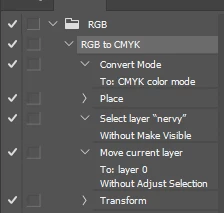
I try to make the action but here is my problem : 
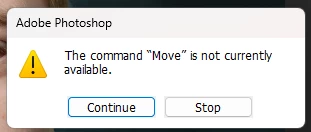


How can I make it work?
Thanks!

This topic has been closed for replies.

1 reply

Stephen Marsh
Community Expert
Community Expert
April 15, 2023

I'm guessing that the other images don't have the layer name "nervy".


You should use relative keyboard shortcuts to select the layer rather than clicking on it when recording the action, or use a common generic name if clicking on the layer.


Showing screenshots of the layers panel for a few images would help to illustrate the layer structure and if it was consistent. For example always the top layer or the layer directly above the Background layer etc.


Relative Layer Keycuts:


Select/target front (top) layer =
Option + .

Select/target next layer up = Option + ]
Select/target next layer down = Option + [
Select/target back (bottom) layer = Option + ,


Move current target layer to front (top) layer = Command + Shift + ]
Move current target layer up = Command + ]
Move current target layer down = Command + [
Move current target layer to back (bottom) layer = Command + Shift+ [


Windows users would swap the Command key for Ctrl and the Option key for Alt


GeriHDHUNAuthor
Participant
April 16, 2023

On Monday I try it and back the answer