
JonathanCole73
Participating Frequently
July 29, 2022
Answered

Photoshop batch actions / image resize running INCREDIBLY slowly. What's up?

  • July 29, 2022
  • 1 reply
  • 1150 views

Hello all. Any insight into why I've just started having this problem please?

Photoshop was working as it should until last week. All of a sudden running batch actions on jpeg files (simple levels/contrast/sharpen tweaks) it taking AGES. I set something to run last night and it took almost 4hrs to run through 500 files. It used to do this in less that 20-30 mins at most. In addition, even the simplest of batch actions (a simple image resize to create a low res version of a file) is taking just as long. This used to be pretty much instantaneous.

I'm a professional photographer so this has destroyed my workflow. VERY frustrating.

I have a MacBook pro with the M1 chip, 64GB ram and all of that. Working with files from Canon EOS R5 of around 60mb, so not massive files at all.

As I say, I had no problems until last week. 

Running 12.5 Montery (updated this morning) and latest version of CC Photoshop.

Help! Thank you.
This topic has been closed for replies.
Correct answer c.pfaffenbichler

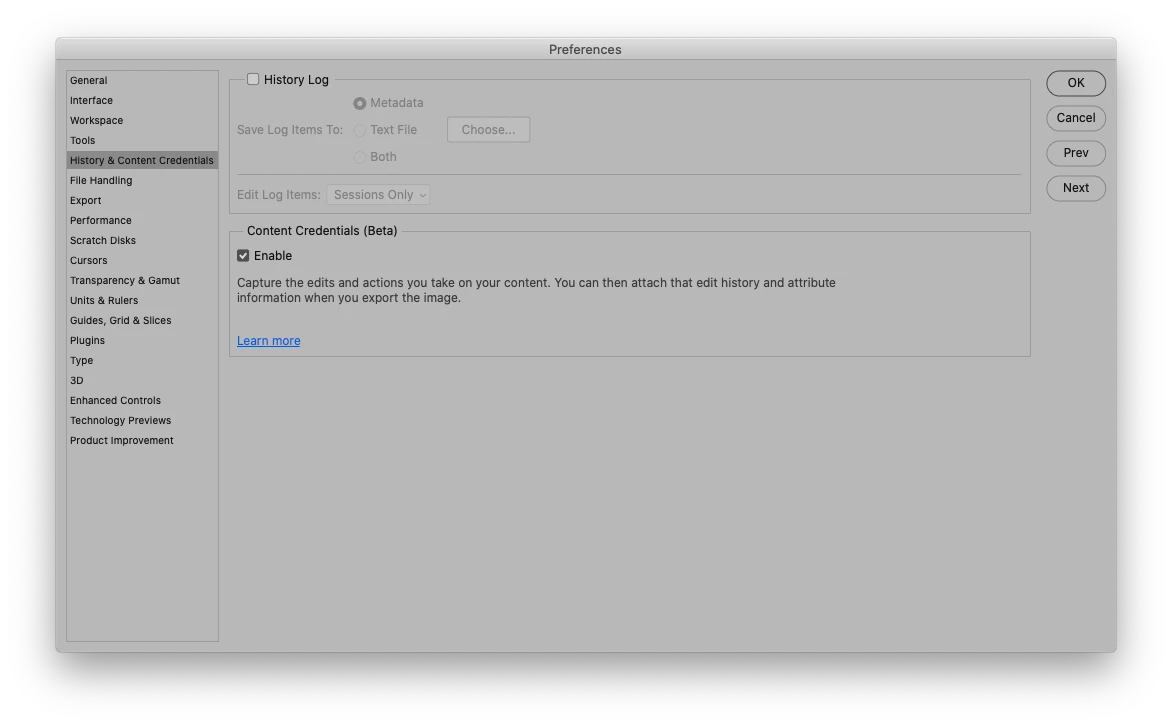
Hi again - I'll check through all the prefs and profiles but in the meantime I just saw this message after running another (very slow) batch. I've never seen that one before, so wondered if it could be relevant? Thanks for the help.


Have you enabled Content Credentials? 

1 reply

c.pfaffenbichler
Community Expert
Community Expert
July 29, 2022

What are the Playback Options (from the dropdown menu of the Actions Panel)? 

JonathanCole73
Participating Frequently
July 29, 2022

It's set to 'Accelerated'. I've done a bit of nosing around to try and find a solution to this problem before posting on here, but no luck so far!

c.pfaffenbichler
Community Expert
Community Expert
July 29, 2022

Everything else is fine in terms of speed and functionality. I've made no changes to any settings or the way I work, which is why this issue is so unexpected.

I haven't tried hiding all panels before running a batch, as I've never have had to before. Why would that suddenly become an issue please?


Why would that suddenly become an issue please?

I don’t know why this may occurr suddenly and even if it would make a difference in this case, but the Panels ( Layers and Channels for example) updating takes some (little) resources, so please try it. 


The behaviour you describe (from 4 files/minute to 62 images/minute and back) does seem peculiar and I have no immediate idea what could cause this. 

What have you done for all-purpose trouble-shooting so far? 

Restoring Preferences after making sure all customized presets like Actions, Patterns, Brushes etc. have been saved might be a good starting point:

https://helpx.adobe.com/photoshop/using/preferences.html

https://helpx.adobe.com/photoshop/kb/basic-trouble-shooting-steps.html