
Participant
September 4, 2018
Answered

Photoshop brush color issue

  • September 4, 2018
  • 5 replies
  • 915 views

I'm running Photoshop CC 2017 on a PC (HP - Windows 7.8). Recently I've had a problem where I load up a brush with color, let's say green (it happens with all colors) but the brush paints it as grey even though the palette still shows it as green. Has anyone else had this problem?
    This topic has been closed for replies.
    Correct answer chanaart

    Check out 3 Options

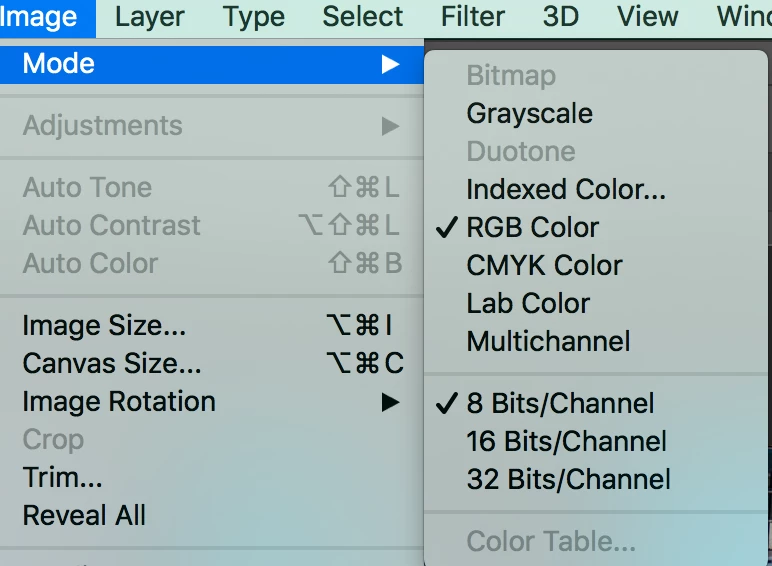
    The color mode of the image. Is it Gray scale?

    Change it to RGB. the color will be back.

    Second:

    are you painting in a mask or on an image?  Mask will gray gray scale ..

    Third:

    check out the blending mode of the brush...

    Let us know if this solves your problem!

    5 replies

    Sebastian Bleak
    Community Expert
    Community Expert
    September 5, 2018

    Hi Bruce!

    Looks like you got some good info from other members in the forum. If you still need help, please provide us with a screenshot of your document, access to the actual file or a short screencast showing the problem in action.

    Thank you!

    Sebastian

    chanaart
    Community Expert
    chanaartCommunity ExpertCorrect answer
    Community Expert
    September 5, 2018

    Check out 3 Options

    The color mode of the image. Is it Gray scale?

    Change it to RGB. the color will be back.

    Second:

    are you painting in a mask or on an image?  Mask will gray gray scale ..

    Third:

    check out the blending mode of the brush...

    Let us know if this solves your problem!

    barbara_a7746676
    Community Expert
    Community Expert
    September 4, 2018

    This could happen if the Brush tool is not set to Normal mode.

    Sahil.Chawla
    Adobe Employee
    Adobe Employee
    September 4, 2018

    Hi Bruce,

    We're sorry to hear about this, could you please try resetting the preferences of Photoshop and let us know if it helps with the issue?

    Preferences Reset Photoshop - https://helpx.adobe.com/photoshop/using/preferences.html


    Make sure you back up any custom presets, brushes and actions before resetting the preferences back to defaults.

    Regards,
    Sahil

    Kanikas
    Community Manager
    Community Manager
    September 4, 2018

    Moving to Photoshop