
Participant
November 19, 2021
Beantwortet

photoshop brush settings color dynamics greyed out

  • November 19, 2021
  • 2 Antworten
  • 5889 Ansichten

In Photoshop 2022, in brush settings, several options are greyed out (cannot access): color dynamics, dual brush, noise and wet edges. How do I resolve it? I already had to add a file manually to get shape dynamics.

Thanks in advance

Christine
Dieses Thema wurde für Antworten geschlossen.
Beste Antwort von J453

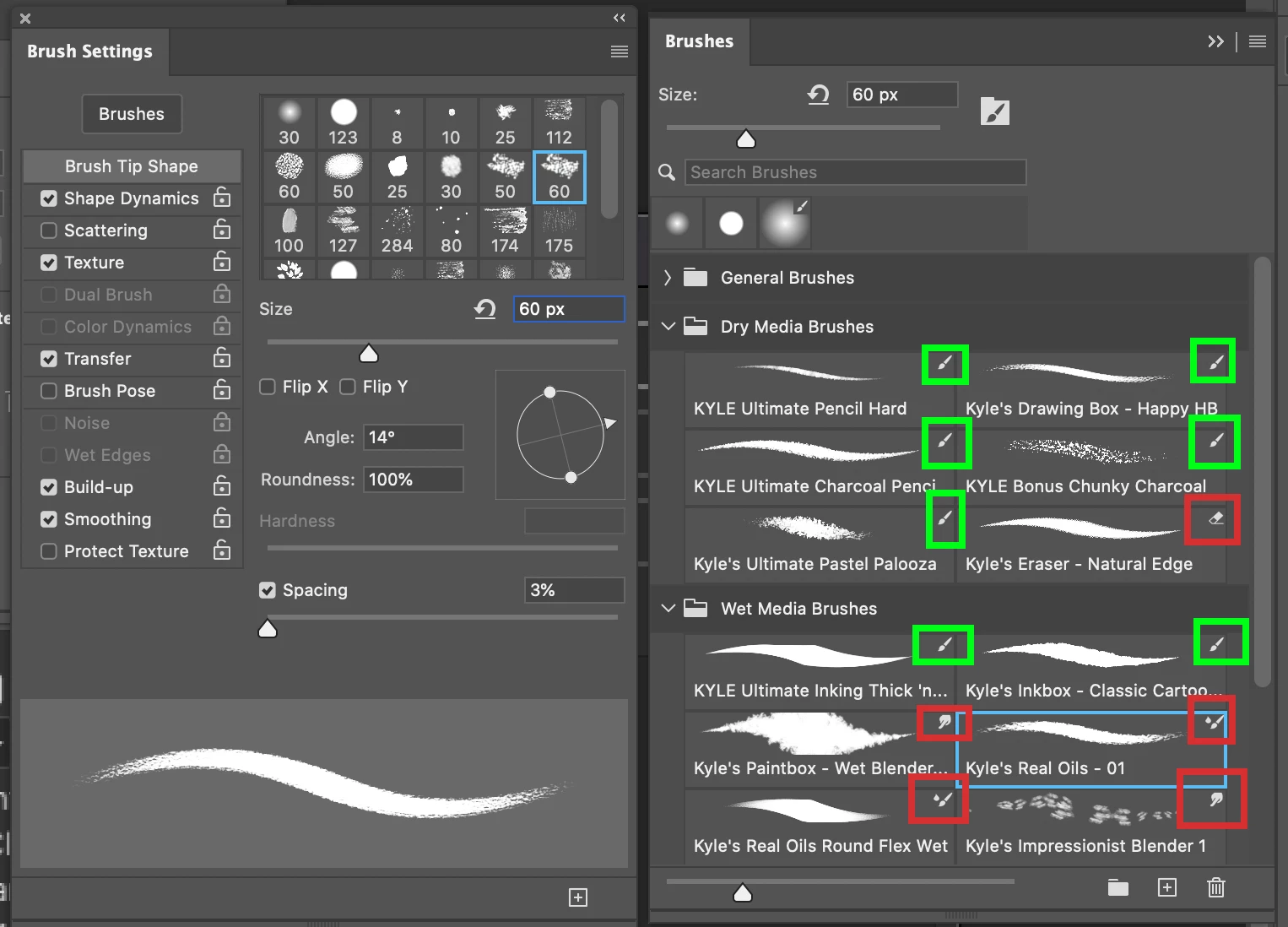
Depending on the brush preset you have selected, these options aren't available:

Regular paint brushes (green) will have these options. Brushes for eraser, smudge, history brush, etc (red) won't have these options.

2 Antworten

J453Antwort
Legend
November 20, 2021

Depending on the brush preset you have selected, these options aren't available:

Regular paint brushes (green) will have these options. Brushes for eraser, smudge, history brush, etc (red) won't have these options.

Participant
September 28, 2022

what if it's a brush that i've created?

Chris 486
Community Expert
Community Expert
November 19, 2021

Hi Sebastien154A!


Have you tried using "reset tool" to see if that fixes your issue?