November 4, 2010
Question

Photoshop Can't Open .png Files

  • November 4, 2010
  • 2 replies
  • 38365 views

Hey, I'm having a bit of trouble here with Photoshop CS5. When I drag & drop/open a .png picture in Photoshop, it gives me the following error:
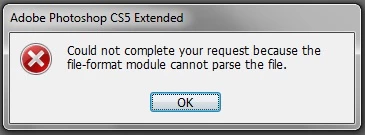
I can open .jpeg files all good, and I'm not too sure about.gif or any others, cause I only use Photoshop mainly to do graphics and such. I did some research and other people insisted that is was a corrupted file within the Photoshop directory. Any help with this would be greatly appreciated!

    This topic has been closed for replies.

    2 replies

    Participating Frequently
    November 8, 2010

    My png files appears to be bmp files, looking at the header, and open as bitmap worked. Anyway, other programs does not need to force the file with "open as...".

    Chris Cox
    Legend
    November 5, 2010

    The file probably isn't a PNG, just an image with the wrong file extension.

    Yes, it could be a corrupt file as well, but not likely for many files.

    November 5, 2010

    I can't save an image in any other format, the only one available is .png. I can convert it, but it's taking me more time to do things. If I could just open it in Photoshop as it is, it would be a lot easier. Any suggestions with what I should to then?

    Participating Frequently
    November 6, 2010

    Again, email me the files and I'll see what might be going wrong.

    But normally people just put the wrong extension on the file (so it's really a PSD or JPEG inside).

    We don't know of any global problem reading PNG files.


    Well, Chris, I couldn't check by myself because I had a very little time in these days, too much work to do, but every kind of file have its own header as you may know, regardless of the file extension itself, so I wonder why Photoshop can't read the file header instead of the file extension, considering that file header is almost every 8byte long, so reading the first 8 bytes identify for sure the file type and then it can be handled by the specific function to view it. That's how programs usually work, extension are useful to the user to identify a file, but shouldn't be the only way a software identify a file type. Micosoft itself, that is known to be bad to user-friendly stuff, can open document with MSOffice even if they have not an extension. Mac open everything regardless of extension, Linux open everything regardless of extension.

    Now, in this specific case I really don't know if the png have the right header, as I said I will check it as soon as I have time, but the above suggestion should be taken in consideration. Reading the first 8bytes of a file will not cause any performance issue, just two codes line to add (and an associative array with header->filetype to be passed to the PS CS5 function that open the files...).