
Participant
February 2, 2024
Question

Photoshop Canvas Size Issue

  • February 2, 2024
  • 3 replies
  • 572 views

Hello! 

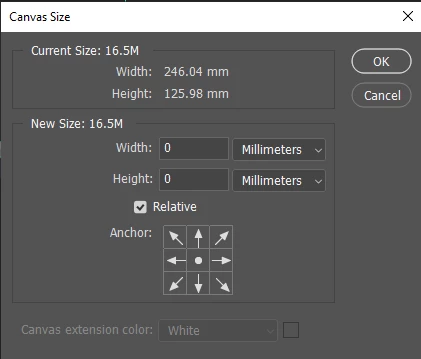
I'm having some issues in setting canvas size to a certain value. I need a 240x120 mm document with 3 mm bleed on each side. In total I need the canvas to be set to 246x126mm. It just doesnt want to give me this exact value. I have checked for things outside canvas with Reveal All option, and checked if i have artboards which I think I dont have. I tried to set it first to 240x120mm and then adding 6 mm on width and height using Relative option. Still the closest i can get is 246.04x125.98 mm 

Do you have any ideas on this Issue. It would be a huge help since im sturggling with this for days already ... 
 

This topic has been closed for replies.

3 replies

davescm
Community Expert
Community Expert
February 2, 2024

To add to Stephen_A_Marsh's correct answer, because Photoshop works in whole pixels then the physical size will only be available to match whole pixels.

246mm x 126 mm at 300ppi would need 2905.51 pixels x 1488.19 pixels. But you cannot have a fraction of a pixel therefore it rounds to 2906 x 1488 pixels which, at 300ppi, is 246.04mm x 125.98mm.


Dave

Participant
February 2, 2024

Oh, I understand, so in order to have the exact value I need I should translate mm to pixels? 

davescm
Community Expert
Community Expert
February 2, 2024

You cannot have that exact physical size using 300ppi in a pixel image. A pixel image has to be in whole pixel units, not fractions of a pixel.


Dave

Participant
February 2, 2024

Check if there is a snap-to-grid feature. It might be adjusting the size slightly. If it is on, try turning it off.

Stephen Marsh
Community Expert
Community Expert
February 2, 2024

Photoshop's native unit is pixels. 

What resolution is your document in PPi or PPCM?


Participant
February 2, 2024

PPi. Now I see that even If a create a new document with the specific measurements i need (without bleed) and check the measurements in Canvas Size the values are different?? How can this be? I tried resetting Essentials ( my preffered workspace) the result its the same