chesterb48204627
Participant
January 13, 2017
Answered

photoshop cc 1917

  • January 13, 2017
  • 3 replies
  • 731 views

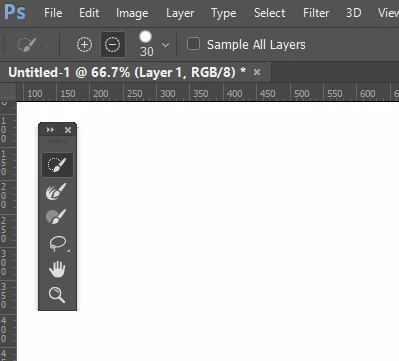
just getting started . when i push the paint brush  the ciril has a  - sign in it andthen i have trouble doing anything

    This topic has been closed for replies.
    Correct answer Trevor.Dennis

    sorry 2017 

    Sent from Yahoo Mail. Get the app


    Chester, we do typos, and myself more than most.  So of course we knew you meant CC2017, but it was an opportunity to rib our Jim, that could not be allowed to pass.

    Reading your post properly, I am actually a bit mystified.  It is not easy to get the brush to show a minus sign, and especially so without pressing a modifier key (Alt or Opt).  You would mentioned pressing the Alt key if you'd done so.

    One possibility is that you were in Select & Mask workspace in which the various brush cursors can display a minus icon _without_ holding down the Alt (Opt) key, according to how it is set in the Options bar.  Does any of that make sense?  Are you all figured out now?

    3 replies

    jane-e
    Community Expert
    Community Expert
    January 14, 2017

    chesterb48204627 wrote:

    just getting started . when i push the paint brush the ciril has a - sign in it andthen i have trouble doing anything

    By "just getting started", does that mean you are new to Photoshop?

    Some things to look at:

    1. The "minus" may be a cross hair, and if it's small or your eyes are not as good (Trevor! Jim!), it's hard to see and could look like a line. Mine looks like a line if I turn on Show Crosshair. The Crosshair is Unchecked by default.

    2. If you have trouble doing anything, try the paintbrush in a new document. Does it work there?

    3. Take a screen shot of your Options bar so we can see the settings.

    4. Reset the Brush tool by right-clicking it in the Options bar

    Does any of this help?

    Oh — 1917 — on April 6, the U.S. declared war on Germany.

    Benjamin Root
    Legend
    January 14, 2017

    CC 1917 The computerized world couldn't handle the Y2K Bug after all Lol

    jbm007
    Community Expert
    Community Expert
    January 14, 2017

    You guys are bad ....................

    You think its easy being me?

    LOL

    jbm007
    Community Expert
    Community Expert
    January 13, 2017

    Try resetting your preferences.

    Preferences in Photoshop

    Trevor.Dennis
    Community Expert
    Community Expert
    January 13, 2017

    Jim, lucky you were about — the rest of us young lads were not about for Photoshop 1917.  In case you are having trouble remembering that far back, it was the year Ella Fitzgerald was born. 

    chesterb48204627
    Participant
    January 13, 2017

    sorry 2017 

    Sent from Yahoo Mail. Get the app