
Known Participant
September 22, 2017
Answered

Photoshop CC 2017 - Problem with Generator

  • September 22, 2017
  • 8 replies
  • 6651 views

For the last couple of days, I've been receiving this error:
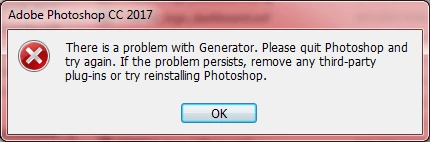
I can still use Photoshop, but attempting to export images (for example, exporting PNGs for the web), results in another error message.
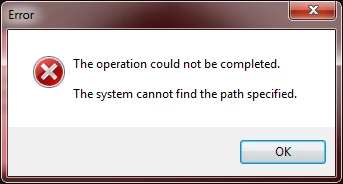
I have uninstalled and reinstalled Photoshop. I launched Photoshop after disabling all third-party plug-ins. I continue to receive these messages.

OS: WIndows 7 Professional

This topic has been closed for replies.
Correct answer CamiSama

Hi Everyone,

I just experienced this issue and was able to fix it. I've tried the two solutions but it did not work for me. I was able to find a fix that worked for me. Hopefully this helps someone else out.

Ensuring you have administrative privileges on  the device:

  • Hit the Windows key and type in Regedit.
  • Navigate to the following folder: HKEY_CURRENT_USER\Software\Microsoft\Windows\CurrentVersion\Explorer\User Shell Folders
  • There you will see a variety of entries. On the right hand side in the Data Column you should see entries that resemble %USERPROFILE%\Downloads %USERPROFILE%\Documents ...etc
  • If there are any items that are mapped to another drive and not the current user profile as above, you could be experiencing this error.
  • My issue was both the Personal and another entry that mapped my documents to an external drive. I edited it to reflect. %USERPROFILE%\Documents
  • Exit the registry editor
  • Restart Photoshop and you should no longer see the issue.

I hope this helps most who have not found a solution. All the best

8 replies

Colin Southern
Known Participant
January 23, 2020

I've been chasing this all morning. Finally found the solution (for me anyway) - it was being caused by MalwareBytes, who are aware of it. THis link for more info and the work-around: https://forums.malwarebytes.com/topic/254622-latest-update-breaks-photoshop/?tab=comments#comment-1349869


brettm21021751
Participant
January 27, 2020

Thank you so much @colins26751223 - second try at trying to find a solution for this and I think MB was the culprit; makles sense as the error only started happening around the time I reinstalled that.

CamiSamaCorrect answer
Participant
May 30, 2018

Hi Everyone,

I just experienced this issue and was able to fix it. I've tried the two solutions but it did not work for me. I was able to find a fix that worked for me. Hopefully this helps someone else out.

Ensuring you have administrative privileges on  the device:

  • Hit the Windows key and type in Regedit.
  • Navigate to the following folder: HKEY_CURRENT_USER\Software\Microsoft\Windows\CurrentVersion\Explorer\User Shell Folders
  • There you will see a variety of entries. On the right hand side in the Data Column you should see entries that resemble %USERPROFILE%\Downloads %USERPROFILE%\Documents ...etc
  • If there are any items that are mapped to another drive and not the current user profile as above, you could be experiencing this error.
  • My issue was both the Personal and another entry that mapped my documents to an external drive. I edited it to reflect. %USERPROFILE%\Documents
  • Exit the registry editor
  • Restart Photoshop and you should no longer see the issue.

I hope this helps most who have not found a solution. All the best

Known Participant
May 31, 2018

I still get an error about "Generator" when I open photoshop, but I can finally use Save For Web again!

Known Participant
June 1, 2018

That may have just been a holdover. I am no longer getting the error!

Participating Frequently
December 12, 2017

A solution for me which is similar but not identical to Adobe's solution …

In Win10: View/ Options: ‘change folder and search options’ to View tab> ‘Show hidden files folders, drives’

Hopefully you can walk through the path:

C:\Users\Bruce\AppData\Roaming\Adobe\Adobe Photoshop CC 2018\

In this case ‘Bruce’ is me, the User.  There should exist in that last folder of ‘Adobe Photoshop CC 2018’ , a nested folder called ‘Generator’ and it likely will not exist for us.  Create that folder.  Additionally in that ‘Generator’ folder that should be a nested folder called Logs.  Also, Create that folder.

The proper path should now look like:

C:\Users\Bruce\AppData\Roaming\Adobe\Adobe Photoshop CC 2018\Generator\Logs\

When Photoshop is run, it should automatically create a file called  ‘generator_latest.txt’.  Us PS users don’t need to worry about that as Photoshop will do this but it's good to know.

I have no idea why some of our machines don’t have these folders.  I suppose it's irrelevant.  Hope this works for some or all of you having this problem.

Bruce

Known Participant
December 13, 2017

That did not work for me.

Participating Frequently
December 14, 2017

<SIGH>

Right after I wrote the above a few hours ago, I fired up PS to do some editing...and guess what?  Yup... the Generator error.

I can't even believe it myself and after a couple of days of error free use.  Makes even less sense than it going bad in the first place.  Why again, especially after a supposed fix that actually worked for a while?

I've been working on this for hours and I'm getting nowhere.  This is Sooooooo bizarre.

Bruce


OK…...a non-solution solution...

So Adobe is no help, I’ve worked on this issue for many hours to no avail and the ‘Generator’ error message is a constant irritant.  Apparently the generator is a Java script launcher and Java script capability might be the underlying culprit.  Whatever,  I will have to live without the functionality of those scripts until someone really solves this problem. 

However it appears that I/we don’t have to live with a constant in-the-face reminder that this feature isn’t working when PS is launched.  For me, that’s multiple times a day.

(on a PC) go to:

Edit > Preferences > Plug-Ins > and uncheck ‘Enable Generator’

…a simple, if ostrich head in the sand, solution since it fixes nothing.  It does insulate us from that first file launch error message.

There will be glitches… like trying to use ‘Export’.  That apparently uses Generator and in another Adobe indignity, just attempting to ‘Export’ will get the ‘Generator’ error message again AND, to add injury to insult, will automatically recheck that ‘Enable Generator’ box in Preferences.  I suspect something behind the scenes like this happened to me for that day and a half when everything was working…then I unknowingly flipped a bit somewhere.

Bruce

emanuell17929083
Participant
December 7, 2017

hej Guys

I experience same problems as you with photoshop.

Did anybody found a solution on this one?

Emanuel

Participating Frequently
November 11, 2017

I've been having the same problem for the last few months.

The suggested 'fix' doesn't work and it has occurred in the last version of PS CC 2017 and now in PS CC 2018.

I'm using an up-to-date Win 7 Home Premium OS w/ a deliberately very generic 16GB  i5 computer.

This is difficult to diagnose definitively because the Adobe 'error' message is essentially useless.  I suspect it's a write privilege issue even though I am the administrator.  I've considered kludging gpedit into Win 7 HP but am likely to mess everything up. 

We need help from Adobe.

Bruce

Known Participant
October 26, 2017

This is also preventing me from creating animated gifs. Is there ​any solution?!

Known Participant
October 20, 2017

I upgraded to CC 2018, and I'm still having this problem.

Akash Sharma
Legend
September 28, 2017

Hi todd_rohrer,

We've documented 2 solutions that might be helpful in fixing this issue. Take a look at this article Error: "There is a problem with Generator" occurs when launching Photoshop and let us know the outcome.

Thanks,

Akash

Known Participant
September 28, 2017

The Photoshop CC 2017 folder and Generator subfolder already exist.

Neither this folder nor previous Photoshop version folders have plug-ins.