Ethylmethylether
Participant
June 30, 2017
Answered

Photoshop CC 2017 Time Spent Editing an Image

  • June 30, 2017
  • 1 reply
  • 12283 views

Hey fellas,

Is there any way you can see how many time you spent editing a photo? Is this an option in Photoshop 2017??

Thanks for your time and attention.

Best Regards.

    This topic has been closed for replies.
    Correct answer Ronald Keller

    It does here, settings and all.

    An example

    *********

    2017-07-01 09:32:20 Photoshop launched

    2017-07-01 09:32:58 File bert en martine bank.psd opened

    Open

    D:\Documenten\AMFOGRAF\Leden\Guido\bert en martine bank.psd

    690

    Select layer “GFR_4508.NEF copy”

    Without Make Visible

    3

    New Levels Layer

    Make adjustment layer

    Using: adjustment layer

    Type: levels

    Preset Kind: Default

    Modify Levels Layer

    Set current adjustment layer

    To: levels

    Preset Kind: Custom

    Adjustment: levels adjustment list

    levels adjustment

    Channel: composite channel

    Input: 44, 255

    2017-07-01 09:33:26 File F:\werk\bert en martine bank.psd saved

    Save

    As: Photoshop

    With Maximize Compatibility

    In: F:\werk\

    690

    **********

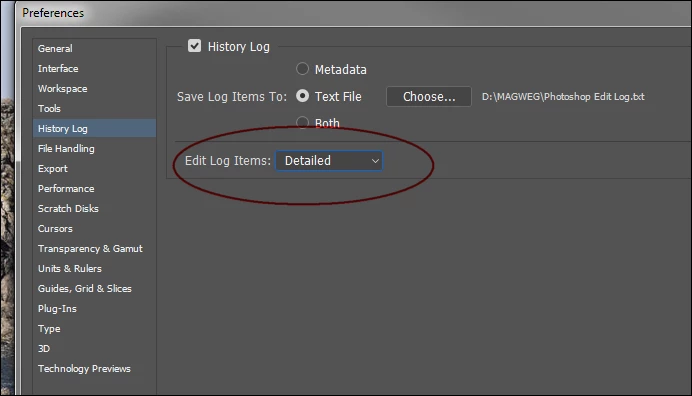
    I suspect you did not specified Detailed and used Concise instead...
    1 reply

    Legend
    June 30, 2017

    Yes.

    Goto Preferences > History Log > Choose a location and name for the logfile and set Edit Log Items to Detailed. It will log everything you do. I don't know if the Concise setting also logs the time but you can surely test that out.

    Ethylmethylether
    Participant
    June 30, 2017

    It logs everything I do but it doesn't show the timestamps, atleast not in the text file.

    I dont find the option to look into the metadata of the file. Can you help me out here?

    Nah, in the metadata I cant see the timestamps either :

    I appreciate your help and attention tho. Thanks mate.

    Ronald KellerCorrect answer
    Legend
    July 1, 2017

    It does here, settings and all.

    An example

    *********

    2017-07-01 09:32:20 Photoshop launched

    2017-07-01 09:32:58 File bert en martine bank.psd opened

    Open

    D:\Documenten\AMFOGRAF\Leden\Guido\bert en martine bank.psd

    690

    Select layer “GFR_4508.NEF copy”

    Without Make Visible

    3

    New Levels Layer

    Make adjustment layer

    Using: adjustment layer

    Type: levels

    Preset Kind: Default

    Modify Levels Layer

    Set current adjustment layer

    To: levels

    Preset Kind: Custom

    Adjustment: levels adjustment list

    levels adjustment

    Channel: composite channel

    Input: 44, 255

    2017-07-01 09:33:26 File F:\werk\bert en martine bank.psd saved

    Save

    As: Photoshop

    With Maximize Compatibility

    In: F:\werk\

    690

    **********

    I suspect you did not specified Detailed and used Concise instead...