
November 11, 2016
Answered

Photoshop CC 2017 'Use legacy "New Document" interface'

  • November 11, 2016
  • 6 replies
  • 8039 views

Photoshop CC 2017, 2017.0.0 Release, 20161012.r.53 x64

Hi All,

I would like to try the new Start Workspace but my Preferences/General Options –– legacy "New Document" interface

is greyed out. It's like it's locked closed. I've tried fiddling with other boxes in Options to try to release the option,

restarting both application and computer but nothing works so far.
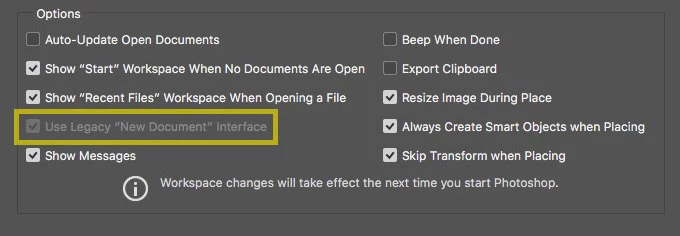
Any helpful suggestions are welcome

Sincerely

John Eley

This topic has been closed for replies.
Correct answer Akash Sharma

Hi Nunos,

Please ensure that you are using the latest version of Photoshop 2017.0.1

Regards,

Akash

6 replies

Known Participant
March 5, 2020

I have tried all the solutions in this thread but none of them solved the problem please can you tell me which of these helped solve the problem?

SonHongTester
Participating Frequently
March 20, 2020

Yes! Me too! Andddd i using v21.1.1 😕😕 

Participant
August 18, 2019

Oh my god thank you! This has been driving me nuts

Participant
August 27, 2017

Just for anyone that is having an issue enabling the New Start Workspace because the Use Legacy "New Document" Interface is ticked and grayed out; go to the plug-ins menu and make sure that Load Extension Panels is ticked.

Participant
May 20, 2018

yes this is a good anwser

rs68255699
Inspiring
April 22, 2017

Maybe it is not solved yet? First deselect all the other boxes on the left side of the panel. Then you can select Use Legacy New Document Interface

Participant
January 27, 2017

I have the same problem

Akash Sharma
Akash SharmaCorrect answer
Legend
January 30, 2017

Hi Nunos,

Please ensure that you are using the latest version of Photoshop 2017.0.1

Regards,

Akash

Participant
February 10, 2017

Hello i have just updated it and i still have it grayed out... :/

Akash Sharma
Legend
November 11, 2016

Hi John,

Does it help you Reset Preferences on Quit from Preferences>General.

Regards,

Akash

Participant
November 14, 2016

no it didnt work for me!!!