
Participant
October 29, 2017
Answered

Photoshop CC 2018 corrupting PSD files

  • October 29, 2017
  • 17 replies
  • 15742 views

Photoshop CC 2018 keeps corrupting files and it is damaging to my work (as in money earned).

It is so frustrating, it keeps happening in haphazard ways and I can't pin it to one special behaviour.

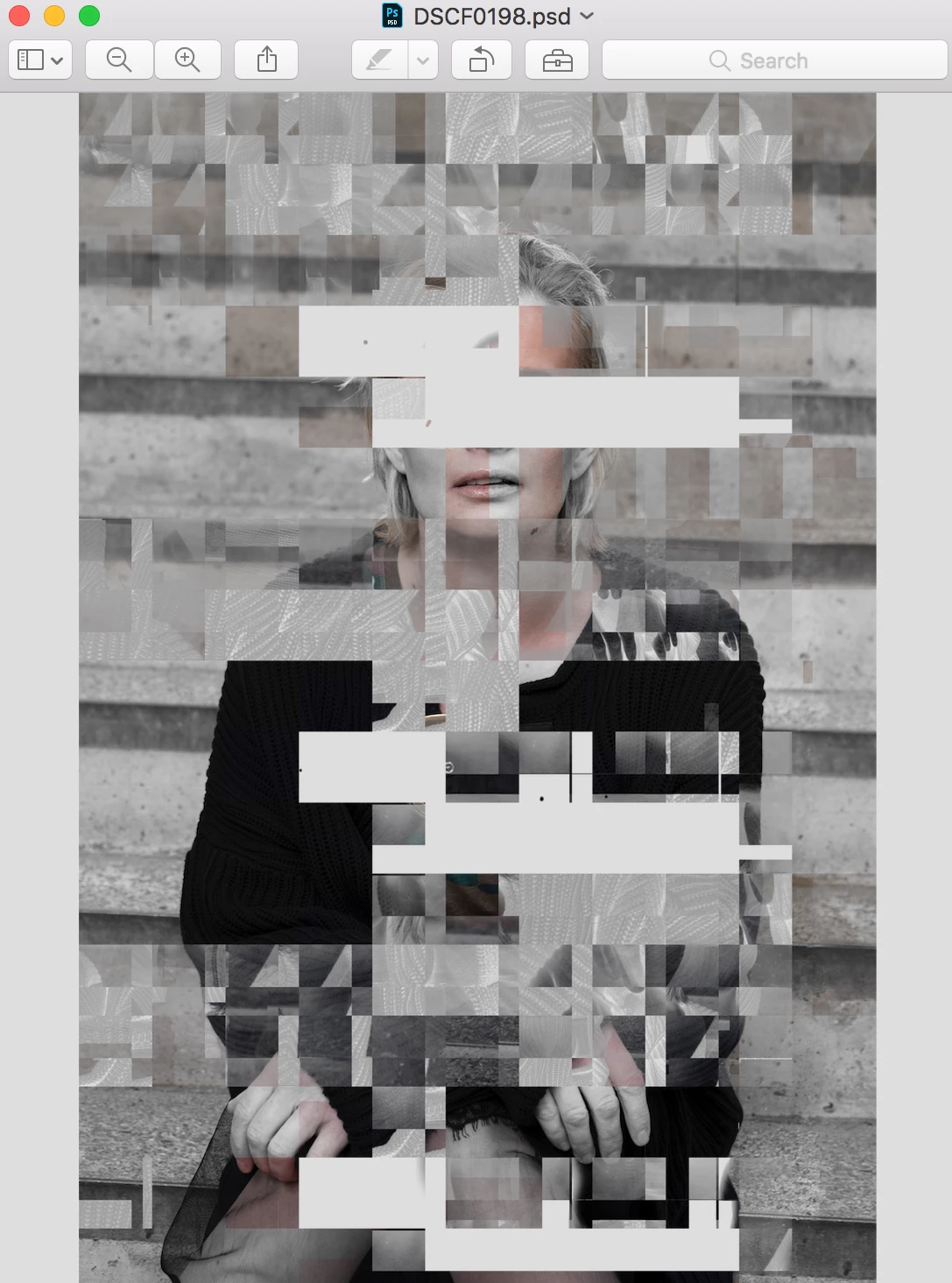
It starts with image artifacts, and when I can see those, the file is basically gone.

macOS Sierra 10.12.6

2,7 GHz i5

8GB RAM

Intel Iris Graphics 6100

I will download the old PS CC for the time being but this is not the solution.

Shame on you Adobe for delivering such a buggy product that is not only annoying but detrimental.

This is the file in Preview:
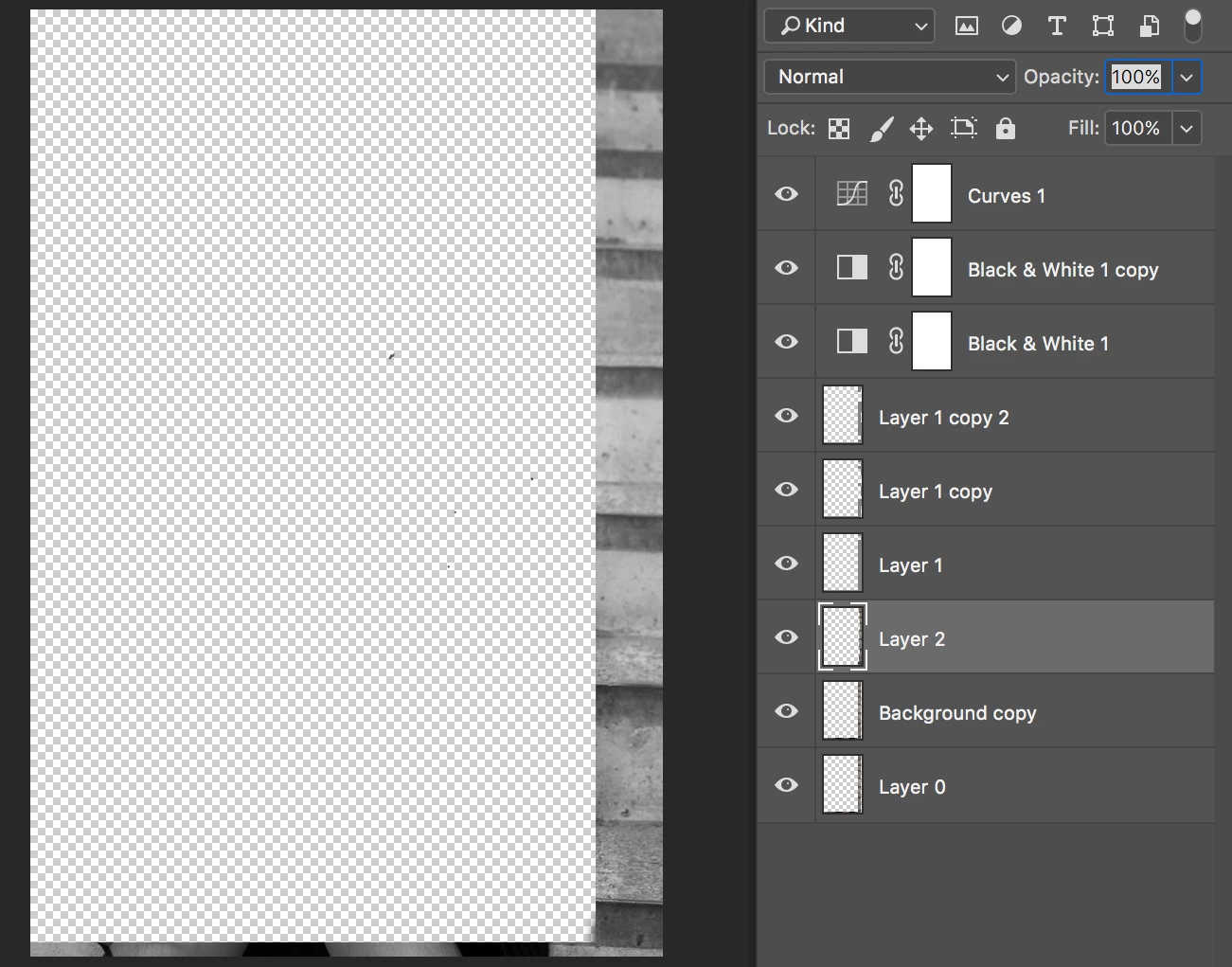
and this is it opened in Photoshop:
Cool. 

This topic has been closed for replies.
Correct answer davescm

Hi

I have not experienced any corruption of files.

However , in your position I would do the following:

1. Create a couple of test files and work on them to isolate the issue.

2. Turn off the GPU in "Photoshop > Performance and if that resolves the problem - turn it back on first in basic mode then try the other modes.

3. Once the outcome of the GPU on/off is known - raise a report at the link below , where it will be seen by Adobe staff, giving as much system info as possible - and be prepared to share a corrupted file. (This forum is predominantly answered by volunteer users)

Photoshop Family Customer Community

Dave

17 replies

Known Participant
November 20, 2017

Same issues on a Surface PRO I'm afraid.

Will try disabling the plugin.

Zooming in with brush tool selected and boom.

JPEG

Dropbox - _DSC8713_SHORTBREAD_V2_trashed.jpg

PSD

Dropbox - _DSC8713_SHORTBREAD_V2_trashed.psd

Adobe Photoshop Version: 19.0 20170929.r.165 2017/09/29: 1138933  x64

Number of Launches: 28

Operating System: Windows 10 64-bit

Version: 10 or greater 10.0.16299.15

System architecture: Intel CPU Family:6, Model:5, Stepping:1 with MMX, SSE Integer, SSE FP, SSE2, SSE3, SSE4.1, SSE4.2, AVX, AVX2, HyperThreading

Physical processor count: 2

Logical processor count: 4

Processor speed: 2295 MHz

Built-in memory: 8097 MB

Free memory: 1528 MB

Memory available to Photoshop: 6825 MB

Memory used by Photoshop: 60 %

Surface Dial: Enabled.

Alias Layers: Disabled.

Modifier Palette: Enabled.

Highbeam: Enabled.

Image tile size: 128K

Image cache levels: 4

Participant
January 13, 2018

I am having the same problem, all my images with layers are LOST!! When I try to open I get a program error. I've just lost days of work. Does anyone know of a way to recover these files?

Participant
January 13, 2018

I'm still using Photoshop 2017. I've heard nightmare stories about 2018 and have not updated. At this point, I don't trust Adobe's tech capabilities enough to update any of their apps.

Legend
November 10, 2017

Are there steps you can perform that consistently reproduce this issue?

How often is this happening?

Do you have background save enabled?

Are the files stored on a local drive? or remote server?

Are these files stored in a location that uses a cloud sync or back-up service? (e.g. Creative Cloud sync, Dropbox, Skydrive, etc)

A damaged file might also be helpful. if you have one you can share, either post a URL to a CC shared file or dropbox, or let me know. That said, ideally we need steps to reproduce.

prepressdm
Participant
November 10, 2017

For me, this happened on the second file I used which was imported from a camera raw .nef file.

Locally, not on a network.

After that disaster I uninstalled 2018 and went back to 2017 so I can't try troubleshooting. (Not that I have the time for it anyway)

Not sure if I had background save enabled, it would be whatever the default was set to.

I do have crash plan as a backup service but it's not running while I'm working on it.

Legend
November 10, 2017

Thanks. Note, you can keep the latest version and prior versions installed at the same time. Just make sure you uncheck "Remove Prior Versions" in the advanced settings in the Creative Cloud desktop app. Update apps to the October 2017 release of Adobe Creative Cloud

Participating Frequently
November 10, 2017

I'm having the SAME ISSUE, thankfully I work with images, mostly in smart objects so I can relink the original file, and clean up every single mask I have, but this is really bad, some paint layers I can't save. This is MY JOB, I can't afford to lose work this way! I used to stick to CS6 and never had a single problem. Since I finally made the jump to CC in September, I keep having a million different problems. I really regret my decision at this point, as at least CS6 was stable and ran fast! I handle files that can go 4-6gb on tight dealines, I can't afford this crap. I had this problem before the CC2018 upgrade, but before it would affect 1-2 layers (the one I would be touching). Now it corrupts all my layers! I turned off GPU so we'll see but I'm not holding my breath.

I have a PC laptop, Intel i7-4810MQ @ 2.80ghz, 32 GB RAM, Windows 10 up to date, Intel HD Graphics 4600 & NVIDIA GeForce GTX 870M, all my drivers are up to date and I basically did a full clean install on my PC back in September, so all drivers are no older than then (and the reason I upgraded to CC at the time). I see most people having issues with Mac, but I'm on a 3 yo top of the line Digital Storm laptop...

gener7
Community Expert
Community Expert
November 10, 2017

CC 2018 is a .0 release and prone to a lot of problems. It was conventional wisdom to keep the earlier version around for at least a month.

You can with the CC plan install earlier versions as shown here:  Re: Photoshop CC 2018 corrupting PSD files

CC 2017 or even CC 2014 are good picks. See if that works for you. You paid for it and might as well as get the benefits.

Gene

prepressdm
Participant
November 10, 2017

yeah, and Adobe could do beta releases for the guinea pigs that enjoy corrupting files for fun.

I already moved back to 2017 for photoshop at least. We had to move forward for some of the software because we are a print/media provider as well and need to have the same version as our clients.

prepressdm
Participant
November 9, 2017

Same thing happened to me, I was using the healing brush tool and it just went berserk, then created these boxes (maybe from sections of the cloning tool areas I was working on?) and it's not a GPU thing, because they are completely selectable shapes. The black layer even turned white. I tried saving a copy closing re-opening rebooting and it's still messed up.

This is scary, I have a ton of work to do on products and cannot have it mess up like this. I will revert until it's fixed.

Quick summary of specs if it helps: Win 10 pro - 64 bit, i7, nvidia 680m, SSD, 16GB Ram.

Participant
November 6, 2017

THIS IS INSANE!!!!!! IT'S HAPPENING TO ME TOO!!!!!!!

It's Pritty F$%ED Up.........

EVERYBODY, sonner or later it will happen to you. I have a fresh system, just installed OS Sierra on my Mac and this happened to me today.

I will recommend to go back to 2017 until Adobe get's real about this BIG issue and takes care of it. Never seen anything like it on 15 years of working in Photoshop

mglush
Community Expert
Community Expert
October 30, 2017

Did you download any images from the internet lately?

Michelle

Participant
October 30, 2017

Images from the internet?? No? But even if so, I've been using Photoshop for more than 10 years now, I have never had such a problem. This makes PS unsafe to work, as alernick​ said, I'm not opening another file in this cauldron of uncertainty

davescm
Community Expert
davescmCommunity ExpertCorrect answer
Community Expert
October 30, 2017

Hi

I have not experienced any corruption of files.

However , in your position I would do the following:

1. Create a couple of test files and work on them to isolate the issue.

2. Turn off the GPU in "Photoshop > Performance and if that resolves the problem - turn it back on first in basic mode then try the other modes.

3. Once the outcome of the GPU on/off is known - raise a report at the link below , where it will be seen by Adobe staff, giving as much system info as possible - and be prepared to share a corrupted file. (This forum is predominantly answered by volunteer users)

Photoshop Family Customer Community

Dave

alernick
Participant
October 30, 2017

I am having the same problem today. It is destroying my files. I am afraid of opening more files as they are getting destroyed one by one.

PHOTOSHOP GUYS, pl;ease come up with a fix ASAP.

How can I revert to CC 2017?   Anyone?

alernick
Participant
October 30, 2017