
Participating Frequently
February 4, 2018
Answered

Photoshop CC 2018 Hand Tool Problem

  • February 4, 2018
  • 5 replies
  • 5324 views

Just upgraded to the 19.1 release and the Hand Tool is behaving very differently. I will try my best to describe it below.

Let's say I am working on a portrait oriented image. In the past, as soon as I zoom in just enough so that the height of the image goes beyond the height of the document space, I can then use the Hand tool to move/position the entire document all four ways (up, down, left right) anywhere within the document space. But I can't do that anymore.

1) I can't position/move the entire image left and right if the width of the image doesn't extend beyond the width of the document space. I can only pan/scroll the image up and down and 2) even though I can pan/scroll up and down vertically with the hand tool, I can't move/position the entire image beyond the height of the document space. In other words, in the past I could have the image zoomed in a lot and then use the Hand Tool to keep pulling the image down until the top of the image is, says, 2/3 down from the top of document space (vice versa if I pull the image up). Now, I can only pull the image down until the top of the image is at the top edge of the document space but no more.

In summary, it seems that the Hand Tool now only can only pan/scroll  within the image but can't move/position the entire image within the document space. This is difficult to explain and I hope I have described it clearly enough. Am I missing something here?
    This topic has been closed for replies.
    Correct answer Barb Binder

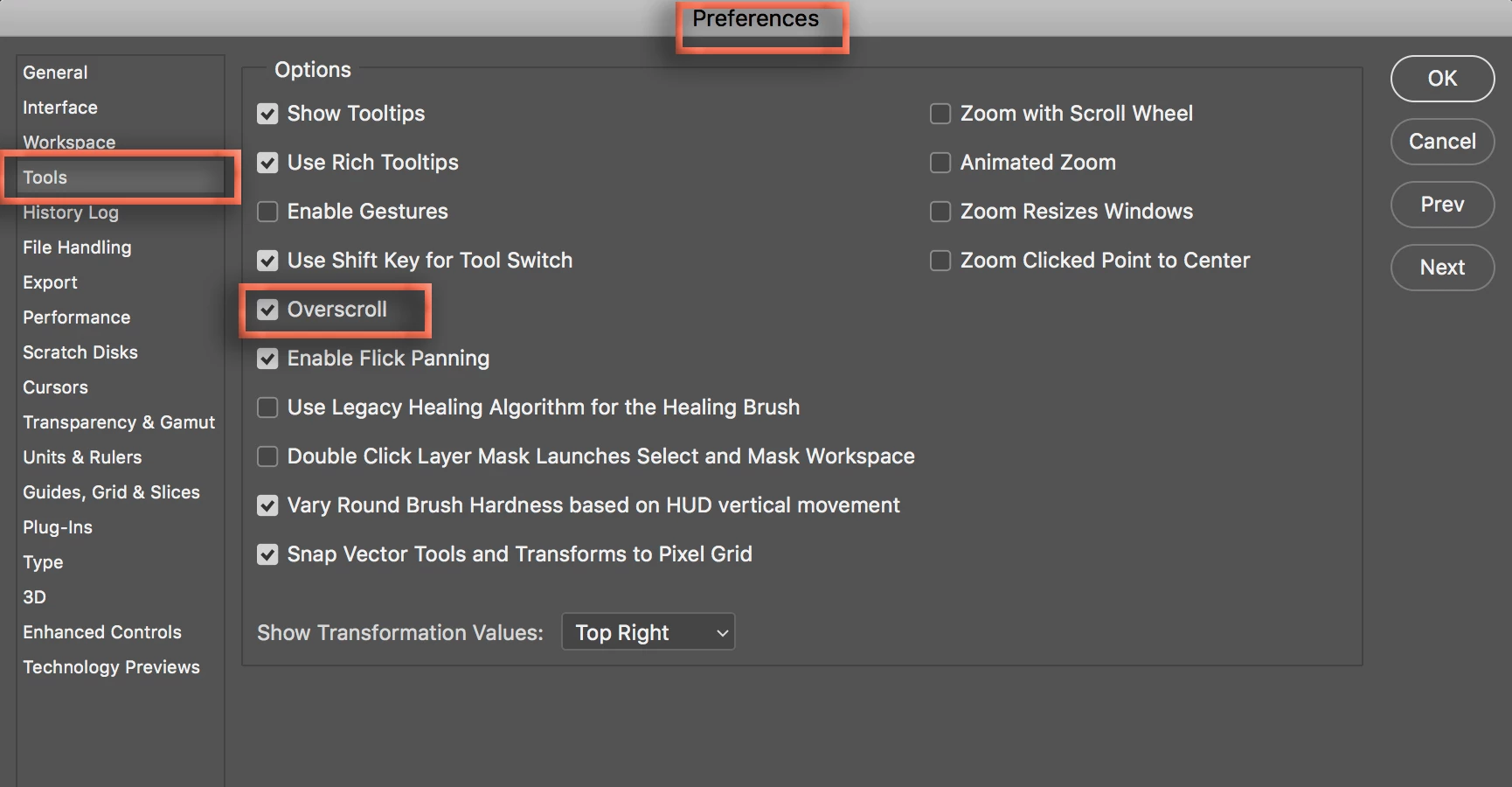
    Go to Preferences > Tools > enable Overscroll.

    ~Barb

    5 replies

    MrFunnyman526
    Participant
    September 2, 2020

    Thanks a lot! I must have missclicked something and was wondering what was wrong 😉

    BartonGarrett256
    Inspiring
    December 24, 2018

    Come on Adobe, what the heck are you doing?  This program is memorizing strings of random numbers....

    JJMack
    Community Expert
    Community Expert
    February 4, 2018

    I forgot about that option I never use it.

    JJMack
    Barb Binder
    Community Expert
    Barb BinderCommunity ExpertCorrect answer
    Community Expert
    February 4, 2018

    Go to Preferences > Tools > enable Overscroll.

    ~Barb

    ~Barb at Rocky Mountain Training
    PSUserRAAuthor
    Participating Frequently
    February 6, 2018

    Thank you Barb, that does it.

    Barb Binder
    Community Expert
    Community Expert
    February 6, 2018

    Oh, good! Glad that helped.

    ~Barb

    ~Barb at Rocky Mountain Training
    JJMack
    Community Expert
    Community Expert
    February 4, 2018

    The way you write it is working sound like correct  operation.  If you expand the image window wider then the document width  you will only be able to pan up and down for the full width  is visible. If you expand the image window wider and higher the the image there is nothing to pan the whole image is visible. When you work on a portrait in portrait image window the portrait fits in. When you zoon in the image is both wider and taller then the image window so you can pan in all four directions.

    JJMack