
katrine99854762
Participant
October 22, 2017
Answered

Photoshop CC 2018 - Make brush smoothing 0 by default on all brushes?

  • October 22, 2017
  • 6 replies
  • 39291 views

Hi guys,

I'm a painter who uses photoshop as my main canvas. I love the new update, and I love the brush smoothing. But not while I'm painting.

I tend to switch my brushes a lot and while I paint I find the brush smoothing capability slows down my workflow because I have to keep changing it to 0 every time I use a new brush. I use over 300 brushes, and maybe use about 50 brushes quite frequently (texture, effects, etc) and I find having to continually change the smoothing to 0 very cumbersome.

Anyone have a fix? 
This topic has been closed for replies.
Correct answer Jeff Arola

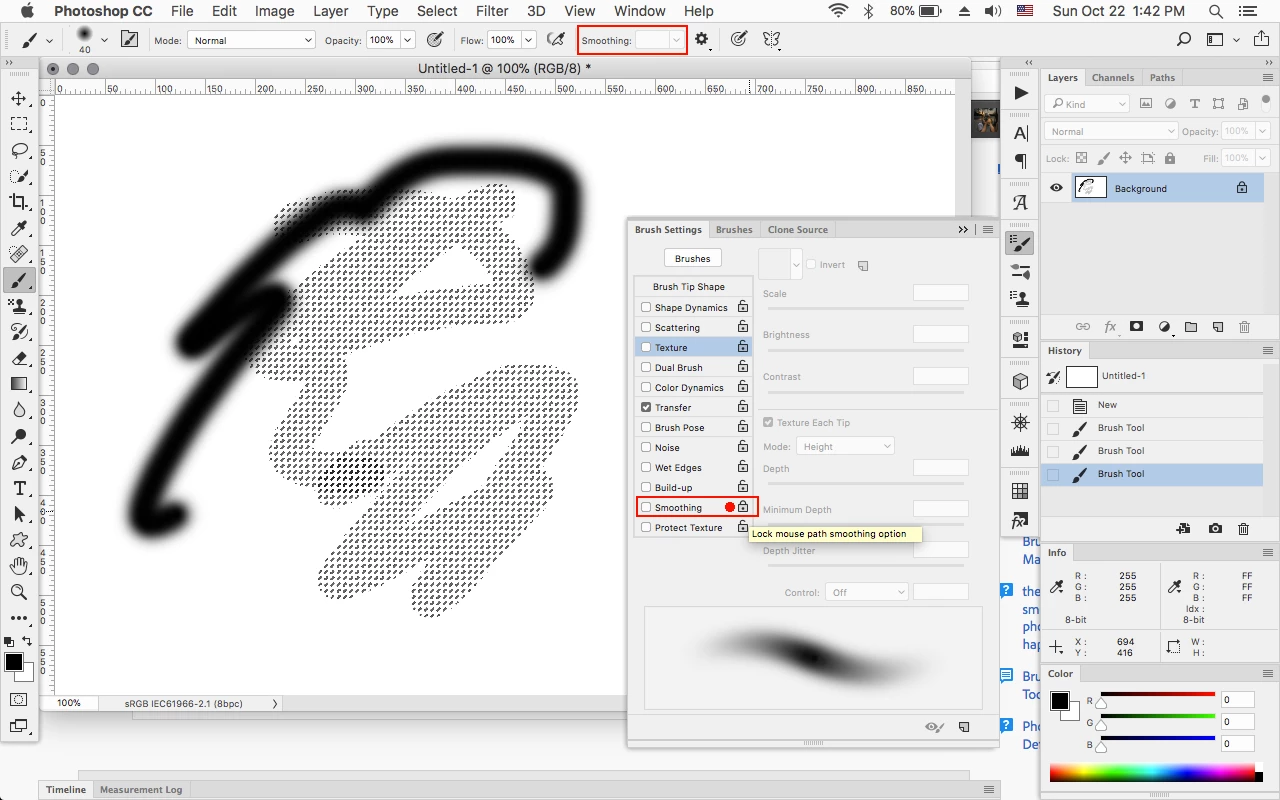
In the Brush Settings panel uncheck Smoothing and then Lock and see if that works.

6 replies

JimLaz
Inspiring
November 20, 2017

I have found the solution to my particular problem by using Legacy Brushes. I dragged the group to the top of the panel so they should always be there. This is exactly what I need. I hope it resolves the problems of others here.

JimLaz
Inspiring
November 15, 2017

Yes, this is costing me much frustration and wasted time. Adobe seems to think it's helping by adding items as default. I'm sure we all agree that we would rather do that ourselves. Default bare brushes would be simple and easy to give us, I would think.

Jeff Arola
Community Expert
Community Expert
November 15, 2017

Have you installed the November photoshop cc 2018 update (version 19.0.1) that just came out to see if the problem is corrected?

Help>Updates from within photoshop or use the Creative Cloud Desktop Application to check for updates.

Fixed issues in Adobe Photoshop CC

JimLaz
Inspiring
November 17, 2017

Thanks Jeff. I installed it. Didn't help. I don't think it's a bug as much as Adobe thinks it's helping us by giving us loaded artistic brushes by default. That would be useful if it was a painting program but, though I am a painter, I use Photoshop as it was intended. As a photo correction and composing tool. I've gotten around the problem by making custom "plain" brushes. I just have to look for and select them each time I use brushes and erasers. Nevertheless, I love Photoshop and do appreciate everything that they make available to us.

Participant
November 1, 2017

Unfortunately  even locking and unlocking this is not stopping it from enabling smoothing by default each time I launch PS 2018.  Abobe, you need to address this, is there anyone looking at forums?

October 22, 2017

I only use custom brushes and when I turned off smoothing it stays off when I pick a new brush, even after a restart of PS. The only thing I think I may have done different is that I deleted all the default brush folders in PS before I installed my custom brushes from CC2017.

Only thing is that it will come back on again if I use a tool preset. It's a shame Adobe couldn't make brush settings stay after you go back to them after a tool. It was similar in CC2017 except with opacity and size (pressure), they would stay off when I'd go back to a brush after using a tool preset. Maybe in CC2019?

Inspiring
October 29, 2017

Let me get this straight.

I'm having the same problem.

If I select a brush in the tool presets presets panel, then turn on smoothing in the brushes panel, then the brush will smooth out when I sketch with it.

Now- when I select a different brush in the tool presets panel - then everything should reset for that brush and the smoothing should turn off - BUT - the smoothing option stays turned on.

Why???

ahmed_waheib
Inspiring
October 22, 2017

I agree on Jeff solution but I would like if you can make the smooth 0% and uncheck all the smooth brush moods.

Jeff Arola
Community Expert
Jeff ArolaCommunity ExpertCorrect answer
Community Expert
October 22, 2017

In the Brush Settings panel uncheck Smoothing and then Lock and see if that works.

katrine99854762
Participant
October 22, 2017

Ah, yes. That does work. I wish there was a way to mass-do it though so that they all change.