twinbrush
Inspiring
November 29, 2018
Answered

Photoshop CC 2019 New document window not working

  • November 29, 2018
  • 13 replies
  • 30029 views

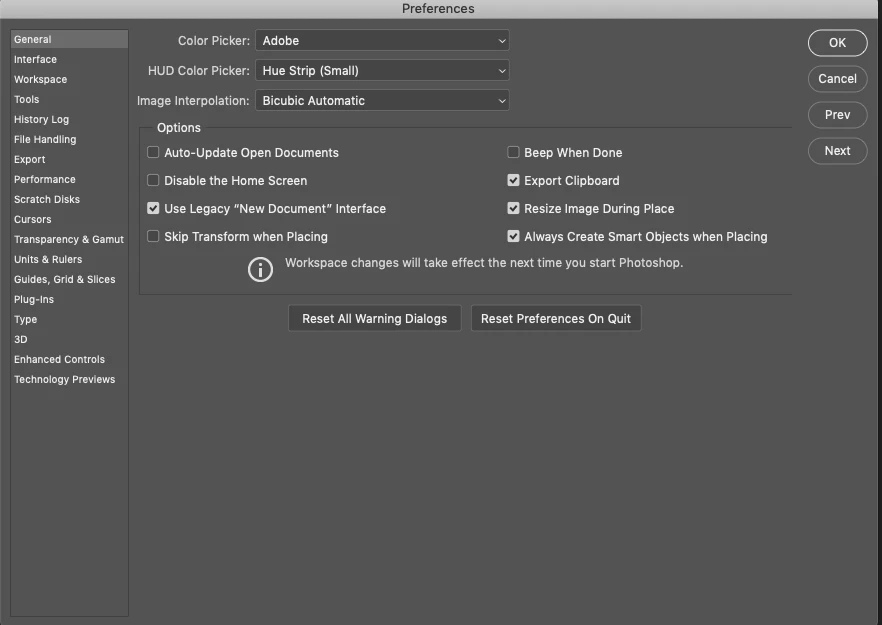
For anybody having trouble creating new documents in the latest 2019 build of Photoshop, you're not alone. Doesn't matter if I select a custom document or a saved template the New Document interface only provides options to 'Cancel' or 'Save Preset'...neither of which allow you to create a new document. The only work around I've found so far is to go to preferences > general and select 'Use legacy "New document" Interface'. Photoshop has been reinstalled, computer restarted and still remains an issue.

The amount of bugs in this new version really makes me think Adobe should invest in some hardcore exterminators....or maybe test the update first before rolling this out to paying customers. I understand its a seriously complex bit of software, but being unable to create a new document....that's one of the first tasks and apparently has been overlooked. Performance is so slow compared to previous versions (which have been getting slower anyway)...on top of that changing the way undo and transform works is just bizarre. Don't get me wrong I'm 100% an advocate for having consistency across the shortcuts in the suite, but the fact there's not even consistency in how the transform command works within Photoshop itself is inexcusable. Don't hold shift to constrain proportions on image layers, but do hold it for shape or Photoshop vector layers.....what!?!

Rant over....for now

    This topic has been closed for replies.
    Correct answer kathyking333

    Yes, this is an issue with the new version, but this is the work around that solved the issue. Not ideal, since you don't get the same "new" window as the update, but it works. Go to your Preferences and under General, check the box Use Legacy "New Document" Interface.

    13 replies

    Participant
    October 26, 2021

    And it's still a problem in October 2021. Obviously not an urgent bug to fix.

    gener7
    Community Expert
    Community Expert
    April 26, 2020

    Strange, but as long as you can continue work.

    gener7
    Community Expert
    Community Expert
    April 25, 2020

    While the original question has been answered, Adobe has come out with a Tech note for the blank home/new document screen.

    https://helpx.adobe.com/photoshop/kb/troubleshoot-home-screen-issues.html

    Participating Frequently
    April 26, 2020

    This didn't work at all for me. I ended up doing the following:


    1. I uninstalled PS 2020 and chose not to keep any preferences 
    2. i then went through Windows deleting any folder associated with PS2020 as many are still left over. I also made sure to empty my temp files 
    3. I then reinstalled the latest version which still had the same issues and rolled back a version at a time until I found one that works which was 21.0.3. 

    I can now use PS like before and without any issues relating to new docs or saving. 

    Participant
    February 11, 2020

    I am glad that I came across this article. Although, I would think this would be an issue that has been fixed by now based after seeing how long ago this thread was started. Every time that I tried to create a new document in Photoshop I get a blank window. I was starting to get frustrated, because I literally have not been able to make any new documents. This article helped greatly. I did try what someone wrote in the comments. (Reset Preferences On Quit) That did not work. What did work was (Use Legacy "New Document" Interface) under General. Thanks for your post!

    Strangefate
    Participant
    March 11, 2020

    Just started having the same problem... March 2020!

    Participating Frequently
    April 25, 2020

    I'm having the issue too. No matter what I try I can't get the new doc window to come back up. 

    gener7
    Community Expert
    Community Expert
    December 15, 2019

    If I see a blank window, I go into Preferences > Performance and checkmark "Legacy Compositing" or try tamping down the Drawing Mode to Normal or Basic, then Restart.

    Rothiri
    Participant
    October 14, 2019

    Still happens with Photoshop CC (Adobe Photoshop Version: 19.1.9 20190724.r.451 2019/07/24: 1207350 x64)

    I had a document open hit "cntl+n" nothing, choose new from the menu, nothing closed my document, still can't create a new document 


    I had to completely close photoshop and relaunch - that seems wonky

    Bcogzz
    Participant
    April 16, 2019

    I think I solved the mystery and Adobe support, you might want to make a note of this. I JUST started using the tool for the first time tonight by opening PS CC from the taskbar instead of bringing a photo in from Bridge.

    I was trying to open a new document to work along with a class and couldn't do ANYTHING with the tool. I tried saving it to a TIFF file and a jpeg file, I finally discovered that the tool was creating a bitmap ONLY and would not come out of that no matter WHAT I did. PS finally suggested I try changing the document to grayscale. BORING... but I went to the Image tab at top left and then mode. I found the bitmap WAS selected. I changed it to RGB Color and Viola!!! everything worked!!!

    Hope it helps you.

    kathyking333
    kathyking333Correct answer
    Participant
    January 28, 2019

    Yes, this is an issue with the new version, but this is the work around that solved the issue. Not ideal, since you don't get the same "new" window as the update, but it works. Go to your Preferences and under General, check the box Use Legacy "New Document" Interface.

    nimphea
    Participant
    April 1, 2021

    Hi! Is there a way I could actually bring back the updated "new document" window with all the presets presented there? I find it a hassle to make a project without actually seeing the sizes when I use the legacy interface 😕😕

    humboy
    Participant
    January 27, 2019

    Same problem, i can't create a new document!.... OMG adobe...

    Participant
    December 31, 2018

    Hi, Use the Legacy New Document Dialogue Box instead.
    Go to Preferences ---> General -----> Use Legacy "New Document" Interface

    kathyking333
    Participant
    January 4, 2019

    This actually worked. The Reset Preferences on Quit did nothing. You don't get the same window as the 2019 version, but at least I can use New now.

    Next issue... if I could get Libraries window to stay open. No luck there. Just like New, it vanishes as soon as it opens. SO bad! What is the point of having Libraries when you can't use them.

    And one more rant... can Adobe make their drop downs and short cuts the same between each program. Just an example: Photoshop they name it Libraries. InDesign: CC Libraries. Really people!

    c.pfaffenbichler
    Community Expert
    Community Expert
    January 5, 2019

    This is a user Forum, so you are not really addressing Adobe here, even though some Adobe employees thankfully have been dropping by.

    To make actual Photoshop Feature Requests please post over at (or rather: first do a search to see if a request or bug report on the issue already exists)

    Photoshop Family Customer Community