
nv79797637
Known Participant
October 23, 2018
Question

Photoshop CC 2019

  • October 23, 2018
  • 4 replies
  • 4636 views

excuse me if my question too stupid.

new to photoshop so i am confused.

everyone is talking about CC 2019 on youtube and i saw a thread talking about update and different versions show up.

i have already updated creative cloud, but my photoshop on desktop still CC 2018.

why's that? and i don't see different version for selection on creative cloud.

I've already installed Photoshop month ago and using it from time to time.

Thanks for your help to teach me this.
    This topic has been closed for replies.

    4 replies

    Chuck Uebele
    Community Expert
    Community Expert
    October 24, 2018

    You can have two version if you want. When you click on install, there is a screen that has a check box to uninstall previous versions. So you check or uncheck that depending on what you want to do.

    nv79797637
    Known Participant
    October 27, 2018

    nope. there's no additional option for me when i click "install" photoshop cc on creative cloud app.

    so i thought it will install photoshop cc 2019....but after finished, i open photoshop and check it's 2018.

    now i have a total new photoshop 2018 that wipe away all my previous setting.

    wonder if i need to uninstall and then install back again.

    gener7
    Community Expert
    Community Expert
    October 28, 2018

    Click on the Open button for v 20.0 and to be sure, click on the three dot menu and select "Check for App Updates"

    Once CC 2019 (v 20.0) is launched, the icon will appear in your bottom Windows 10 taskbar, which you right-click on to pin to the Taskbar for future use.

    Barb Binder
    Community Expert
    Community Expert
    October 23, 2018

    Hi nv79797637:

    Also, what operating system are you using? You need Microsoft Windows 7 with Service Pack 1, Windows 10* (Version 1709 or later) or macOS version 10.12 (Sierra), macOS version 10.13 (High Sierra), or macOS version 10.14 (Mojave) to be able to update to Photoshop 2019.

    ~Barb

    ~Barb at Rocky Mountain Training
    nv79797637
    Known Participant
    October 24, 2018

    yeah. my systerm seems ok, it's window 10. just don't know how to update phtoshop desktop, just realized i update creative cloud doesn't mean i update photoshop.

    so i am figuing out how to update the photoshop on my desktop. i don't want to keep two versions just in cae the new 2019 doesn't work.

    or u think i need to uninstall everything and reinstall it?

    jordanh65344997
    Inspiring
    October 23, 2018

    Yeah, you need to download Photoshop. Creative Cloud is just an app that lets you interface with Adobe products. Here you can install, or even uninstall CC apps. You can also use it to access Adobe Fonts as well. Updating Creative Cloud is only half of the equation.

    nv79797637
    Known Participant
    October 24, 2018

    oopss......i see.

    creative cloud always notifify me to update. so i update for many times even last night.

    thought when i update creative cloud. then my photoshop is automatically updated.

    but i have already got Photoshop installed on my desktop and using it for weeks. do i need to uninstall it ? or somewhere there's a button to update the photoshop on my desktop?

    October 23, 2018

    Hi

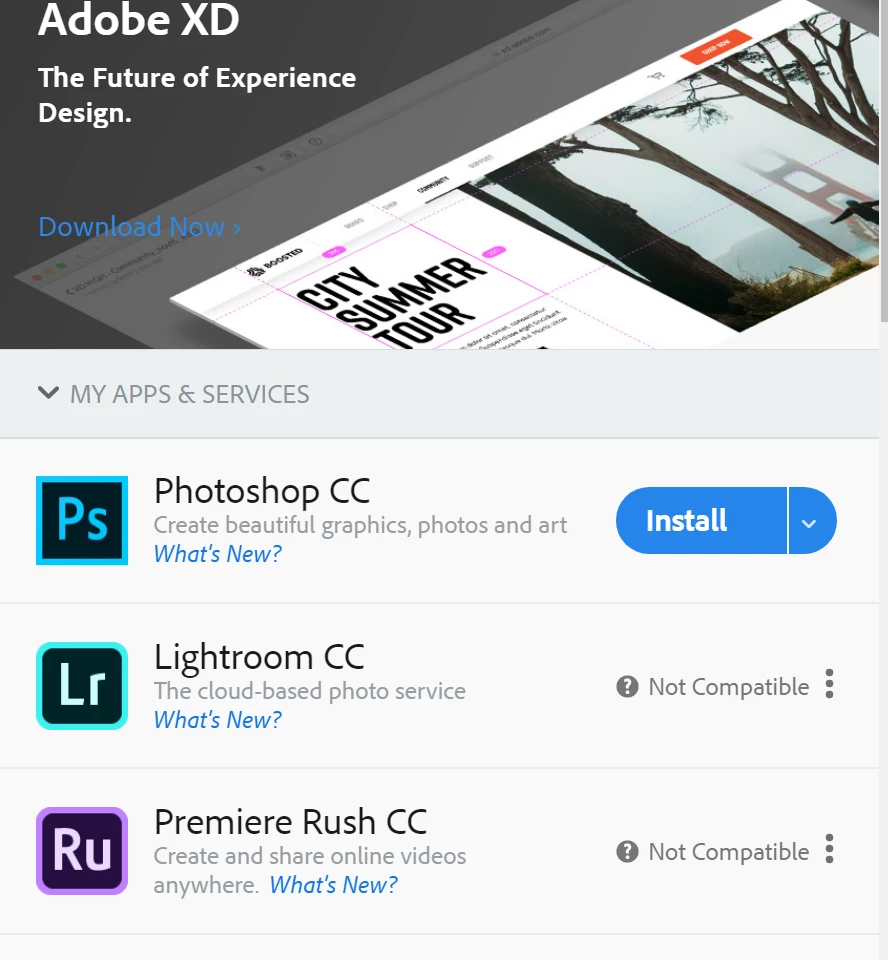
    Is that a screenshot from your creative cloud if so what happens when you click on install

    nv79797637
    Known Participant
    October 24, 2018

    yes. that's the screenshot of my creative cloud. because i watched the other threads people screen shot and they have several versions.

    I didn't click it because i have installed Photoshp already. may be i need to, but i want to keep the old version like others because people say there are bugs in 2019