November 13, 2019
Answered

Photoshop CC 2020 Slow Loading Layers

  • November 13, 2019
  • 6 replies
  • 8497 views

I just updated all my programs to 2020 and when I turn on and off my layers they take an oddly long time to load or load when I click on the art. The files are from 2019 I don't know if this is just a problem with the file.

This topic has been closed for replies.
Correct answer themezly

As far as I can see here OP has asked about CC 2020 not 2019, and in 2020 the "Legacy compositing" has been disabled
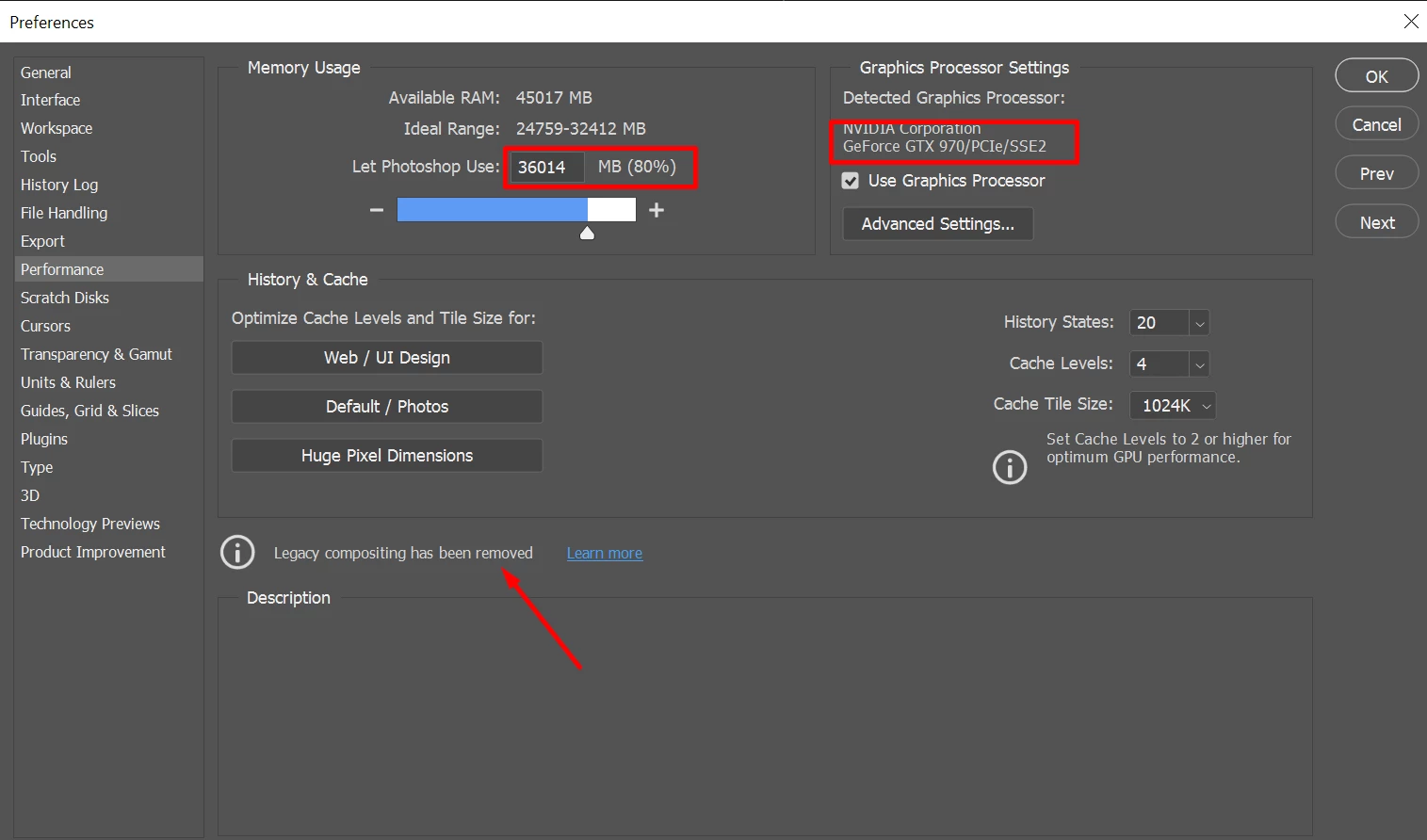


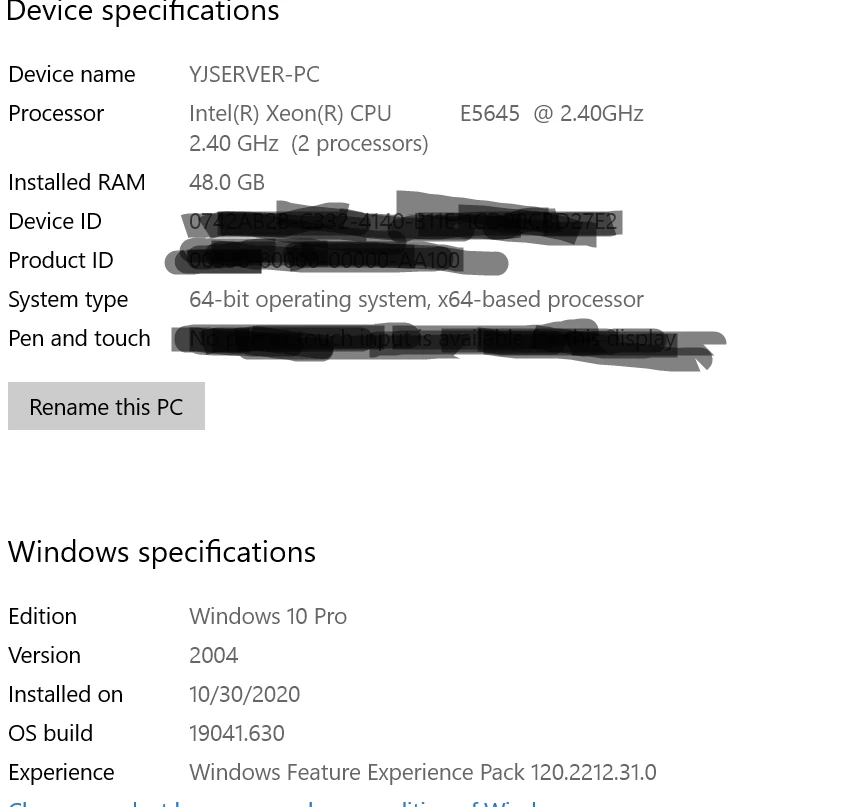
Please provide an actual solution since this is the most ridiclous subscription I have signed up for. C6 blows 2020 blows out of the water. Here is my system and you can see in image above that CC should be able to handle anything with the assigned RAM and GPU power. 


Who ever finds this post and has same issue, I opened new one here https://community.adobe.com/t5/photoshop/photoshop-cc-2020-extremly-slow-no-solution-in-sight/m-p/11658868?page=1#M491948

6 replies

themezlyCorrect answer
Participant
December 8, 2020

As far as I can see here OP has asked about CC 2020 not 2019, and in 2020 the "Legacy compositing" has been disabled


Please provide an actual solution since this is the most ridiclous subscription I have signed up for. C6 blows 2020 blows out of the water. Here is my system and you can see in image above that CC should be able to handle anything with the assigned RAM and GPU power. 


Who ever finds this post and has same issue, I opened new one here https://community.adobe.com/t5/photoshop/photoshop-cc-2020-extremly-slow-no-solution-in-sight/m-p/11658868?page=1#M491948

Participant
July 21, 2020

I'm having the same issue. my computer is kind of insanely good, so it makes no sense to me why 2020 would have any issues beyond just poor construction. No matter my file size, selecting and creating layers and groups will freeze up photoshop 2020, even empty layers.  Going to try 2019 again because it's taking me hours extra to do anything.

Participant
July 28, 2020

I'm having the same issues, all of a sudden (following the Adobe latest updates + Nvidia Latest updates) Photoshop is insanely slow. Slow to open little files, slow to select layes or manipulate them, impossible to shift layers between open documents 😞
I've tried disableing the 3D acceleration and also tried reinstalling (clean install) the Nvidia Driver.
Nothing, it still legging. 

kamilr80402452
Participant
August 7, 2020

Same issues here.

Ryzen 3800x

32GB RAM

2070 Super

W will follow this topic.

Berube
Inspiring
June 6, 2020

Hello everyone,


Same issues here, in Photoshop 2019.

I tried both, "Legacy Compositing" and the "UnChecked" setting under the Preferences, Performance Options.

Turns out a "Layer FX" (Bevel/Emboss) was causing mag layer On/Off visibility lag.

Hope this helps.


-Berube


[website removed by moderator]

Kevin Stohlmeyer
Community Expert
Community Expert
January 14, 2020

what are your computer specs? Mac/Win OS version, specific PS version, RAM, HD space, working off external, network or local?

How large is the file (both file size and pixel dimensions)?

Participant
January 16, 2020

Mac Pro (Late 2013)

3 GHz 8-Core Intel Xeon E5

32 GB 1866 MHz DDR3

graphics AMD FirePro D700 6 GB


local. 


hd space 220 gb available of 1TB

file size 72m  3000 x 4000 pixels


I reverted to 2019 and for a while (a few hours), it seemed like it was OK, but now it presents the same problem.  Files are also very slow to save. I have been working with the same file sizes for years and never had a problem. 


I am running on Catalina.


Kevin Stohlmeyer
Community Expert
Community Expert
January 16, 2020

Have you tried turning on Legacy compositing in Photoshop preferences?

Participant
January 14, 2020

I had the same problem, I ended up reverting to the 2019 version. 

Akash Sharma
Legend
November 13, 2019

Hi there,


This is not a typical experience as Photoshop 2020 is slow at loading Layers, sorry to hear about this.


Could you please turn on the Legacy Compositing option in Performance preferences?
Choose Edit > Preferences > Performance (Windows) or Photoshop > Preferences > Performance (macOS). Select Legacy Compositing. Quit and relaunch Photoshop.
 
Let us know how it goes.
 
Thanks,
Akash

Participant
January 14, 2020

It does the same for me. Layer visibility toggle is useless (turning off and on has no effect). Loading an adjustment layer takes a long time. I had to revert to 2019 version and works fine.