
Participant
July 27, 2020
Answered

Photoshop CC Enter key or shift+enter doesnt work anymore on Text tool?

  • July 27, 2020
  • 2 replies
  • 5410 views

okay so i'm a bit annoyed atm cause either there's a change in Text tool that I didnt know or its a bug

when I'm using text tool and try to press shift+enter, it'll usually create a new line of text where I can type but when I do that now it DOES NOT create a new line instead it stacks up resulting into this:
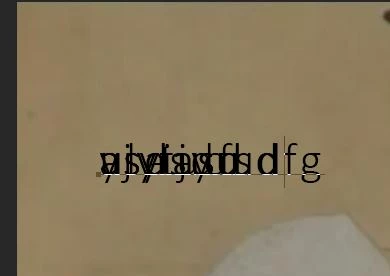
is there a setting i need to change or what?

This topic has been closed for replies.
Correct answer Michael Bullo

Find the Leading option within the Character Panel. Press the downward facing arrow to the right of the number field. This will reveal a dropdown menu. Auto should be the first option within this menu.

2 replies

Michael Bullo
Community Expert
Community Expert
July 27, 2020

Good call by Jane having you show the contents of the Character panel. The problem is that your Leading value is set to 0.01pt. Change this to Auto if you want Photoshop to apply the default spacing between lines or set whatever number you feel is appropriate for this block of text.

jane-e
Community Expert
Community Expert
July 27, 2020

"Good call by Jane having you show the contents of the Character panel."


Thanks, @Michael: Leading was the first thing I suspected, but I wanted to rule out the others just in case.


@Land_Otter: When Gutenberg invented typesetting, he put two strips of lead to separate the lines of type, which he called "leading". He measured type and leading in points, and his system is still used today. Typical line spacing (leading) is type size plus two, although that's just a starting point. So 12 pt type would have 14 pts of leading (12/14), and 18 pt type would have 20 pts of leading (18/20)


Computers have added Auto Leading for beginners who don't understand typesetting and typography, and Auto Leading is set by default to 120% of the type size.


~ Jane

jane-e
Community Expert
Community Expert
July 27, 2020

It's hard to see if you have a text frame (drag) or if you are using point text (click). Can you show your Paragraph and Character with an insertion point clicked settings? Both panels are in the Window menu. Also, which Enter key — alpha or numeric?

~ Jane

Participant
July 27, 2020

the alpha..the shift+numeric enter key brings up the 3D settings

I havent changed anything in the paragraph/character settings other than the font size and font type...