Participant
January 9, 2018
Answered

Photoshop CC eraser doesn't change

  • January 9, 2018
  • 5 replies
  • 10272 views

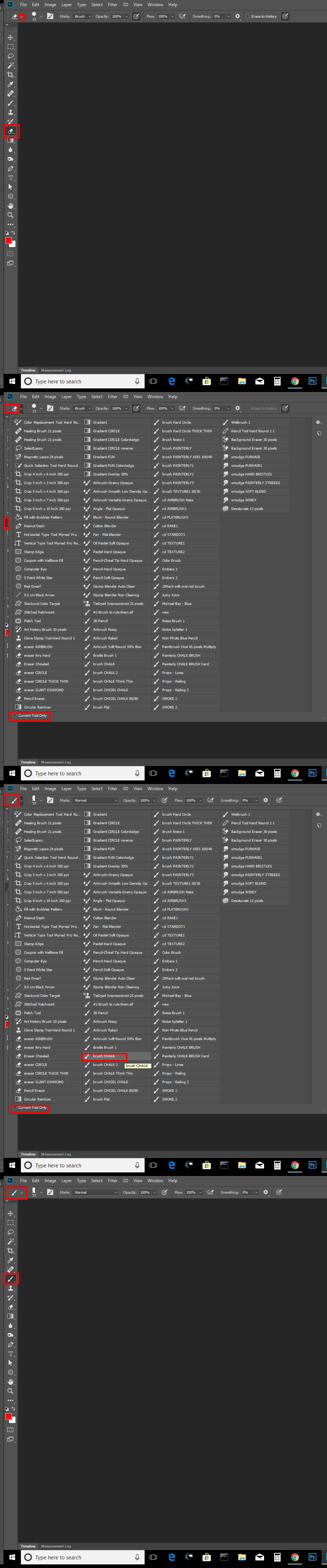
When I press eraser and then try to choose a brush preset for an eraser - photoshop doesnt change preset. It instead switches to brush tool.

Reset of both program and  PC didn't give much.

This topic has been closed for replies.
Correct answer JJMack

Try creating eraser preset and select them.  You can only select tool preset for the current tool. If you have unchecked current tool only. You can select any tools Preset.  Photoshop will first switch to the correct tool then set the settings recorded in the tool preset.  If you record the select brush Brush preset into an action and Current tool only is checked and the current tool is the eraser tool the action will fail with select is not available.  If current tool only UI is unchecked Photoshop will first switch to the brush tool and select will be available. The Brush tool will be the current tool with the preset settings set.
]

5 replies

Participant
August 30, 2021

100% agree idk what absolut morons come up with these updates but they are nothing but a pain in the ass! 😠


Participant
May 5, 2021

I'm here for the same reason others are. 


Ehm, let me clear my throat a minute... ehem....   Adobe, hello....  


WHAT THE F%)#%*^#)&^  DID YOU DO THIS FOR???????!?!!!!!?!?!?!?!?!?


This is ridiclous. You better get your s^%# toghether Adobe. 

Change it back. Now. 


In the mean time, while we wait for Adobe to make sensible decisions again, the workaround is, as posted by Angie Simpson, is to click Cmd+Alt while you change the brush type for your eraser. Every fu$^ing time. 

Idiots. 


Seru Naivalu
Participant
May 7, 2021

Hi,


Select your relevant brush, then from the top tool bar, Mode: drop down menu, select Clear. Then use your selected brush as an eraser.


If this still isnt clear then watch this guys tutorial.


Hope this helps.

Participant
April 12, 2021

Like someone suddenly improved your car by moving the door handle to the inside the exhaust pipe.. thanks mate!

(Every digital artist on planet earth is probably looking for another software right now)

Participant
October 4, 2019

Click the eraser tool, then hold Ctrl + Alt and click on the brush you want to use as an eraser from your brush menu.


I'm using version 20.0.6 and this works. Yeah, it's so dumb that they changed it so you have to do extra steps. Makes no sense. But then, they changed a lot of things that have been a certain way for two decades for who knows what reason.  ¯\_(ツ)_/¯  Don't get me started on the new Transform Tool functions. 

mardus
Known Participant
November 21, 2019

Thanks! And that whole god damned department (what's it called, the F-UX R&D???) in Adobe resposnible for f*cking up workflows should be shot! Or at least decimated!

JJMack
Community Expert
JJMackCommunity ExpertCorrect answer
Community Expert
January 9, 2018

Try creating eraser preset and select them.  You can only select tool preset for the current tool. If you have unchecked current tool only. You can select any tools Preset.  Photoshop will first switch to the correct tool then set the settings recorded in the tool preset.  If you record the select brush Brush preset into an action and Current tool only is checked and the current tool is the eraser tool the action will fail with select is not available.  If current tool only UI is unchecked Photoshop will first switch to the brush tool and select will be available. The Brush tool will be the current tool with the preset settings set.

]

JJMack
August 20, 2018

Why doesn't the tool allow adjustments w/o having to go make something else do it? Makes zero sense to have a non-adjustable eraser tool.

DRESCODE Design
Participant
December 8, 2018

i take my hat off to you sir!! What a bunch of retards...This completely disturbs my workflow and I really don't understand why this changed?! This didn't used to be a problem AT ALL?! Now what?...Must I really go thru a bunch of "record" and "check, uncheck" sequences to do something I don't won't to be bothered with?!...These kind of illogical (power to the Spock) and non-functional changes really piss me off!!