
Participant
June 18, 2013
Answered

Photoshop CC Live Shapes Properties Bug (also in 2022)

  • June 18, 2013
  • 38 replies
  • 72464 views

Checking out the corner radii controls on vector shapes and it looked to be working, until I created a couple of other shapes. The Properties box inconsistently changes for the same kind of shapes.


Link to vid to show my problem: http://cl.ly/PheD


Looks like I can't go back to edit the shape for some reason. What would cause this? It's like the shape has suddenly stopped being a Live Shape.


Cheers!
This topic has been closed for replies.
Correct answer Jeff Arola

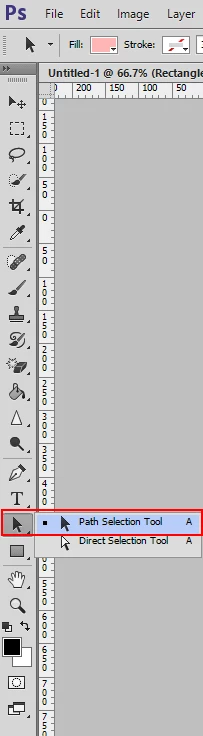
What happens if you use the Path Selection Tool to select the shapes instead of the Move Tool?

38 replies

Legend
December 28, 2021

@ryjostudio Not a bug. It looks like you have this warning dialog turned off: 

When you modify the shape manually like you do in your video - instead of parametrically, Photoshop no longer recognizes the shape as a "Smart" shape.

Participant
December 28, 2021

Here is a video of this issue on something as simple as modifying a single anchor point on a shape.
https://www.loom.com/share/dede1b51898740f6bc40f06e306d964a

Legend
November 14, 2021

@default83le9f9hn2vl I'm not able to reproduce the the OP or prior issues in this thread. Can you provide steps to reproduce or a video that demonstrates the problem in Photoshop 2022 v23.0.1? The properties panel has changed and improved a lot over the past 8 years.

BevansDesignNTE
Participating Frequently
November 7, 2019

I just upgraded to PS 2020, and this bug is STILL not fixed. As far as I know, the problem has existed since the Properties panel was introduced. We've got at least 6.5 years of reports in this thread alone.


Adobe, fix your bugs. They're really piling up.

Participant
November 7, 2021

Nearly 2022, this bug is approaching decadal status. Very cool, Adobe! Very cool.

PECourtejoie
Community Expert
Community Expert
November 8, 2021

Changing this discussion into a bug report thread for the team to notice it.

Participating Frequently
May 15, 2017

So I'm having same issues as the original poster and its 5 years later? Why can't we transform live shapes without losing all properties? Why do you intermediately lose the ability to make live shapes that have properties? I have other grievances with Photoshop, but after using Z Brush and Modo I realize how badly this software is aging. Please step up your game Adobe.

Picons
Participating Frequently
January 3, 2018

This is really a joke Adobe. This bug consists more than 5 years, and nobody fixes it? How valuable our we (the users) to you?

Participant
March 2, 2017

For me was something really dumb, for some reason the "show transform controls" box was desactivated.

Just activated it back again.

santz
Participant
March 31, 2015

Jeane, the way you decided to implement this is not to handy. It would be great if the next update this comes as it was and no as it is right now.

Thanks!

Participant
March 25, 2015

Any further developments on this? I originally tried this fix:

How to change between Live shapes to masks properties in Photoshop CC - Graphic Design Stack Exchange

Which worked just fine for a while. Now I am back to masks all the time and no options to switch. I make my vector art in AI and copy and paste it into PS as a shape layer. I love the properties tab, it's so great except when it decides it wants to be masks only. Can't we get a little toggle button at the top of the panel to pick either shape or mask?

Anyway, any advice or new tricks would be greatly appreciated.

Participant
February 5, 2015

Bug still not fixed, now even ALT + click on shape layer trick do not work - Adobe - please fix this annoying bug.

tP-Jeremy
Participant
October 22, 2014

Still same thing for me.  It was working last week and now when I select my shapes with the Path Selection Tool or the Direct Select tool the only one the Live Shape Properties comes up for is rectangles.  Nothing else works.

Known Participant
October 23, 2014

Yeah, actually I'm encountering the same thing as you now. There's a limited tool strip in the control panel that comes available when you select with the path selection tool, and apparently the problem with not being able to select a shape if it's linked to another layer has been sorted out, but now the ffucking properties panel shows nothing even upon drawing a shape initially! Oh... don't like the bad language, Adobe? Then fix the goddam problem! How hard can it be????