
Inspiring
April 23, 2023
Question

Photoshop CC memory issues, recent problem

  • April 23, 2023
  • 2 replies
  • 3279 views

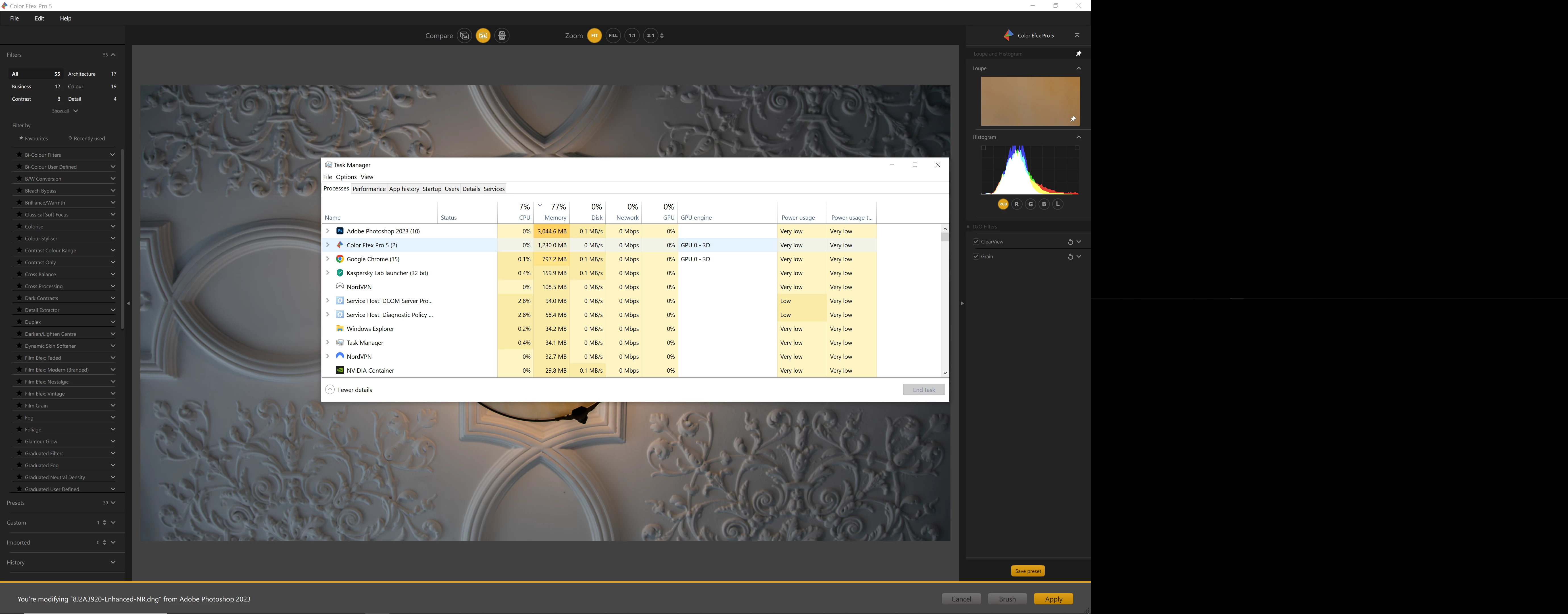
I'm having some real issues with memory usage, only started relatively recently. I open a RAW image in Camera RAW and immediately memory usage is 1200 ish MB. Then after very little editing its up to 5-6000 MB memory usage before even I've opened it up in CC. This means its almost unusable.  This is activity log after a 31 MB image opened and no real processing done yet. Also Microsoft Edge Web View 2 - I dont know what that has started, I dont even use Edge - Ive cleared the Adobe cache, Ive unticked use graphics processor (which seem to be two main suggestions). Would appreciate feedback, as presently I'll have no choice but to cancel PS CC and use something else as after editing one or two images its really really slow.


As said, only happened in the last few months - 16 GB RAM, data on an SSD and progs on separate drive, normal work flow is Camera RAW / CC & NIK - PS and Camera RAW up to date 
This topic has been closed for replies.

2 replies

Kevin Stohlmeyer
Community Expert
Community Expert
April 24, 2023

Hi @Jon5FE2 Go to Photoshop Help Menu/System Info and copy/paste details in a reply. Post only once as the system takes time to process the large amount of data. 

Jon5FE2Author
Inspiring
April 26, 2023

Was that information any use to you?

Participant
July 23, 2024

im also having this issue for like an year now. nothing works. have to always close and restart ps 


about this problem, any solution?
TheDigitalDog
Inspiring
April 23, 2023

What is specifically is 'unusable'? 

PS needs 3-5X any open document in RAM (or slower scratch disk). 

Can't hurt, try resetting the Adobe Camera Raw preferences, better? 

Try resetting the Camera Raw preferences:
Hold down the Command key and select Photoshop > Preferences > Camera Raw (macOS*) or hold down the Ctrl key and select Edit > Preferences > Camera Raw (Windows).
Click Yes in the dialog that asks "Delete the Camera Raw Preferences?"
See also:
https://helpx.adobe.com/camera-raw/using/camera-raw-settings.html
*On Ventura, it is now called "Settings".  

Author “Color Management for Photographers" & "Photoshop CC Color Management/pluralsight"
Jon5FE2Author
Inspiring
April 23, 2023

By unusable I mean that if I click on a specific step there is a lag of up to a second, sometimes a little more. It gets worse as time goes on, and I get to maybe three or four images being processed and I shut down and re open. It happens in Camera RAW and continues in CC, and if I open NIK it adds to it as you can see.  I'll try your suggestions thank you, and see if it makes a difference 

TheDigitalDog
Inspiring
April 23, 2023

OK so not unusable, a lag which is likely due to the GPU you're using. 

Review your system's specs and compare them to the minimum requirements document*: https://helpx.adobe.com/lightroom-classic/system-requirements.html 

Where within this range does the hardware fall? 
*last revised/updated at the Max 2022 release.

So you didn't reset preferences? 

Author “Color Management for Photographers" & "Photoshop CC Color Management/pluralsight"