
Known Participant
September 20, 2013
Answered

Photoshop CC / Wrong UI language / How to change? [2013]

  • September 20, 2013
  • 1 reply
  • 36474 views

Hi!


I installed the "Adobe Creative Cloud" tool.

I change my language to "Deutsch" (German).

Then I installed Photoshop CC.


But it is in English.


I checked Edit -> Preferences -> Interface -> UI Language.

But there is no other option then English.


Is there any German version available? How can I get that?


Is this issue caused by Windows 7 system language: English?
This topic has been closed for replies.
Correct answer gener7

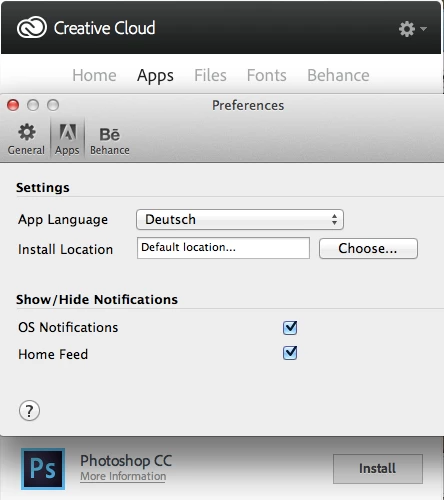
You can check your Creative Cloud Application Preferences to see if Deutsch is still chosen.

It should list Photoshop CC with the "Install" button next to it so you can install the Deutsch language version.

If not, let me know and I can point you to a multilingual download.

1 reply

gener7
Community Expert
gener7Community ExpertCorrect answer
Community Expert
September 20, 2013

You can check your Creative Cloud Application Preferences to see if Deutsch is still chosen.

It should list Photoshop CC with the "Install" button next to it so you can install the Deutsch language version.

If not, let me know and I can point you to a multilingual download.

Participant
November 26, 2013

Hi,
Hope to get some help re this issue as well.

I bought the PS CC in Denmark, but want it in English (North American).

My finder is now in Englsih as well and I tried to re down load after the change.

None of this helps. PS is still in Danish and when I try the above, I do not get the install option.

How do I get to switch like Barteg ?

Participant
November 28, 2013

Hey Borghill,

Had the same issue - also with Danish ;o)

It looks like you need to change teh language in the CC desktop and than reinstall. Not a biggy but annoying that it takes re-install to fix.

But hey, maybe there is another way Adobe?