I couldn't find any crash reports with your account logged into the Community. I'll help you figure this out.
Please submit a crash report if you see a crash reporter pop-up: https://helpx.adobe.com/photoshop/kb/submit-crash-reports.html
Open Event Viewer from Windows Search.
- Go to Windows Logs > Application Logs & look for Error & Warning logs.
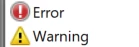
- Share the log related to the Lightroom Classic crash instance with us.
-
As a basic step, ensure no stale preferences in your Photoshop. Go to the location of the preference folder below and rename it to backup. https://helpx.adobe.com/photoshop/using/preferences.html
- Windows 10/11: Users/[user name]/AppData/Roaming/Adobe/Adobe Photoshop [version]/Adobe Photoshop [version] Settings
- Press Windows + R & type this is the Run Window - %APPDATA%\Adobe
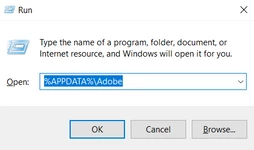
- Rename the Adobe Photoshop folder by adding a .old at the end. (Adobe Photoshop 2023 > Rename > Adobe Photoshop 2023. old)
These changes will give a fresh start to Photoshop as a fresh install. Let me know how it goes.
Thanks!
Sameer K

 AdChoices