
Inspiring
March 20, 2025
Answered

Photoshop colour picker not updating

  • March 20, 2025
  • 1 reply
  • 410 views

Anyone else experience colour picker problems??  Pressing ALT on Windows PC, the RGB & HSB values should update as the cursor passes over different colors - But it spends most of it time being blank.
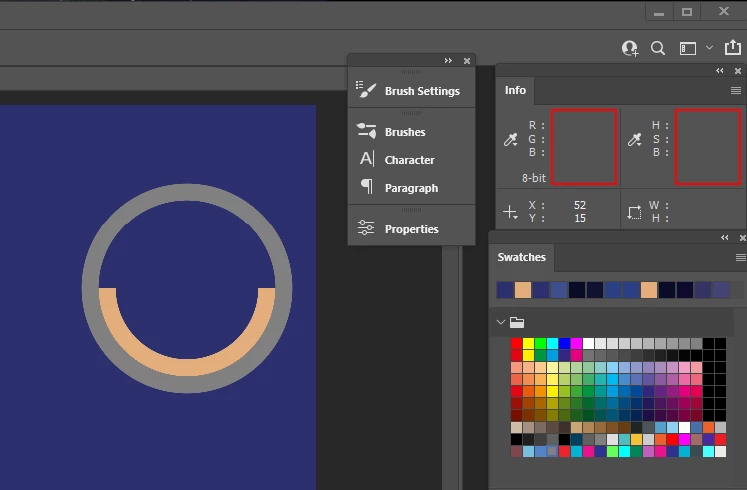

See red rectangles, top right hand corner. The values will update after a tiny movement of teh cursor, but then go blank again after a nother move.


I can't tell you how infuriating this is. - well I can, but it involves lots of Anglo Saxon words.


Correct answer Ged_Traynor

@Ghoul Fool Photoshop version 22.2 is no longer supported, so if it is a bug it won't be fixed by Adobe and how do you know it's not a preference issue, preference files can become corrupt and cause unexpected behaviour in Photoshop

1 reply

Ged_Traynor
Community Expert
Community Expert
March 20, 2025

@Ghoul Fool just tested on my system with Photoshop version 26.4.1 and cannot replicate the issue, what exact version of Photoshop are you using, have you tried manually resetting your Photoshop preferences
https://helpx.adobe.com/ie/photoshop/using/preferences.html#Manually
Remember to back up your settings before doing the preference reset
https://helpx.adobe.com/ie/photoshop/using/preset-migration.html

Inspiring
March 20, 2025

Have you an AMD processor? It's not preferences, I assure you. Version 22.2.0 Win 11

Ged_Traynor
Community Expert
Ged_TraynorCommunity ExpertCorrect answer
Community Expert
March 20, 2025

@Ghoul Fool Photoshop version 22.2 is no longer supported, so if it is a bug it won't be fixed by Adobe and how do you know it's not a preference issue, preference files can become corrupt and cause unexpected behaviour in Photoshop