Participant
January 24, 2022
Question

Photoshop Colour shifting problem

  • January 24, 2022
  • 3 replies
  • 103 views

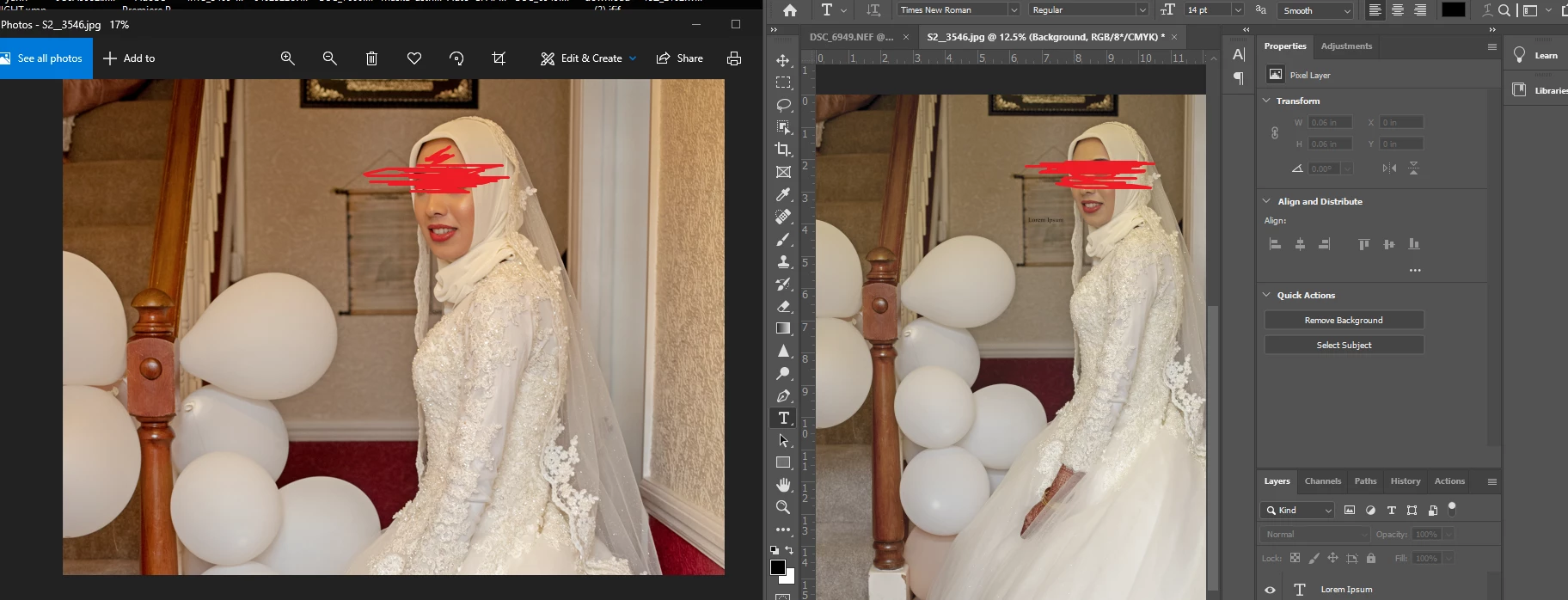
the colours in my photoshop are dull and the exported are highly saturated how will i edit when i cant see help 
This topic has been closed for replies.

3 replies

NB, colourmanagement
Community Expert
Community Expert
January 25, 2022

The image on the right of your screenshot has "RGB8*/CMYK' at the end of its title, that means that 'CMYK softproofing' is active which will often significantly reduce the image saturation on-screen. Softproofing alters the RGB image preview to match CMYK print output (like magazines etc) CMYK print is often far less saturated.

Please see Per's post for how that works. 


That aside: 

Many Windows "image" applications [other than Adobe apps such as Photoshop] do not use colourmanagement. So that could account for a difference also. Up till Windows 11 Windowws Photos was apparently not colour managed, nor is "Paint". 


A non-colour managed application program just sends the raw data to the screen [if that’s a high gamut screen it will look VERY saturated]. A colourmanaged application like Photoshop converts image RGB values temporarily, en-route to the display, to suit the monitor display screen's characteristics using it's ICC profile. 

Colourmanagement is great, but you can't expect to match colour managed viewing when using non colour managed application programs to view images.


I hope this helps
neil barstow, colourmanagement net :: adobe forum volunteer
google me "neil barstow colourmanagement" for lots of free articles on colour management
[please only use the blue reply button at the top of the page, this maintains the original thread title and chronological order of posts]

D Fosse
Community Expert
Community Expert
January 24, 2022

In addition to what Per says, Windows "Photos" may or may not be color managed depending on when you last updated Windows. Microsoft very recently implemented color management in Photos. If it's an older version, it's not color managed and will not display correctly.


To be clear, proof should always be off.

Per Berntsen
Community Expert
Community Expert
January 24, 2022

You have probably pressed Ctrl + Y accidentally, which activates Proof colors, and you're seeing a preview of CMYK colors.

Press Ctrl + Y to turn it off. (or go to View > Proof colors)
