
Participant
May 25, 2020
Answered

Photoshop colours not displaying correctly

  • May 25, 2020
  • 4 replies
  • 5159 views

Hi,


Using PS 21.1.3. Something's happened with my colour pallette in Photoshop, and the colours are no longer standard (with #000000 being black). Screenshot below shows that black is now a dark green colour.
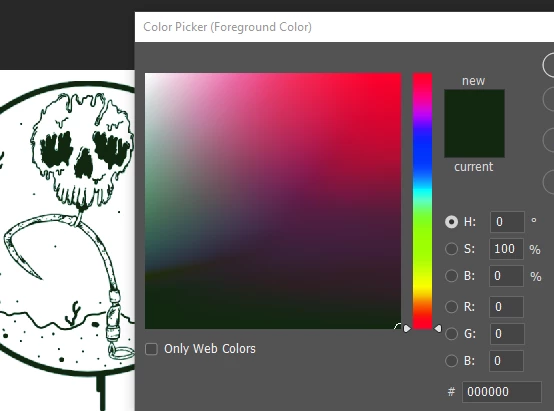
 

I've tried editing the colour settings (Edit > Colour Settings) but none of them change it back to the standard colours. Also tried deleting all preferences (Edit > Preferences > General > Reset all prefences on exit), and also uninstalling Photoshop and reinstalling it, but nothing seems to work.


Any help would be great!
This topic has been closed for replies.
Correct answer D Fosse

Don't change anything in Color Settings! That's not where the problem is. Change everything back.


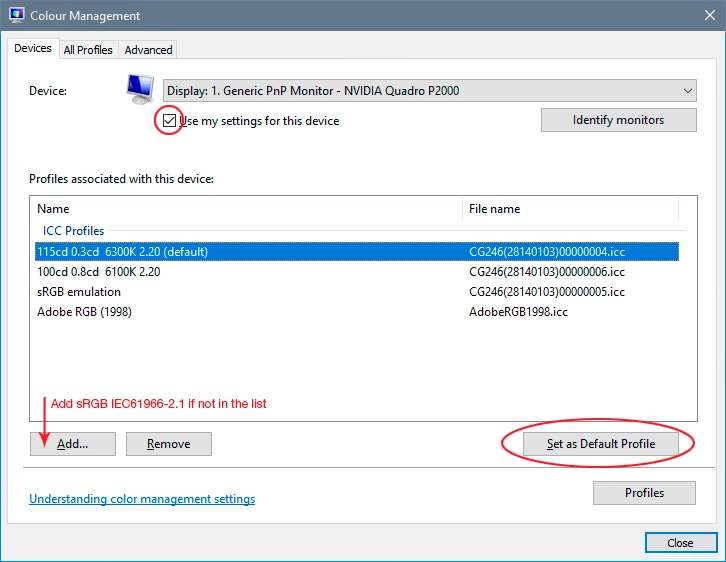
Yes, this is a broken monitor profile. Seems a new batch of bad manufacturer profiles are pushed through Windows Update now. Temporarily change it to sRGB IEC61966-2.1 here. The proper fix is to use a calibrator to make a new profile, but sRGB may be close enough for now:

4 replies

Participant
May 25, 2020

This worked, thanks a lot!

Legend
May 25, 2020

Hex numbers are not a standard! This is a dangerous myth which causes huge problems. 000000 is going to be close to black, but variable, depending on your settings.

davescm
Community Expert
Community Expert
May 25, 2020

In an RGB colour space 0,0,0 should indeed be black. That issue with the colour picker is definitely a broken monitor profile issue

Dave

D Fosse
Community Expert
D FosseCommunity ExpertCorrect answer
Community Expert
May 25, 2020

Don't change anything in Color Settings! That's not where the problem is. Change everything back.


Yes, this is a broken monitor profile. Seems a new batch of bad manufacturer profiles are pushed through Windows Update now. Temporarily change it to sRGB IEC61966-2.1 here. The proper fix is to use a calibrator to make a new profile, but sRGB may be close enough for now:

c.pfaffenbichler
Community Expert
Community Expert
May 25, 2020

What is the image’s color space? 

Can you check if your monitor profile is faulty by changing it to sRGB?