


- Home
- Photoshop ecosystem
- Discussions
- photoshop could not complete your request because ...
- photoshop could not complete your request because ...

Copy link to clipboard
Copied
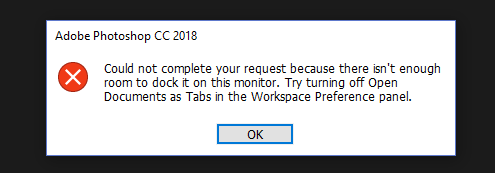
Hello, so here is my problem.
Yesterday everything worked fine and today it's doesn't work for some reason.
Before someone ask I didn't touch/do anything to Photoshop to get this error it just popped this morning when I lauched it.
Hopefully someone have a quick working fix for this issue.
Thank you for reading.


 1 Correct answer

Hi
Can you get into Photoshop preferences, if so try resetting them


Explore related tutorials & articles
 10
Replies
10
10
Replies
10


Copy link to clipboard
Copied
Hi
Can you get into Photoshop preferences, if so try resetting them
Copy link to clipboard
Copied
Well it worked Thank you  !
!
Copy link to clipboard
Copied
You're welcome

Copy link to clipboard
Copied
bonjour ,pour moi cela ne marche toujours pas
Copy link to clipboard
Copied
je sais allée aux préférences mais une fois dans la fenêtre rien ne marche et j'ai fait ce que vous avez dit sur un coup de chance j'ai pu mais cela ne fonctionne toujours pas merci de bien vouloir m'aidée

Copy link to clipboard
Copied
hi i tried to reset preferences on quit but its still not working
what else can i do?

Copy link to clipboard
Copied
me too!


Copy link to clipboard
Copied
Hi, you've posted on a very old conversation.
Since you're not able to access the application, you can try to reset the preferences of Photoshop using the steps mentioned here: https://adobe.ly/4lfwMei
Please backup your settings prior to resetting the preferences. You can check: https://adobe.ly/4cmel3s
Let us know how it goes!
Thanks,
Nikunj

Copy link to clipboard
Copied
It works 😃 Thank you so much. PS. You need to close the application and launch it again to be able to see the changes.
Copy link to clipboard
Copied
I cannot get it to open at all or get to the preferences. What do I do??


Get ready! An upgraded Adobe Community experience is coming in January.
Learn more
 AdChoices