
Participating Frequently
September 10, 2024
Answered

PHOTOSHOP CRASHES OPENING TIFF OR JPG FILE

  • September 10, 2024
  • 2 replies
  • 803 views

Hi, i have a big problem with running PS with my Macbook air M1 8GB


It seems to be fine when i only open PS or i open a PNG file, but when i try to open a TIFF or e JPG file the app crashes...


I'm paying for a service and the there isn't a support by Adobe, because i've tried in every way to fix it and nothing works,


i need help.. until today i've worked every day without problems in PS,, and now it crashes everytime i tried to open these files..
This topic has been closed for replies.
Correct answer Kevin Stohlmeyer

Ok, as i said, every time i open photoshop and i try to set "Camera Raw settings", photoshop crashes


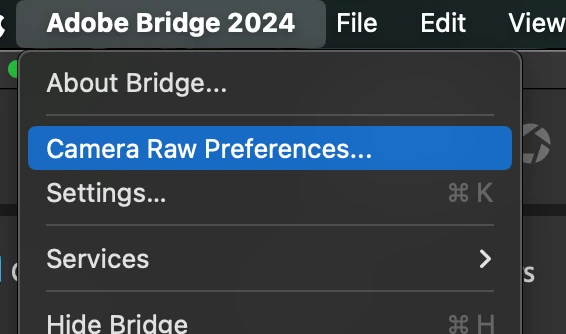
@diego_9327 Dont use Photoshop - use Bridge.

Hold Shift+Opt+Cmd keys and go to:

It will ask if you want to reset the preferences. Say yes.


2 replies

D Fosse
Community Expert
Community Expert
September 10, 2024

I'm guessing this is ACR crashing in the GPU, with ACR set to open TIFF and jpeg.


As a temporary workaround, disable TIFF and jpeg support in ACR preferences (accessible from PS or Bridge).


Also see section 6 under troubleshooting here ("Check and delete the TempDisableGPU3 or TempDisableGPU2 files"):

https://helpx.adobe.com/camera-raw/kb/acr-gpu-faq.html

Participating Frequently
September 10, 2024

i cant access to the panel, everytime i try to click "Camera Raw", photoshop crashes

Kevin Stohlmeyer
Community Expert
Kevin StohlmeyerCommunity ExpertCorrect answer
Community Expert
September 11, 2024

Ok, as i said, every time i open photoshop and i try to set "Camera Raw settings", photoshop crashes


@diego_9327 Dont use Photoshop - use Bridge.

Hold Shift+Opt+Cmd keys and go to:

It will ask if you want to reset the preferences. Say yes.


Kevin Stohlmeyer
Community Expert
Community Expert
September 10, 2024

@diego_9327 go to Photoshop Help Menu>System Info and copy/paste the report in a reply here.

Participating Frequently
September 10, 2024
Report_Crash_Photoshop.pdf
Kevin Stohlmeyer
Community Expert
Community Expert
September 10, 2024

@diego_9327 thats only a partial crash report. What I was looking for was your system info to help diagnose the issue. Go to PS Help menu/System info and copy/paste the report here. Not the crash report.