


Participant
September 30, 2025
Question

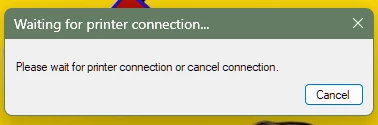
Photoshop crashing on opening any file, trying to open printer.

  • September 30, 2025
  • 3 replies
  • 149 views

If I open any file, or create a new file I am immediately met with a "waiting for printer connection..." message, which it for some reason can not do. I am also not trying to print anything so not sure why it matters whether it can connect or not. I've unninstalled all printers, and reinstalled the one that I do use, and connected everything. I thought maybe it was the latest PS update, so I reverted to an older version and still the same problem. I'm running on windows 11.
3 replies

Anshul_Saini
Community Manager
Community Manager
October 20, 2025

Hi @spencers80265762 & @jdietz72,


Thanks for the follow-up and for confirming it’s still happening. The behavior you’re describing (apps stalling or crashing while “waiting for printer connection…”) usually comes from Photoshop or Illustrator trying to query a default printer that’s unavailable or not responding.


As a workaround, please try the steps in this Adobe help article: https://adobe.ly/4hh5h2o


This forces the apps to reference a stable virtual printer and often stops the crash/hang behavior.


Could you both try that and let us know if the issue stops after switching the default printer?


Best,

Anshul Saini

jdietz72
Participating Frequently
October 7, 2025

Just chiming in to say that not only is this happening to me as well, it's now started in Illustrator. I have not and will not ever print from either application and as someone who works very quickly, having to sit and wait several minutes for Adobe's applications to connect to a printer I don't ever want them to use is absurd. This seems like it should be a simple background task that shouldn't be holding up work...

Community Manager
September 30, 2025

Hi @spencers80265762, welcome to the community!
Sorry to hear you're running into trouble. As a first step, could you try resetting your Photoshop preferences? That’ll return things to the default setup in case something behind the scenes got a bit off.
Here’s how to do it: https://adobe.ly/42WIaEe
If you can't open Photoshop at all, you'll need to do the manual method.


Let me know how it goes!
Alek

*(If you mention me with an @, like @Aleke, I’ll get a notification and can respond faster.)*
Participant
October 1, 2025

Thank you for the suggestion Alek,

Unforunately it still asks me the same thing, and then crashes.