Inspiring
May 25, 2025
Answered

Photoshop Crashing on Start Up

  • May 25, 2025
  • 6 replies
  • 1333 views

Hi,


I am runninf Photoshop as part of the Photogtaphic package, using V 26.7 on a MacBook with Sequoia 15.5.  Every time I open the App it crashes, without the product actually getting to a point where I can check preferences.  I hav restarted the MacBook, unisntall and reinstalled Photoshop 26.7 and the porbalem remains.  Adobe must have about 10 crash reports from this afternoon's activities


Any advice please?

Thanks


mike


Correct answer Mike2485416145cp

@Mike2485416145cp if you are getting a creah report... how far are you to an Apple store? I prefer face-to-face, but if one can't be done, maybe try contacting Apple online tech support. 

I had my battery replaced last year, and when I got the MacBook Pro back, it was acting up like crazy. Doesn't matter what Adobe app I tried opening. The Apple tech guys told me to manually delete the 'Adobe Preferences' as it will be regenerated as the computer restarts — I made a copy of the folder (for good measure) and instead, deleted the whole folder. Restarted it, and 'wham', my apps work.... now, I remove that folder every 6 months or so. The preferences folder went from 17 gigs to 390kb! 
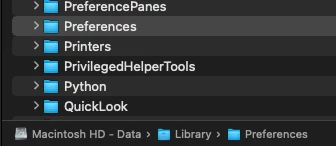


Problem resolved with assistance from Adobe support.  Turned out to be a clash with an old On1 component.  Although I had removed the software a couple of years ago one AI element remained in the MacBook library.  Once removed Photoshop resumed servcie!

6 replies

Participant
July 4, 2025

I'm having the same problem as this post above, same operating system.... I also have the On1 suite on my Mac... who do I talk to to resolve this... It's happening om my Macbook also so how do I find out how to resolve this?

Participant
July 4, 2025

I copied this from a previous post:      I am running Photoshop as part of the Photogtaphic package, on a MacBook with Sequoia 15.5.  Every time I open the App it crashes, without the product actually getting to a point where I can check preferences.  I hav restarted the MacBook, unisntall and reinstalled Photoshop 26.7 and the problem remains.  Adobe must have about 10 crash reports from this afternoon's activities..


I'm having the same problem as this post above, same operating system.... I also have the On1 suite on my Mac... who do I talk to to resolve this... It's happening om my Macbook also so how do I find out how to resolve this?


Anshul_Saini
Community Manager
Community Manager
July 4, 2025

Hi @Leon_James2950,


Thanks for sharing those details. Based on the crash data, it looks like the issue is linked to the ON1 Resize plugin from the ON1 AI 2024 suite. Since this is a third-party plugin, the best course of action would be to contact ON1 Support directly for further assistance on compatibility or a possible update.


If you’re looking to get Photoshop running smoothly in the meantime, you could try installing Photoshop 2024 (v25.12) from the Creative Cloud desktop app or update to the latest version of ON1 AI 2025, which may have addressed this issue.


Hope that points you in the right direction.


Best regards,

Anshul Saini

Known Participant
May 31, 2025

6 crashes today, only photoshop opened, 128 GB Ram, Thx for the recovery file option, any fix update coming soon?


Legend
May 31, 2025

Good idea to start a new post, era. State version, Os, etc. You'll get more responses if you don't piggyback.


Larry
creative explorer
Community Expert
Community Expert
May 25, 2025

@Mike2485416145cp Even though macOS Sequoia 15.5 is available, it was recently updated on May 12, 2025. This would suggest, maybe, and quite possibly, that Photoshop 26.7 has not yet received a specific update from Adobe to ensure full, stable compatibility with macOS 15.5.

so, did I read right, you uninstall this 10x? Sorry, it's late where I am... In this case, I would do a clean install of Photoshop. But first, I would use Adobe Cleaner Tool straight from Adobe's website and not a third-party app. The Adobe Creative Cloud Cleaner tool can fix many common problems, specifically designed to thoroughly remove all traces of Adobe applications, including corrupted installation files and preference settings that standard uninstallers might miss. After running the cleaner tool, restart your MacBook. This is vital to clear out any lingering processes or temporary files.

By any chance, was there an earlier version that worked before installing Photoshop 26.7? If so, you could tentatively roll back to a previous version until Adobe can get an updated patch?


If you use the Adobe Creative Cloud desktop app directly from Adobe's website, maybe try installing the previous version? This way, you can at least do some work in the meantime, or you could use Photoshop on the Web too.


m
Inspiring
May 25, 2025

Thanks for the advice.  I've tried the cleanup tool and reinstalled and still no luck.  I'll try an earlier version and see how I get on.  The previous version was no better.


creative explorer
Community Expert
Community Expert
May 25, 2025

@Mike2485416145cp if you are getting a creah report... how far are you to an Apple store? I prefer face-to-face, but if one can't be done, maybe try contacting Apple online tech support. 

I had my battery replaced last year, and when I got the MacBook Pro back, it was acting up like crazy. Doesn't matter what Adobe app I tried opening. The Apple tech guys told me to manually delete the 'Adobe Preferences' as it will be regenerated as the computer restarts — I made a copy of the folder (for good measure) and instead, deleted the whole folder. Restarted it, and 'wham', my apps work.... now, I remove that folder every 6 months or so. The preferences folder went from 17 gigs to 390kb! 


m
Legend
May 25, 2025

When is the last time that Ps ran without crashing?

Is this the first time you've had so much trouble?

What software/apps/plugins were installed right before the issue started?


Check out

Troubleshoot crash or freeze in Photoshop

especially #5, Troubleshoot GPU and graphics driver


Larry
Inspiring
May 25, 2025

Longer than I care to remember.  I am a heavy lightroom user and rearely touch photoshop, so months.  I accepted both today's Macbook movie driver upgrade and the Photoshop uprgrade.  It also crashes when the MacBook is started in safe mode.

Legend
May 25, 2025

Mike, I, too, am running v26.7 (released 3 days ago, no longer Beta) under Sequoia 15.5. No problems.

Try resetting Preferences/Settings at start-up:

Relaunch Photoshop While Pressing The Keyboard Shortcut

Press and hold Shift+Command+Option (Mac), Shift+Ctrl+Alt (Win) while launching Photoshop.


Larry
Inspiring
May 25, 2025

Hi Larry,


Thanks for the suggestion.  I started as you suggested and was asked if I wanted to delete the seetings file which I did, and it crashed.  So unfortunatley no futher forward.


Mike

creative explorer
Community Expert
Community Expert
May 25, 2025

@Mike2485416145cp are you running a Beta version of Photoshop? Beta is only for testing purposes try downloading the non-Beta version! 

m
Inspiring
May 25, 2025

Automatic downloads, so assume not the Beta version, unless it automatically downloaded.