JohnVo
Inspiring
February 24, 2017
Answered

photoshop create a new library how to enable it again

  • February 24, 2017
  • 1 reply
  • 1011 views

hi

everytime i have opened a camera raw file as Smart Object  in photoshop , i have always seen the window dialog  to create a new library

in this dialog there is the option to Don't show it again

how can i enable it again?

i mean how have this dialog when i open camera raw files as smart objects?

in the adobe page there is nothing -> Creative Cloud Libraries in Photoshop

Thanks

EaCSBvD.png

This topic has been closed for replies.
Correct answer Jeff Arola

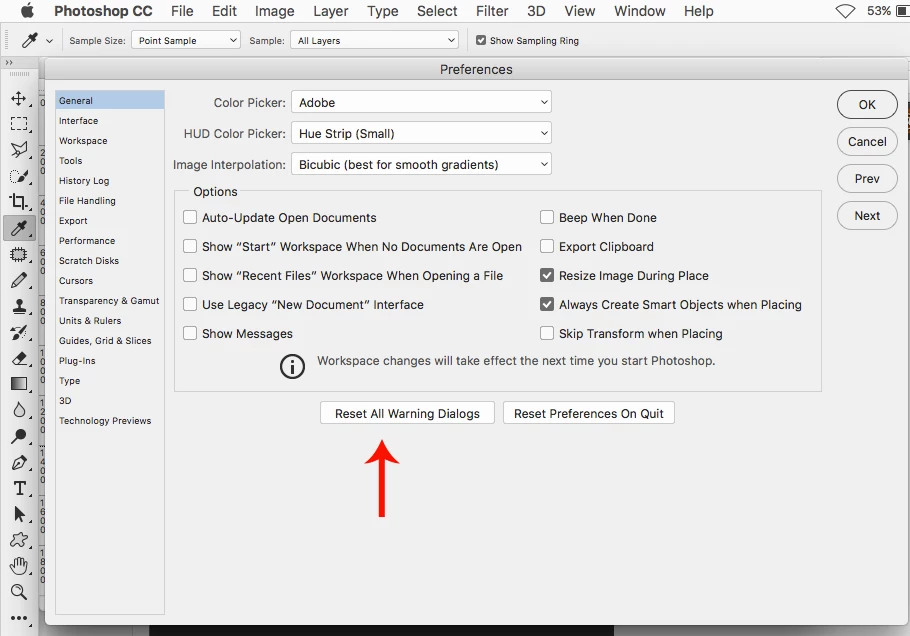
Go to Edit>Preferences>General or Photoshop CC>Preferences>General and click on Reset All Warning Dialogs.

1 reply

Jeff Arola
Community Expert
Jeff ArolaCommunity ExpertCorrect answer
Community Expert
February 24, 2017

Go to Edit>Preferences>General or Photoshop CC>Preferences>General and click on Reset All Warning Dialogs.

JohnVo
JohnVoAuthor
Inspiring
February 24, 2017

hi

thanks

is the only way?

Jeff Arola
Community Expert
Community Expert
February 24, 2017

As far as i know, the only way besides a full preferences reset.