JohnVo
Inspiring
February 24, 2017
Answered

photoshop create a new library how to enable it again

  • February 24, 2017
  • 1 reply
  • 1011 views

hi

everytime i have opened a camera raw file as Smart Object  in photoshop , i have always seen the window dialog  to create a new library

in this dialog there is the option to Don't show it again

how can i enable it again?

i mean how have this dialog when i open camera raw files as smart objects?

in the adobe page there is nothing -> Creative Cloud Libraries in Photoshop

Thanks

EaCSBvD.png

This topic has been closed for replies.
Correct answer Jeff Arola

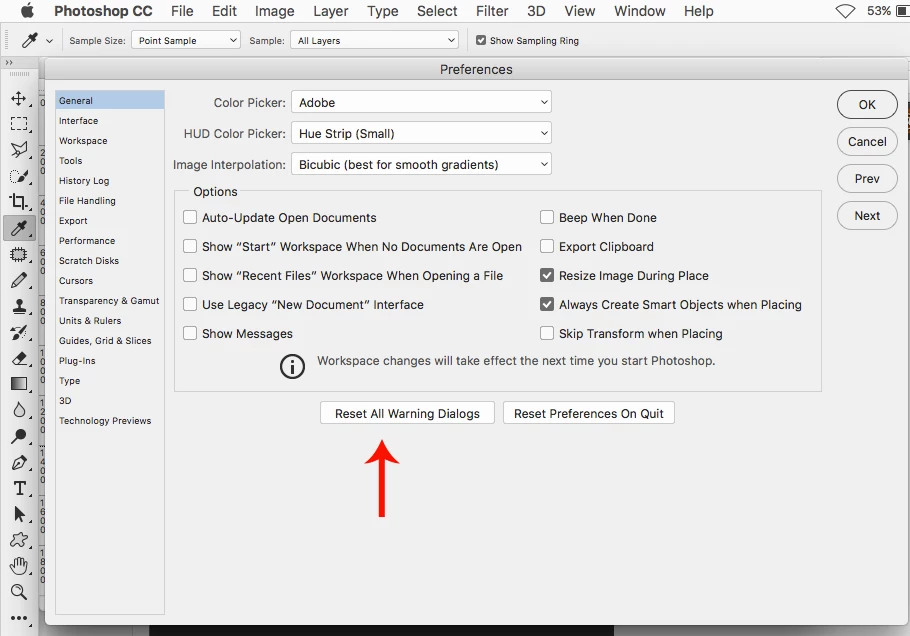
Go to Edit>Preferences>General or Photoshop CC>Preferences>General and click on Reset All Warning Dialogs.

1 reply

Jeff Arola
Community Expert
Jeff ArolaCommunity ExpertCorrect answer
Community Expert
February 24, 2017

Go to Edit>Preferences>General or Photoshop CC>Preferences>General and click on Reset All Warning Dialogs.

JohnVo
JohnVoAuthor
Inspiring
February 24, 2017

hi

thanks

is the only way?

JohnVo
JohnVoAuthor
Inspiring
February 24, 2017

As far as i know, the only way besides a full preferences reset.


thanks!

i tried to check the library palette but found nothing