

CarlyCamera
Participant
March 26, 2020
Answered

Photoshop | Creating an Action with a closed Group

  • March 26, 2020
  • 3 replies
  • 2301 views

When I create a lengthly action, I put all the steps in a New Group (or folder). I close the group, label it. I then stop my action. When I replay the action all the steps work... but the folder with all the lengthly steps is open. It doesn't close. 


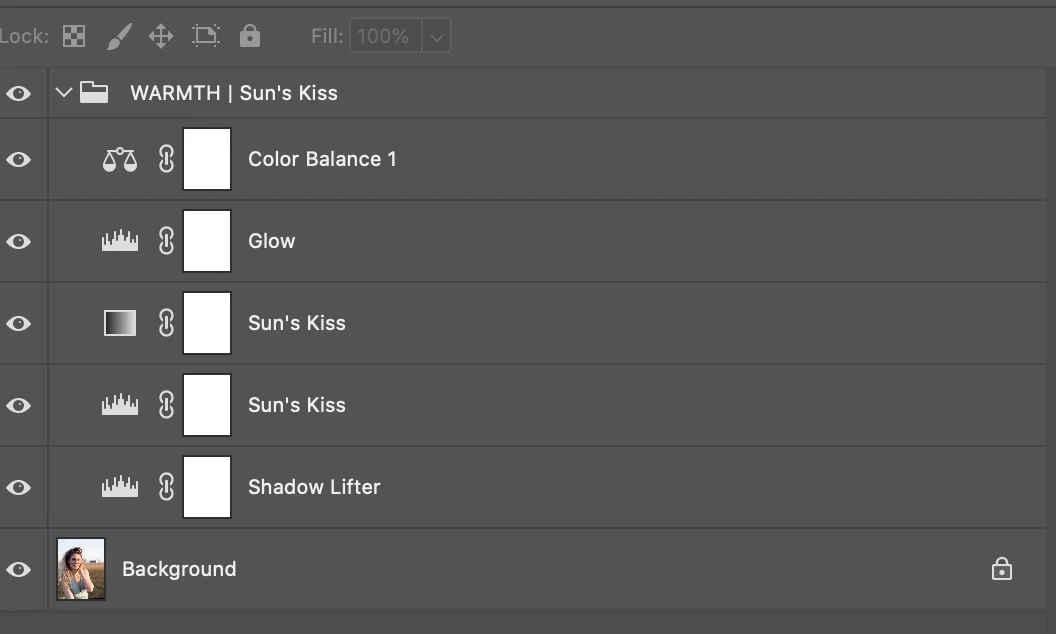
How do I make the folder close? I want the action to play and close the folder like the image below. 

 

Instead when the action is played it doesn't close that folder. And looks like this. 


I have tried recording the action and having me close the folder before I stopped the recording. That doesn't work. 


It's not a big deal when you run 1 action with one open folder. But when you begin to run several actions with several folders for a lengthly action, it gets big and messy quick. 


Thanks for your help. 

This topic has been closed for replies.
Correct answer JJMack

you would need to record the action a little differently.   Do not create a new layer group and add layers into the group.  Instead  just create all the layers and name them that you want in the group. When the last layer you want in the grout is added that will be Photoshop targeted layer. Add the rest of the layer you added to the targeted layers.  It Is best to record this relatively using the shortcut Shift+Alt+[  for each layer added. The Shortcut add the Previous layer to the targeted layers.  Once all the layer are targeted record menu Layer>New>Group from Layers... . In the Pop-up dialog name the group. The group will be created and closed.

3 replies

Stephen Marsh
Community Expert
Community Expert
March 26, 2020

The panel menu Layer > Collapse All Groups can also be recorded or inserted into an action, however it is all or nothing.

JJMack
Community Expert
JJMackCommunity ExpertCorrect answer
Community Expert
March 26, 2020

you would need to record the action a little differently.   Do not create a new layer group and add layers into the group.  Instead  just create all the layers and name them that you want in the group. When the last layer you want in the grout is added that will be Photoshop targeted layer. Add the rest of the layer you added to the targeted layers.  It Is best to record this relatively using the shortcut Shift+Alt+[  for each layer added. The Shortcut add the Previous layer to the targeted layers.  Once all the layer are targeted record menu Layer>New>Group from Layers... . In the Pop-up dialog name the group. The group will be created and closed.

JJMack
CarlyCamera
Participant
March 26, 2020

Brilliant!!! It worked! Thank you so much JJMACK!!!

Known Participant
July 28, 2021

This is the way to do it. But Adobe should have an assignable step in the layers panel menu "close group" in addition to what exits and the moment, which is "close all groups"  


Simple fact is. many things keep getting missed when Photoshop gets developed, and therefore become seemingly not possible to record these steps in Actions.


One other example is the "align to" .. choose "canvas" in Align the toolbar. Does not record. This kind of this is essential in Actions. 

John T Smith
Community Expert
Community Expert
March 26, 2020

Adobe currently has 23 programs included in a full Cloud subscription
Please post the name of the Adobe program you use so a Moderator may move this message to that forum

CarlyCamera
Participant
March 26, 2020

Photoshop


[To find a forum for your program please start at Adobe Support Community]
[Moving from generic Start/Help forum to the specific Program forum... Mod]