
Copy link to clipboard
Copied
In the past week my crop tool on Photoshop 25.4.0 has changed.
I can't seem to just draw any size crop border around part of an image. The crop tool only allows crop dimensions as per the drop down menu and this often is not what I want.
I have tried every single option in the drop down crop menu and they are ALL pre-defined to some degree.
I cleaned my keyboard and I may have pressed keys in unison because since then is when I've been experiencing this problem (!!!).
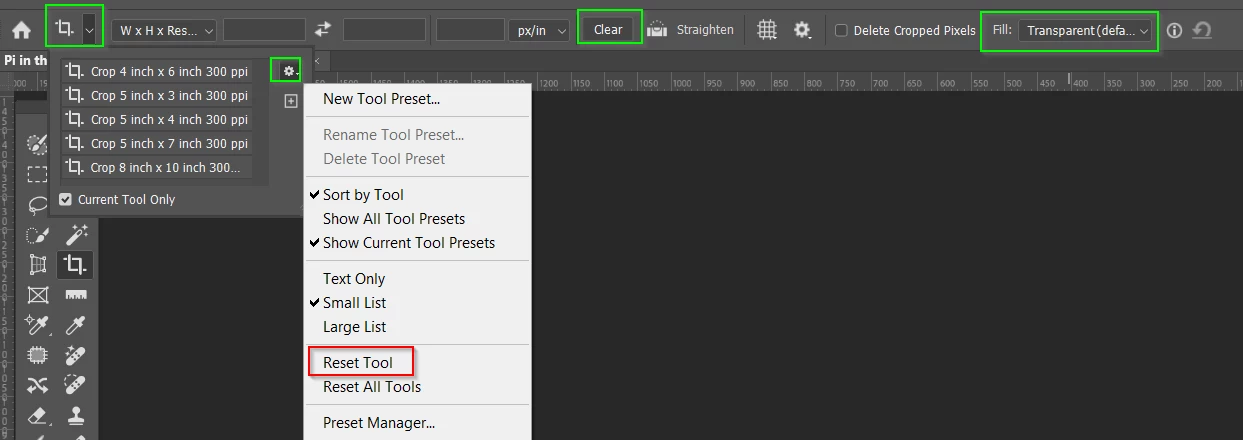
I feel sure will have clicked the Clear button
You can also Reset the tool from the top left corner drop down
Otherwise make Fill is set to Transparent, mode is set to W x H x Resolution
I don't think the latter is strictly necessar, but lets make completely sure.
Copy link to clipboard
Copied
I feel sure will have clicked the Clear button
You can also Reset the tool from the top left corner drop down
Otherwise make Fill is set to Transparent, mode is set to W x H x Resolution
I don't think the latter is strictly necessar, but lets make completely sure.
Copy link to clipboard
Copied
well that is super embarrassing!!! I reset constantly but it was the clear button that I needed to hit!
thankyou Trevor!
Copy link to clipboard
Copied
It's a right of passage that we all encounter at some stage no matter how long we have been doing it. I have more than once started threads on this forum, and got andswers I cringed at not seeing myself. 😞
Find more inspiration, events, and resources on the new Adobe Community
Explore Now