
Participant
June 2, 2024
Answered

Photoshop Cropping Tool

  • June 2, 2024
  • 1 reply
  • 603 views

Quite suddenly, Photoshop 23.5.1 is misbehaving. When I select the crop icon and select the cropping area, the rectangular box turns into an oval of the same dimensions and crops to a much larger size... it's unusable/ I've never known any serious glitch with Photoshop, and certainly not this. I've tried restarting the programe, restarting the Mac and so on
This topic has been closed for replies.
Correct answer Jeff Arola

I would reset the Crop Tool and see if that fixes the issue.


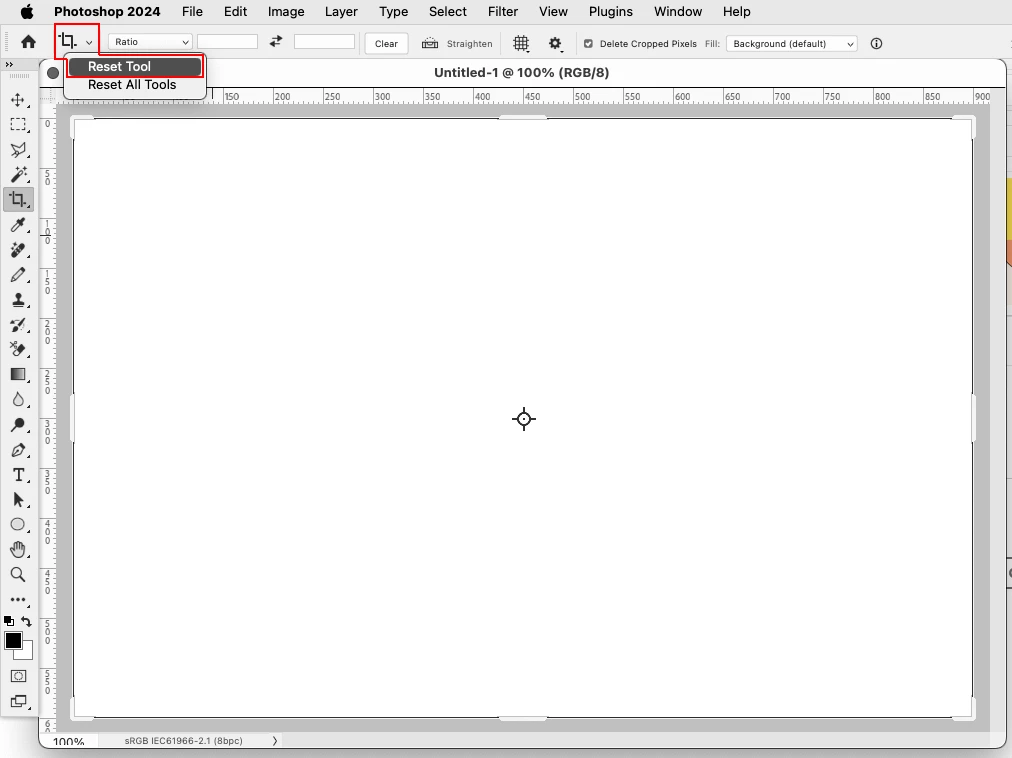
Right click on the Crop Tool icon in the tool options bar and click Reset Tool.


If that doesn't work can you post a screenshot of what your seeing?


1 reply

Jeff Arola
Community Expert
Jeff ArolaCommunity ExpertCorrect answer
Community Expert
June 3, 2024

I would reset the Crop Tool and see if that fixes the issue.


Right click on the Crop Tool icon in the tool options bar and click Reset Tool.


If that doesn't work can you post a screenshot of what your seeing?


Participant
June 3, 2024
That was so easy! Never thought of it, thanks