Copy link to clipboard
Copied
Hello,
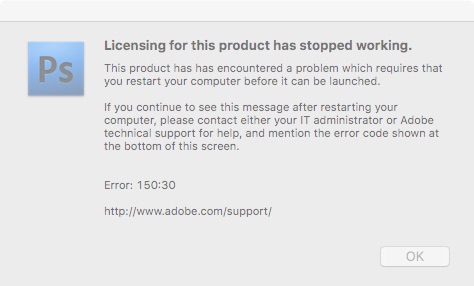
I was wondering if anyone could help me with something. All of a sudden, my copy of Photoshop CS4 stopped working. I am getting an error saying licensing for the product has stopped working. It suggests restarting my computer, which I have done twice, to no avail. I checked, and it looks like all of my CS4 programs are affected. I know this is an older version, but everything does what I need, and I can't afford to be told to just upgrade to the latest version as a solution, right now. Any help in resolving this would be very appreciated. Thanks, in advance!
-Zach

I have a screenshot guide set up for repairing this error if you are using a Mac. It gets to the point and shows how to use the License repair Python script. Study and carefully follow those steps.
150:30 screenshot guide
https://forums.adobe.com/thread/1714695 Posts 11-18
Copy link to clipboard
Copied
Copy link to clipboard
Copied
I have a screenshot guide set up for repairing this error if you are using a Mac. It gets to the point and shows how to use the License repair Python script. Study and carefully follow those steps.
150:30 screenshot guide
https://forums.adobe.com/thread/1714695 Posts 11-18
Copy link to clipboard
Copied
Hi, everyone! Thanks for the above advice. I am at the step where Terminal should be running the License Recovery, but it said it may take a few moments and then showed a question mark. It's just sitting at that, with a gray cursor box next to it. No indication as to whether it has finished or anything. Any ideas?
-Zach
Copy link to clipboard
Copied
Never mind. I realized it had text above it, and it was waiting for another press of Enter/Return. Looks like it worked. Thanks, again, everyone!
-Zach
Copy link to clipboard
Copied
Thanks for getting back. It is a strange script to run since entering your password does not provide you with dots as feedback. I'm glad you were able to get it finished.
The kb article at least to me doesn't provide enough detail on running the script, which is why I put that guide together.
But worse comes to worse, you can reinstall, but then you have to run updates.
The 150:30 error is usually a result of transferring Photoshop CS4 from backup or another Mac. That breaks activation.
Finally the upcoming MacOS 10.15 will no longer support 32 bit apps which is what CS4 is. Mojave 10.14 is the last one that will.
Gene

Find more inspiration, events, and resources on the new Adobe Community
Explore Now