
Participant
March 15, 2021
Answered

Photoshop CS5 can't find shape properties

  • March 15, 2021
  • 2 replies
  • 2335 views

Hi,

I would like to change manually the size of my shape but I can't find the shape properties window.

Can't find the width and height fields. When I create a shape, the shape properties don't show up on my screen. I've attached the screenshot of what I am seeing.


Please can you help me ? Is it because in Photoshop CS5 there's no shape properties ?


Thank you


This topic has been closed for replies.
Correct answer Conrad_C

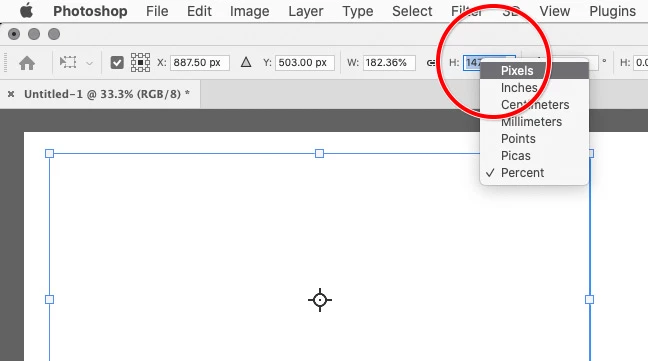
To change the unit of measure used in the options bar, right-click a units field, then choose the unit you want to use. I think that was possible in Photoshop CS5. If you are using a Mac mouse where right-click is not enabled, then Control-click the field.


And yes, if you are in Photoshop CS5, that was before the Properties panel was added, so it must be done in the options bar.

2 replies

Julie98A4Author
Participant
March 15, 2021

Hi,

Thank you for your answer but I need to set an exact width and height in pixel that's why I'm looking for the corresponding fields. When I vectorize my shape and select it, the Width an Height appears but it's by percentage (screenshot attached). Do you know how to set it by pixel ?


Thank you very much

Conrad_C
Community Expert
Conrad_CCommunity ExpertCorrect answer
Community Expert
March 24, 2021

To change the unit of measure used in the options bar, right-click a units field, then choose the unit you want to use. I think that was possible in Photoshop CS5. If you are using a Mac mouse where right-click is not enabled, then Control-click the field.


And yes, if you are in Photoshop CS5, that was before the Properties panel was added, so it must be done in the options bar.

Julie98A4Author
Participant
March 24, 2021

Thank you so so much ! This is it, i can set my size in pixel now. Again thank you so much !

JJMack
Community Expert
Community Expert
March 15, 2021

You can use Photoshop Vector tools to edit the shape's layer's paths and also use free transform to change the shape  layer vector paths.

JJMack